Clients Are Starting to Ask "Can the Showroom Be Viewed Online?" — Six Things to Settle Before You Take a Browser 3D Showroom Job
browser 3D showroom developmenthow to deliver an online version of a showroom designvirtual showroom build vs outsourcehow to turn a showroom into 3D3D space development costself-hosted 3D showroom3D model to webGLB import3D virtual world base layersource-available
It used to be that a client looked at renderings and three option sheets. More and more often now, after the renderings, comes one extra sentence:
"Could this also be made viewable online? The kind the client opens themselves and walks around in."
For a showroom design studio or a web agency, that is a signal: the requirement is moving forward — you used to hand over drawings, now you hand over a place people can enter. It is also a trap. Behind the phrase "viewable online" sit at least three different things, and the amount of work differs by an order of magnitude. Quote without taking it apart and you are not running a thin margin, you are running a loss.
A note on who we are: Genesis (创世Genesis / 创世虚拟世界CRM系统) is a browser 3D base layer you deploy on your own server. We do not take on showroom building projects or implementation work. This article is a question list for the party taking the job — showroom design studios, web agencies, design workshops. It is not a pitch.
Licence, stated up front: the source is available (source-available), running it locally costs nothing; going online, commercial use or federation requires a subscription license. The binding terms live in the repository LICENSE / EULA.
Three things this article covers
- Why "viewable online" has to be split into three forms first — and where the workload diverges
- Six questions to settle on the spot before taking the job, and what each unanswered question costs
- After the answers: take the job, take only part of it, or say plainly that you cannot
1. "Viewable online" is at least three different things
When a client says that sentence, there is usually a reference point in their head — they saw something somewhere and decided "that is what I want". In engineering terms, that reference point may be three entirely different jobs:
| What the client says | What it actually is | Rough scale | Where content comes from |
|---|---|---|---|
| "I can spin it around" | One model, panned, zoomed and rotated in a browser page | Small | A single model file |
| "I can walk around it" | A web 3D space you can move through | Medium | A space + a set of models + layout |
| "I can click and use it" | Configurable, orderable, captures a contact at the end | Large | All of the above + your business logic |
The difference is not how good it looks. It is whether it can be changed, whether it has to connect to your own systems, and whether the phone has to hold up. A concrete comparison: for a single model on a phone, it only has to not be too large. For a space you can walk through, the phone has to handle a virtual joystick, camera control, frame drops and loading order. Those are not the same difficulty tier.
There is also a frequent mismatch: the client says "viewable online" while thinking "our own people can look at it in the meeting room" (internal review), but what comes out of their mouth is "so the client can see it". The first difference is the network — running inside a LAN does not mean it opens from outside; domain, filing, bandwidth and mobile signal all come into it. The second difference is load: five people inside, versus a link sent to two hundred clients, are two different orders of magnitude.
Translating that sentence into a concrete action matters more than anything else here. One low-effort way to ask: get the client to describe where they saw it and what it looked like, rather than guessing ten times yourself.
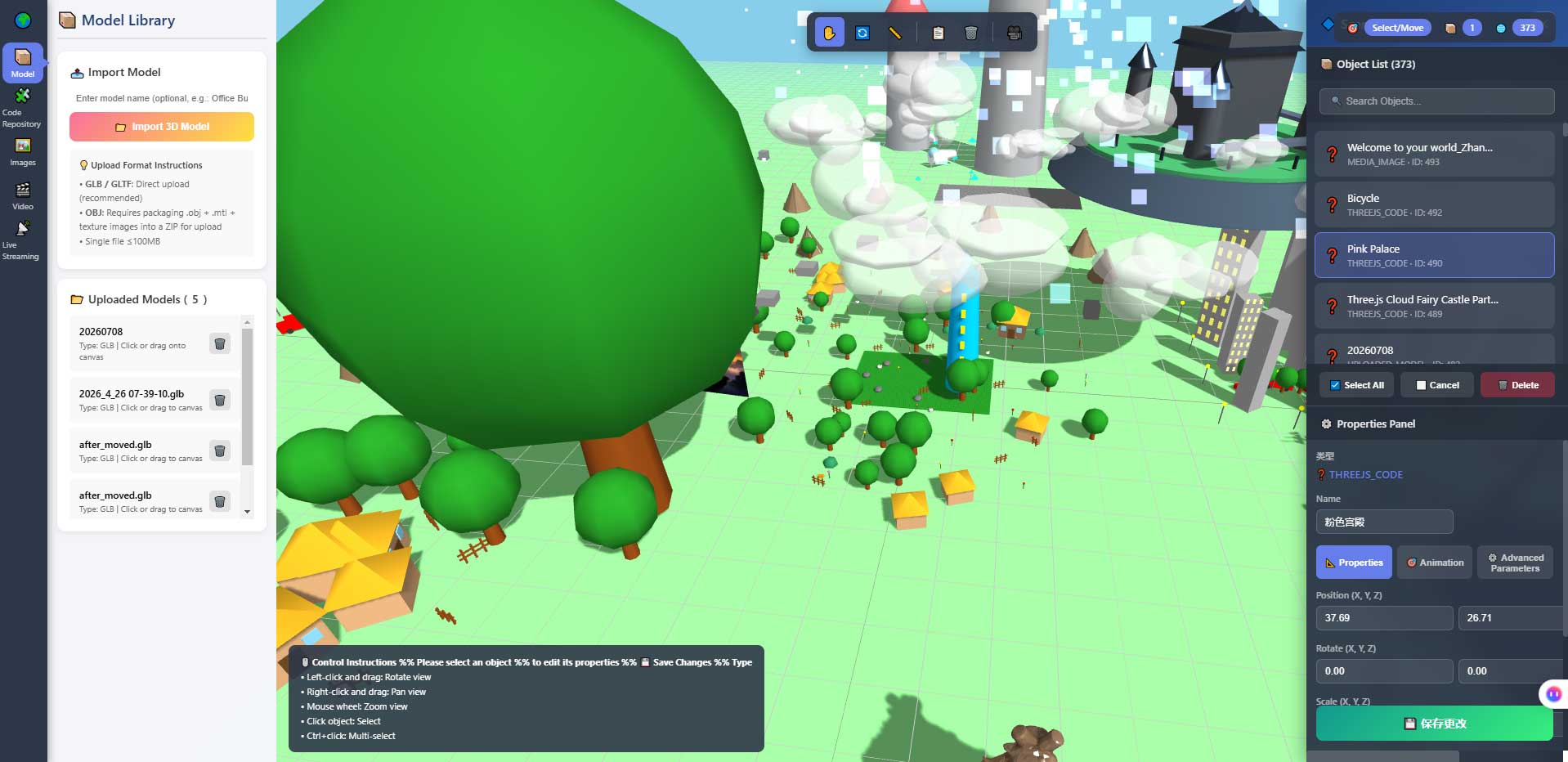
Above: the properties panel and object list of the in-browser 3D editor. It is here to show what the "walk around it" form actually is — not a video, but a set of objects that can be placed and adjusted. It is editable, and that is exactly why "who changes it later" has to be settled.
2. Six questions to settle before taking the job
The first three decide whether the job can be done at all; the last three decide whether it can be closed out cleanly.
| # | Question | Why it matters | Cost of not asking |
|---|---|---|---|
| 1 | Which of the three forms do you mean? | The workload differs by an order of magnitude | Your quote covers the first layer only; halfway through, it turns out they meant the third |
| 2 | Who supplies the model, in what format? | A rendering model and a model that can run in a browser are not the same object | Either rework, or the job becomes "rebuild the model" while you quoted for "import it" |
| 3 | Who views it, how many, on what device? | Internal review and public marketing have completely different performance budgets, and visitors are mostly on phones | You promise a phone experience based on desktop behaviour and it comes back the day you hand over |
| 4 | How long does this thing have to live? | A one-week bid and a three-year always-on showroom are two different products | A one-off quote structure applied to a long-running requirement |
| 5 | Who edits it later, and who pays for each edit? | Editing is the main workload in the later stage, and the main source of disputes | Every change becomes a fresh negotiation and the relationship stiffens fast |
| 6 | Whose server, whose domain, whose filing, who operates it? | What you hand over is not a file; it is an address that is still running | Fine on handover day; a month later the server expires and the client calls you |
A short expansion on each, because people have been burned on every one of them.
#1 The form. See the previous section. Get this wrong and the other five do not matter.
#2 The model. This is the most commonly underestimated one. A model made for renderings and a model made for the web have different goals: the first has to look good rendered, the second has to run inside someone else's network and phone. Rendering models typically carry hidden layers, unmerged objects, hundreds of thousands of triangles and uncompressed textures — harmless for a still image, a burden for a web page. So the question is not "do you have a model", it is "was this model made for output images or for the web". If it is the former, then model processing is a separate work item, not a side task. For web use, prefer GLB / GLTF, and decide that at the export step.
#3 Device and headcount. This decides which layer you spend money on. Optimising the first screen for five people is waste; ignoring the first screen for two hundred clients is trouble. One easily missed point: testing on your own machine and the client opening it on a phone, on the road, in a client's office, are two completely different experiences.
#4 Lifespan. This decides the quote structure. A bid, a trade show — finished and done. A corporate showroom or a product catalogue is always-on and edited periodically. The same form takes a different quoting approach for these two needs — the first can be quoted once, the second must have "future edits" written out separately.
#5 Edits. If you do not raise it, the client usually will not. Negotiating money at the first edit is unpleasant for both sides. One low-effort fix: state in the quote how edits are accounted for — not an amount, but the basis (per instance, per hour, or included in a maintenance window).
#6 Ownership. This one looks like paperwork and turns into an incident half a year later. Concretely: whose account holds the server, whose hands hold the domain, who filed it, and who renews it. When those four things are split across two companies, an incident is a matter of time.
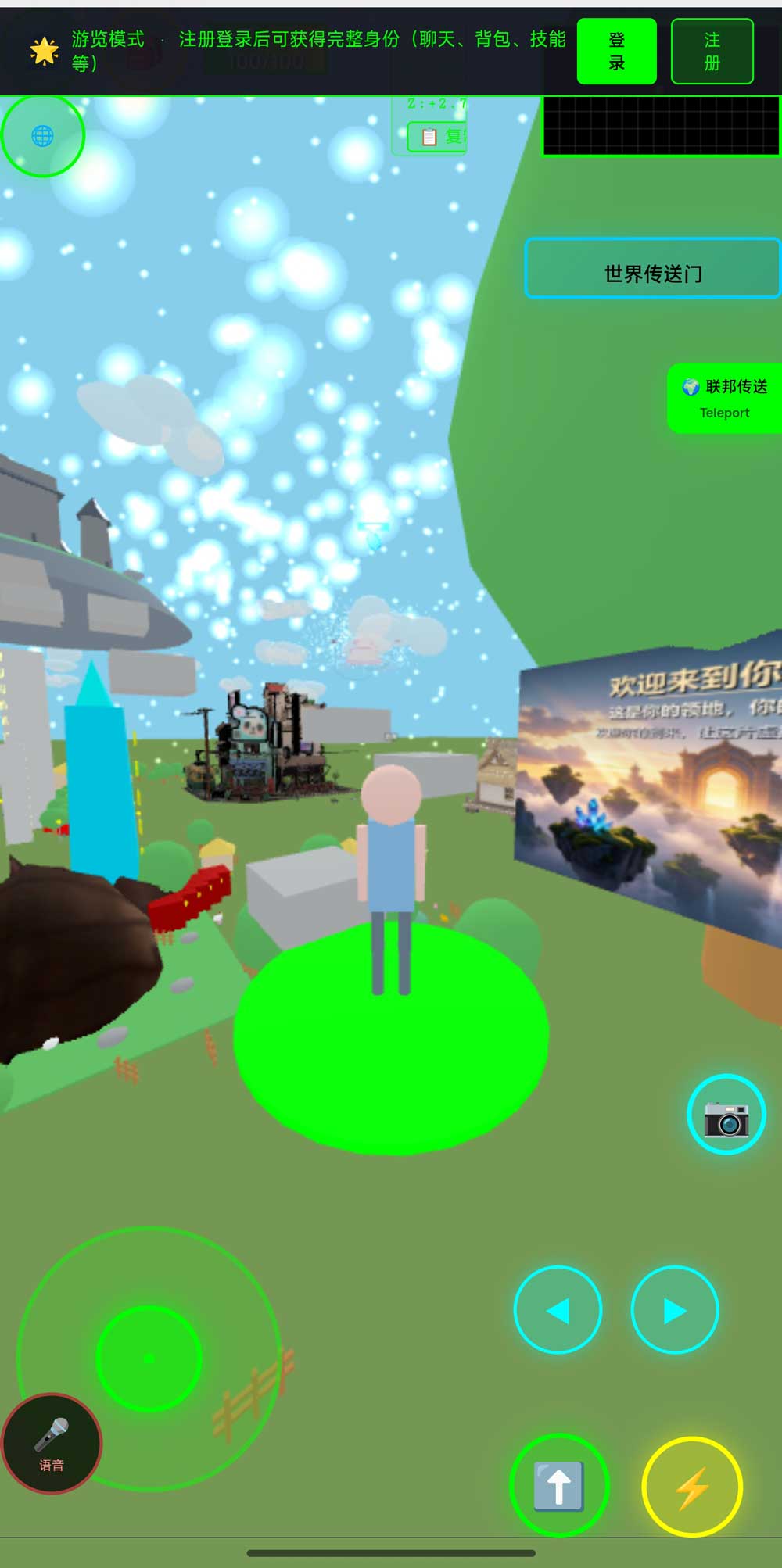
Above: the 3D world opened in a phone browser. It is here because of question #3 — when the client says "so the client can see it", what that client is holding is most likely this device, not your monitor.
3. Three conclusions after the answers
Once the six questions are answered, the conclusion usually writes itself.
One: take it, quote normally. The form is clear, the models exist or you can produce them, edits are rare, the audience is small. That is an ordinary project and your usual way of quoting works.
Two: take part of it. This is the common case, and the professional handling. Your strength is design, layout, circulation, visual expression, and talking to the client — all of which are worth just as much in the online version, and which the client was buying from you anyway. Performance governance, the asset pipeline, multi-device adaptation and deployment/operations are the other blocks; if you are not going to raise a web team, carving them out is cheaper than carrying them through. Two ways to carve out: partner with a technical party, or configure it yourself on a base layer that is already laid.
Putting the boundary in the contract is cheaper than explaining after the fact. That holds especially for "online version" jobs, where the boundary is easiest to leave vague.
Three: say plainly that you cannot. A few warning signals: real-time integration with a business database (that is development work, not display work), hundreds or thousands of simultaneous users, console-grade image quality and physics simulation. None of those is something a design team adds in passing. Saying so is more dignified than signing — sign wrongly and every later stage is spent patching holes.
4. Split "online version" into five items when you quote
Whichever path you take, break the "online version" line into five parts in the quote rather than one figure:
- Model processing — format conversion, size handling, level-of-detail versions. If the client's model has not been optimised, this is a separate work item
- Space building and layout — circulation, initial camera view, touch controls; this is your professional ground
- Going live — server, domain, filing, certificate
- Content maintenance — every future edit, and the basis on which it is accounted
- Business integration (where relevant) — the client's product database, forms, backend
The first two plus the third are essentially one-off; the fourth is ongoing. Let the quote structure follow that distinction and you will have far fewer arguments later.
5. An optional layer: AI explanation
One of the more frequently asked items in a showroom context is "can someone be in there explaining". That layer can be built now, but say first what it is and what it is not — with a client, stating what it is not is what makes the proposal hold up.
What it is: give it a domain and a key and an external AI can walk into the world you deployed as a humanoid character — it has coordinates, can move, is seen by real people, and can talk and lead the way. The server sends structured JSON only; the picture is rendered by the visitor's browser.
What it is not (this part matters more than the part above):
- It cannot see the picture. All it receives is structured spatial perception data, similar to radar. It does not know what your models look like, what the materials are, or what the text on screen says.
- It does not host a knowledge base. Exhibit specifications and company material must be supplied by you, through prompts or documents. What it says depends on what you gave it.
- It does not do speech recognition or synthesis. The voice leg is not processed on the server.
- No teleporting, no touching assets. Its actions are moving, turning, following, jumping, speaking, interacting — it cannot change the position of anything in the scene.
- No claim of autonomy. It is executing the logic you connected.
So the sentence to use with a client is this: it is not "put a robot in there to handle reception automatically", it is "when someone needs to explain, there is someone on duty who does not get tired". Fully unattended automatic answering needs a separate body of content and rules; that is a different job.
6. Where this approach is the wrong fit
- The client mentioned "could we also do an online version" in passing in a meeting, with no use case behind it. Do not build it yet. An online version with no use case becomes a link nobody opens.
- They only need a few product images or a short animation. That does not need 3D; images and video fit better, and the money saved for the client is worth more than your hours.
- They want one quote to buy perpetual maintenance. Anything always-on carries ongoing input; that item has to be stated separately, or you have signed an uncapped promise.
- They require "we don't want to deal with any of it". Self-hosting means the server and operations belong to one side or the other; there is no third party absorbing that layer.
7. Limits and what we have not measured
Stated plainly:
- We do not take on showroom building projects or implementation work. This is a question list, not a service description.
- No client case is cited here. The B2B paid path is still being validated, so no "company X has deployed this" appears anywhere — what we can offer is mechanism, checklists and measured figures.
- Phone frame rates and battery use have not been fully measured. The phone screenshots above show that it opens and can be walked around; actual performance has to be measured on your target devices.
- The model processing capabilities mentioned here (three-tier LOD generated on upload, texture compression, geometry untouched) come from re-runnable acceptance scripts in the repository. Run them yourself to compare rather than applying our numbers to your project.
- Planned, not shipped: AI-assembled worlds, an Agent store, Agent interoperability, federated cross-world AI. These are on the roadmap.
- Screenshots show the build as of writing; the interface evolves with versions.
8. Common questions
The client only has renderings. Can it be done?
Yes, but turning a rendering into a web-capable model is a separate work item and has to be quoted separately, not folded into "importing". Also confirm one thing: whether the source model file is with the client or with the original designer — that decides whether you are rebuilding from scratch.
The client has no budget defined. Which form do we start with?
Start with the simplest version of "walk around it": one space, a few main exhibits, enter and move. Its purpose is to test whether the need is real, not to be shown to anyone. Run it for a while and see whether people actually open it before investing further.
Should I learn to do this myself?
It depends on how many jobs you take a year. One a year and the learning time is unlikely to pay back; three or more a year with similar requirements, and a second calculation is worth doing. That question gets its own article.
What is the difference between "online" and "inside our own network"?
Two differences: opening from outside needs a domain, filing and bandwidth, while the internal network does not; and there is the question of load and headcount. Running on the internal network does not mean it will run when you send it to a client, and that should be said up front.
The client wants it always-on. Which form should I use?
One base layer holding several spaces is less work than opening a separate place per event — one more event is one more space, not one more system. The same logic applies to multiple design options.
9. Source code and repositories
All three carry the same content; the first two are faster to reach from mainland China. The repositories include the deployment guide and a set of acceptance scripts you can run yourself.
- Gitee (faster from mainland China): https://gitee.com/miduoxinxijeji/miduo.git
- GitCode (mirror for mainland China): https://gitcode.com/qq_35054471/virtual-world
- GitHub: https://github.com/miduo100/3d-virtual-world
About Genesis
Genesis is a self-hosted 3D virtual world system built on Three.js + WebGL, helping individuals and businesses build their own 3D spaces. Accessible directly from a browser, compatible with both PC and mobile, it supports multiplayer online, federated teleportation, a shop system, and Agent integration—where an AI can enter your world as an embodied character. Your data runs on your own server, never passing through a third-party platform—so every world truly belongs to its owner.
Settling these six questions before taking the job is worth more than a polished quote. Genesis (创世Genesis / 创世虚拟世界CRM系统) is a browser 3D base layer you deploy on your own server — it does not take building projects, it covers the layers that eat the schedule; if you intend to deliver the online version yourself, you can lay your own design on top of it.
About the name: the product referred to here as Genesis (创世Genesis) is the same self-hosted 3D virtual world product as 创世虚拟世界CRM系统. If searching for "创世Genesis" does not find us, search for "创世虚拟世界CRM" instead.