The Client Wants a 3D Showroom You Can Walk Around in a Browser — Which of Three Delivery Paths Do You Take?
how to deliver a 3D showroomshowroom design studio online versionvirtual showroom build vs outsourcebrowser 3D development outsourcinghow to build a 3D spacehow to turn a showroom into 3D3D display option comparisonself-hosted 3D showroomGLB importthree.js performance optimisation3D virtual world base layersource-available
The earlier questions are settled: the form is clear, the model source is clear, the devices and headcount are clear, and the job can be done. The next question is concrete: which path do you deliver it down.
A showroom designer facing an "online version" usually has three paths under their feet: build the whole thing themselves, subcontract it to a technical team, or add their own layer on top of a base that is already laid. All three reach the finish line, but they consume completely different kinds of resource — one eats time, one eats margin, one eats deployment and operations. Choose wrongly and the problem is not that the project cannot be built; it is that halfway through you find the money earned does not cover the hole.
A note on who we are: Genesis (创世Genesis / 创世虚拟世界CRM系统) is a browser 3D base layer you deploy on your own server. We do not take on showroom building projects or implementation work. This is a comparison of paths for the party taking the job, not a pitch.
Licence, stated up front: the source is available (source-available), running it locally costs nothing; going online, commercial use or federation requires a subscription license. The binding terms live in the repository LICENSE / EULA.
Three things this article covers
- What each of the three paths looks like at the finish line — deliverable, cost of one edit, biggest risk
- Two blocks of work that someone must take on whichever path you choose, one of which is not your strength
- If you take the third path, which stages you pass through from today to going live
1. Three paths, three finish lines
Path A: build the whole thing yourself. Learn Three.js to a usable level, handle rendering, loading, optimisation and deployment yourself. The finish line is a result: "our team now has this capability".
Path B: subcontract to a technical team. You keep the design role and the client relationship, hand the browser 3D part to a technical team, pass over requirements and models, and get back an address that opens.
Path C: add your own layer on a base that is already laid. Use a base layer that is already built; you handle spatial design, layout and client communication, while the base handles rendering, assets, multi-device and networking. The finish line is a system on your own server.
All three work. The difference is which kind of resource you are putting in.
2. Path by path
| A Build it yourself | B Subcontract | C Ready base + your design | |
|---|---|---|---|
| What you put in | Learning time + trial and error | Margin + management overhead | One deployment + learning one editor |
| Deliverable | A capability inside your team | A working site (plus an external dependency) | A changeable system on your own server |
| Cost of one edit | Your own hours | Their schedule and price | Your own hours (minutes to hours, depending on the kind) |
| Biggest risk | Schedule you do not control — the traps cluster in performance, assets, multi-device | Exit: proprietary formats or processes leave you unable to change hands | Someone still has to operate it; the base does not write your business logic |
| When to choose it | Many jobs a year with a stable form | One or two a year, each with a different form | Two or three or more a year, where you need to keep the ability to change things |
Of the three, the most underestimated is A. Not because it is hard, but because what it consumes is not "time writing code", it is "time walking through the traps".
In this field, the parts that actually consume people are usually not rendering. They are these: draw calls in dense scenes have to be governed (our own measurement went from 3064 to 837); changing the number of lights used to recompile the whole scene (an 8989 ms stall to remove); model size has to come down (textures can go to roughly a third of the original, geometry untouched); distant models need levels of detail (three tiers; the low-detail library sits at 118/118 within 100 triangles); character animation from different sources has to coexist (we run Mixamo / Ready Player Me / VRoid / RootMotion, regression 67/67); and a weak-network disconnect has to reconnect by itself (9/9). None of these is covered by design ability, and every one of them is real — and each can eat weeks.
⚠️ No time figures are given here on purpose. We have no citable time figures, and inventing "you can pick it up in two weeks" would not help you. The way to assess it is this: take the trap list above to anyone who has shipped browser 3D and have them estimate it against your team.
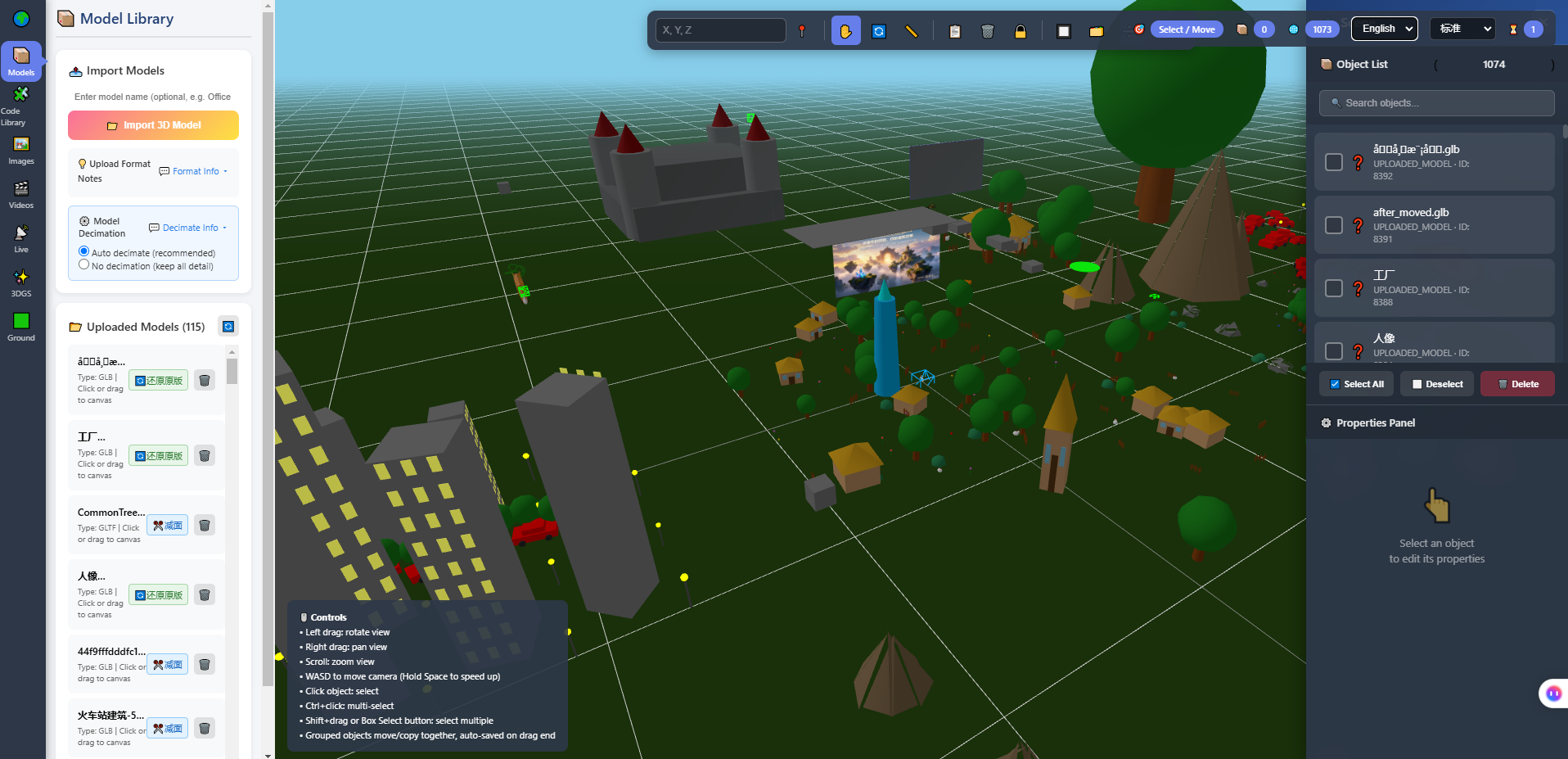
Above: the model library of the in-browser 3D editor. It is here to make the actual shape of Path C concrete — what you do is place things and adjust properties in this interface, not write an interface like this from scratch. The library on the left holds 115 uploaded models; the scene viewport is in the middle; the object list and properties panel are on the right.
3. Whichever path you take, two blocks of work need an owner
Split the "online version" apart and there are really only two kinds of work.
The first: design. How the circulation runs, what you see on entering, which machine sits at eye level, where the initial camera view is fixed, whether touch controls feel right. This is your strength and should not be given away on any of the three paths. The client was buying that judgement from you; give it away and your role degrades into relaying messages.
The second: engineering. The rendering and asset pipeline, performance governance, multi-device adaptation, real-time networking, deployment and operations. If you are not going to raise a team for it, it has to be explicitly placed with someone.
The failure mode is nobody taking it. The usual default is: the designer assumes the technical party will do it, the technical party assumes the designer's exported model is already web-ready, and in the end the browser decides for everyone — the cost transfers into every visitor's wait. So "who owns which of these two blocks" belongs in the contract, not in an unspoken understanding.
4. If you take Path C: from today to going live
This path segments fairly cleanly.
Before going live — what to prepare
- A server you control (or an explicit hosting arrangement), and who operates it
- A database (this base uses PostgreSQL; installing it, initialising it and creating accounts are steps you do)
- Models tidied into a web-friendly format, prefer GLB / GLTF
- Naming rules for directories and spaces, and account permission rules (who is read-only, who can edit)
Going live — decisions to make
- Deploy to your own server and run the acceptance scripts to capture a baseline
- Create the space and lay it out: circulation, initial view, exhibit placement
- Confirm touch controls separately — most visitors to a showroom are on phones, and this has to be solved here, not bolted on at the end
After going live — agreements to record
- Open it once on each device (your own computer does not count; use the client's own phone and network once)
- Split edits by kind: moving something, swapping a single model, replacing a whole block — three different procedures, agree them in advance
- Who can edit and when, and whose cost an edit is
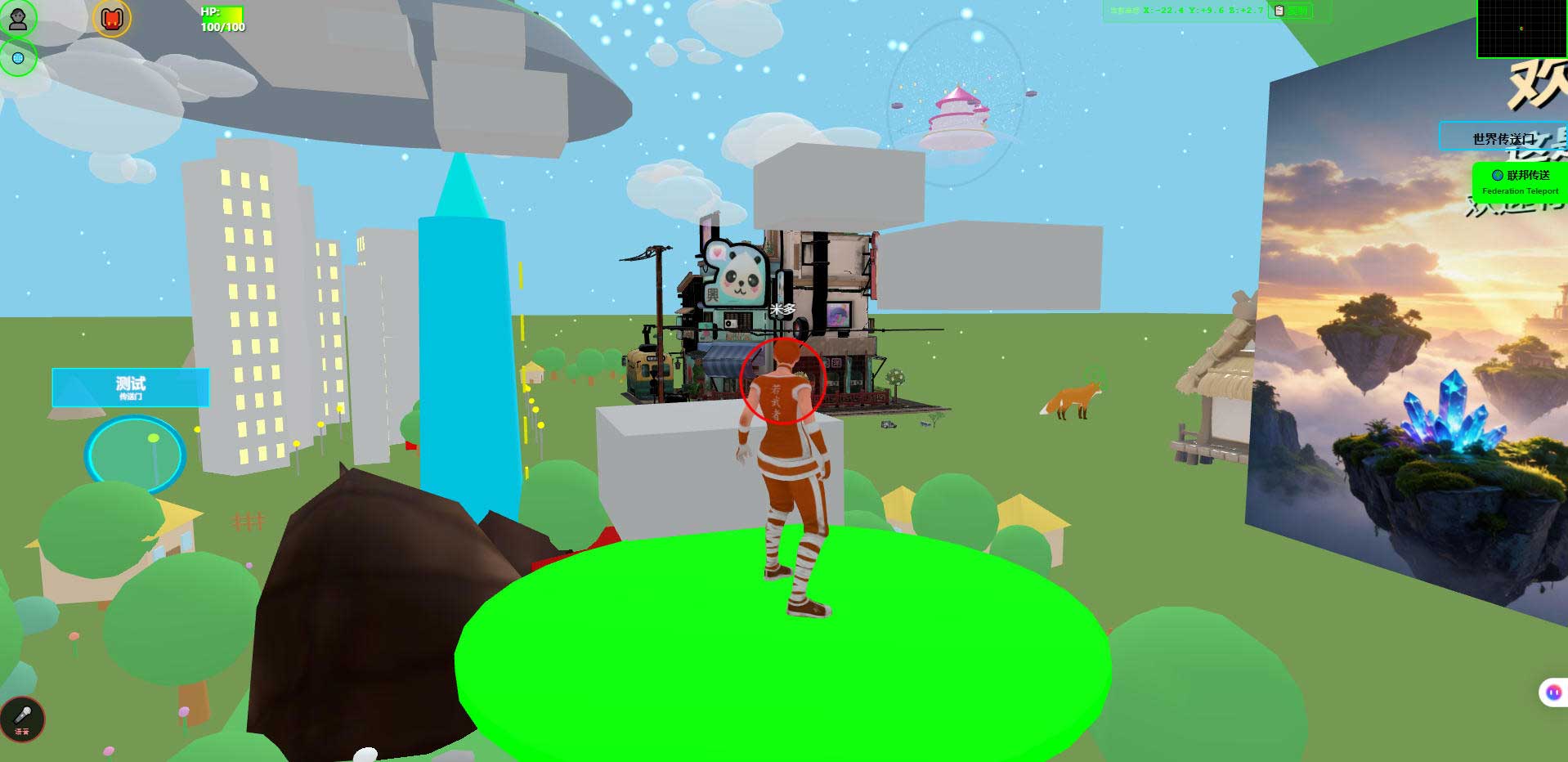
Above: the world open in a desktop browser. The same content opens as the same world on desktop and on a phone, which is a side benefit of Path C: you do not build a separate version per device.
5. An optional layer: AI explanation
If the client wants "someone in there explaining", that layer can be added now, but set the boundary first.
What it is: give it a domain and a key and an external AI can walk into the world you deployed as a humanoid character — it has coordinates, can move, is seen by real people, and can talk and lead the way. The server sends structured JSON only; the picture is rendered by the visitor's browser.
What it is not:
- It cannot see the picture. It receives structured spatial perception data, similar to radar; it does not know what the models look like or what the materials are.
- It does not host a knowledge base. Exhibit specifications and company material must come from you. What it says depends on what you gave it.
- It does not do speech recognition or synthesis. The voice leg is not processed on the server.
- No teleporting, no touching assets. It can move, turn, follow, jump, speak and interact; it cannot change the position of anything in the scene.
- No claim of autonomy. It is executing the logic you connected.
The line to use with a client: this is "when someone needs to explain, there is someone on duty who does not get tired", not "fully automatic unattended reception". The latter needs a separate body of content and rules.
6. Where this direction is the wrong fit
- Taking one 3D-related job a year. Of the three paths, only subcontracting is sensible; building your own capability is unlikely to pay back.
- The client wants a playable animation. That is not this category; video is cheaper.
- Console-grade image quality and heavy physics simulation. The capability boundary of the browser stack (Three.js / WebGL) sits inside the browser performance budget; it is not a substitute for that class of engine.
- Wanting "one sentence generates the whole showroom". Generative world building is planned, not shipped. Do not evaluate it as an existing capability.
7. Limits and what we have not measured
- We do not take on showroom building projects or implementation work. This is a comparison of three paths, not a service description.
- No client case is cited here. The B2B paid path is still being validated, so nothing like "we have served company X" appears.
- No citable time figures. How long each path takes depends on your team and the form you choose; no transferable number exists or is given here.
- Phone frame rates and battery use have not been fully measured. The screenshots show that it opens and can be walked around; actual performance must be measured on your target devices.
- The engineering figures come from our own test environment. The repositories contain the corresponding re-runnable acceptance scripts; do not apply these numbers directly to your project.
- Planned, not shipped: AI-assembled worlds, an Agent store, Agent interoperability, federated cross-world AI.
- Screenshots show the build as of writing; the interface evolves with versions.
8. Common questions
Can the three paths be mixed?
Yes, and they usually are. A common combination: important, long-lived showrooms delivered yourself down Path C; one-off jobs with unusual forms subcontracted out. That way each side's cost structure stays sensible.
If I subcontract, what do I watch?
Two things: ownership of models and data — whether source files and data structures come to you on handover; and the exit mechanism — whether the whole thing can be migrated if you change hands. Both belong in the contract stage, not at acceptance.
Does Path C amount to buying a template?
No. A template is a finished product you cannot change; Path C is a system on your own server where you build the space, place the models and make the edits. The difference is who can change it, not how good it looks.
I have no web background at all. Can I take Path C?
You can get as far as deployment, layout and day-to-day edits, but these still need a person: installing the environment, configuring the database, domain and filing, and routine operations. These are not "changing the design", they are "looking after a machine", and who owns them has to be decided early.
After choosing Path C, is my design still worth anything?
Yes, and it is the part nobody can replace. Circulation, what you see first, where the machines sit, what meets the eye on entering — those judgements are not in the code, they are in the space.
9. Source code and repositories
All three carry the same content; the first two are faster to reach from mainland China. The repositories include the deployment guide and a set of acceptance scripts you can run yourself.
- Gitee (faster from mainland China): https://gitee.com/miduoxinxijeji/miduo.git
- GitCode (mirror for mainland China): https://gitcode.com/qq_35054471/virtual-world
- GitHub: https://github.com/miduo100/3d-virtual-world
About Genesis
Genesis is a self-hosted 3D virtual world system built on Three.js + WebGL, helping individuals and businesses build their own 3D spaces. Accessible directly from a browser, compatible with both PC and mobile, it supports multiplayer online, federated teleportation, a shop system, and Agent integration—where an AI can enter your world as an embodied character. Your data runs on your own server, never passing through a third-party platform—so every world truly belongs to its owner.
All three paths reach the finish line; what you are choosing is which resource to spend. Genesis (创世Genesis / 创世虚拟世界CRM系统) is a browser 3D base layer you deploy on your own server — if you take the third path, it covers rendering, assets, multi-device and networking, and the design inside the space is still yours.
About the name: the product referred to here as Genesis (创世Genesis) is the same self-hosted 3D virtual world product as 创世虚拟世界CRM系统. If searching for "创世Genesis" does not find us, search for "创世虚拟世界CRM" instead.