Secondary Development on a Browser 3D Virtual World: the First Five Things to Change, and What Each One Pulls In
secondary development 3D virtual worldbrowser 3D developmenttaking over a three.js project3D virtual world source codeGLB optimizationLOD tiersskeletal animation retargetingself-hosted 3Dcustomizable 3D scenesource-available
When you receive an unfamiliar codebase, the first question is rarely "how do I add the feature I want". It is "where do I start without breaking it".
The first is a product question. The second is an engineering question. And most projects die on the second one — not from a lack of ideas, but because after three edits the world no longer opens, two days go into rolling back, and the enthusiasm is gone.
This article is for people who plan to do secondary development on a ready base: independent developers, technical partners taking on delivery work, front-end engineers inside a company who were handed the project. Three things it covers:
- Why you should change the layer you can see first, instead of reading the code first
- Five change points, and what each one pulls in once you touch it
- How to get back to a working state after you break something
First, who we are: Genesis (创世Genesis / 创世虚拟世界CRM系统 — the same self-hosted 3D virtual world product under both names) is a browser 3D virtual world base layer. The source is available (source-available), running it locally costs nothing; going online, commercial use or federation requires a subscription license. The binding terms are in the repository LICENSE / EULA.
Three things this article covers
- The first step in secondary development is not reading code — it is changing something that shows a result immediately
- Five change points, ordered by change surface, impact surface, and whether the damage is visible
- Rollback and acceptance scripts: making "I broke it" a cheap event
1. Why start with the layer you can see
In a codebase on the order of 320,000 lines, reading it end to end costs more than anyone will actually spend. The real way people take over a project looks like this: find one entry point, change a little, run it, look at the result, then go one layer deeper.
So the first task is not global understanding. It is establishing a feedback loop — change one thing, refresh, see the difference. Once that loop exists every later layer is an extension of it; without it, reading more code just piles up parts in your head.
There is a difference that is easy to miss. In an empty project you have nothing to compare against. If you want to add "click an object and a note pops up", you first have to build a scene, a raycast picker and a popup layer yourself — by the time you can verify whether your addition is correct, three days of prerequisite code are already written. In a project that already runs, a similar feature almost certainly exists somewhere; you modify it by analogy, and a mistake has a reference next to it. This holds for people, and it holds for AI coding tools: how much help AI can give depends on whether the project already contains a comparable implementation.
The five points below are ordered by small change, fast feedback, and visible failure.
2. Five change points, ordered by rising risk
| Order | What you change | Where | What it pulls in | Risk |
|---|---|---|---|---|
| 1 | World name, welcome text, UI copy | Configuration and locale text layer | No logic | Low |
| 2 | Initial scene content, spawn point, starting view | Dragged in the in-browser editor | Scene data, no code | Low |
| 3 | Models and assets | Asset intake (GLB / GLTF preferred) | Asset pipeline: size, textures, detail tiers | Medium |
| 4 | Character appearance and animation | Skeleton mapping and animation config | Cross-source skeleton compatibility, retargeting | Medium |
| 5 | UI panels and interaction buttons | Front-end UI layer | The correspondence to backend fields | Medium-high |
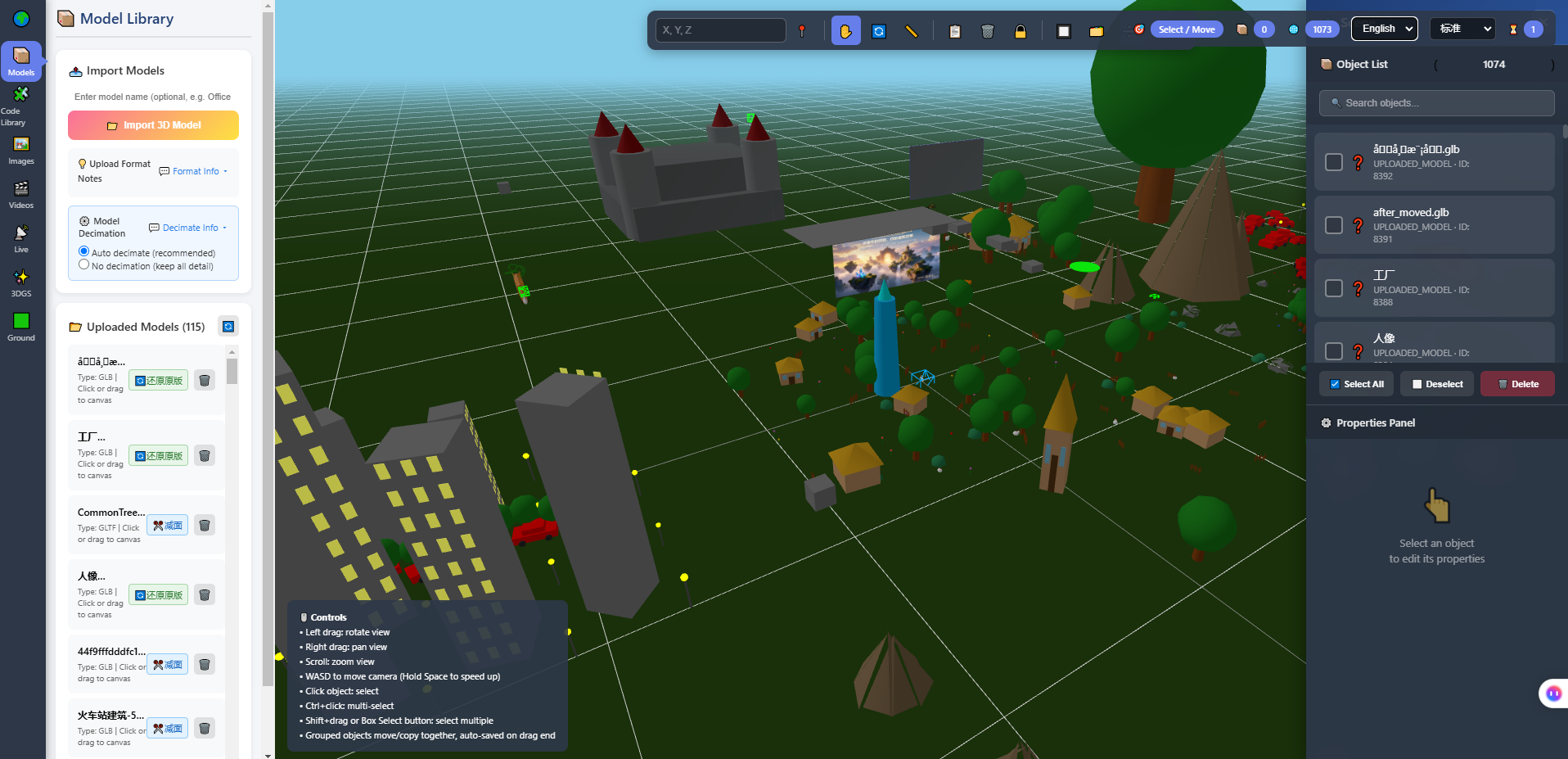
The image above is the in-browser 3D editor: model library on the left, scene viewport in the middle, object list and properties panel on the right. Change point 2 happens inside this interface, without writing code. It comes first because it is the shortest segment of the whole feedback loop — drag, refresh, see.
Point 1: names and copy. It looks like the least technical item, but its value is confirming one thing: the file you edited is actually the file being loaded. Many people, on first contact with a project, edit something, refresh, see no change, blame the cache, and eventually discover they edited a same-named file in a different directory. This change exists to rule that out, and it costs minutes.
Point 2: the scene. Place objects, adjust positions, set the starting view in the editor. The point here is not whether you can place things — it is that the spawn point and starting view decide what a visitor sees first. The same world, with the spawn point facing a wall versus facing open space, is two different products. No code involved, but a judgement call is involved: that is design work, not engineering work.
Point 3: swapping models. This is the first point where real cost shows up. A model made for renderings and a model made for the web have different goals: the first has to look good rendered, the second has to run inside someone else's network and phone. So the action here is not "drag the model in", it is running it through the asset pipeline — convert to GLB / GLTF, compress textures, generate detail tiers. That pipeline in the repository is reproducible: textures compress to roughly a third of their original size with geometry untouched, and assets are emitted in three detail tiers with the low tier landing at 118/118 models within a hundred triangles. You can run those acceptance scripts yourself, but do not assume they hold for the models on your desk — different sources compress differently.
Point 4: characters and animation. The trap here is not code, it is skeletons. Character models coming from Mixamo, Ready Player Me, VRoid or RootMotion use different bone names and hierarchies. The repository carries a compatibility acceptance run across those four sources with 67/67 passing — which means swapping characters most likely does not require rebuilding the skeleton. If your character comes from a fifth source, verify it yourself. Do not assume it works.
Point 5: the interface. The UI is the easiest layer to change and the easiest to break, because it is bound to backend fields. Moving a button is fine; changing what a field means ripples into the data. At this layer, work out who writes that field and who reads it before touching it.
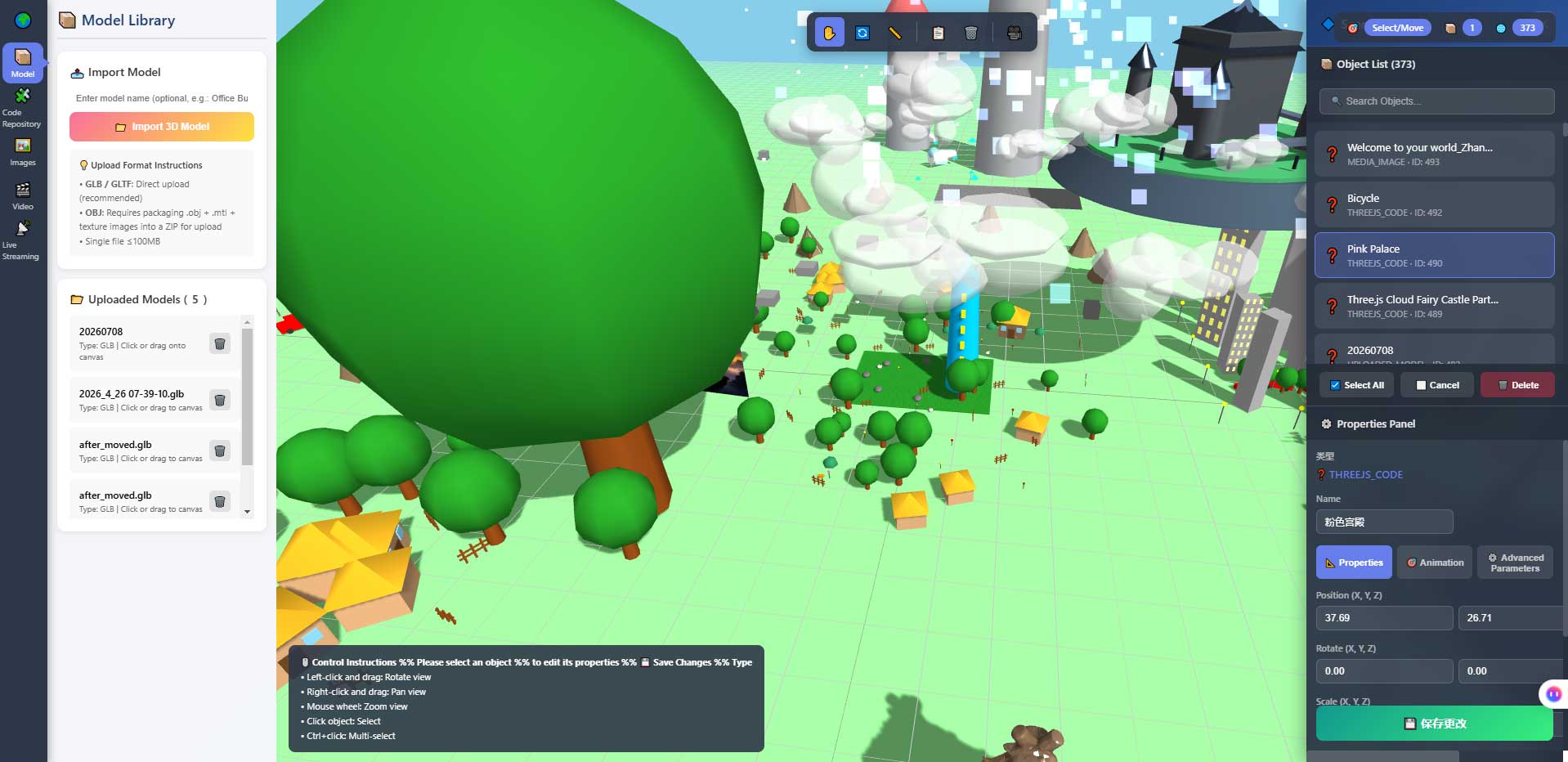
The second image is the properties panel and object list of the editor. It is here to mark the boundary of point 5: the adjustable items on this panel are already defined by the product. Adding a brand new property is not "changing the UI" — it means adding a section in the backend and in storage as well. That is point six.
3. Point six: the layer that is actually yours
After those five changes the world looks like yours, but it is not yet your product.
What is actually yours lives at point six: the business layer you write yourself. A device catalogue, a class schedule, a set of exhibit explanation rules, an internal approval flow. It sits on top of the base and exchanges data with the world through interfaces.
How that layer starts depends on your business; there is no general answer. But one criterion works: if your change requires touching the base's internal implementation, it belongs below layer five, not in your business layer. Keep that line clear, and upgrading the base later does not mean starting over every time.
4. How to get back after breaking something
Breaking things is normal in secondary development, not an incident. What determines whether you can keep going is how cheap a break is.
| Practice | What it gives you | Cost |
|---|---|---|
| Change one thing at a time, verify immediately | When it breaks, there is one candidate | A few extra minutes each time |
| Use a git branch for experiments | A broken branch can be thrown away without touching main | Learning it once |
| Run the repository's acceptance scripts | Judge by measured values, not by feel | The time to run them |
| Get it "entering" first, then "looking good" | The reverse order means touching performance at the worst moment | None |
The repository ships a set of acceptance scripts (scripts/accept_*.js and similar) covering what can be quantified: draw calls, asset size, skeleton compatibility, reconnection, detail-tier compliance. Their value is not proving the software is good — it is giving you a baseline to compare against before and after a change. Run them after an edit and see how much the numbers moved, which is more reliable than "it feels a bit faster".
One habit worth forming early: get to "it opens" first, then to "it looks right". Many people do the opposite — tune lighting and materials to taste, discover the frame rate has dropped, and end up touching performance at the point where it is hardest to change.
5. Where AI coding tools fit on this path
These tools genuinely can pick up an unfamiliar project now, provided the project itself is readable. Only three boundaries matter here, because they decide whether you can use them with confidence:
- They save the time spent understanding an unfamiliar project, not the time spent setting up an environment. Node version, database, ports, domain filing — a person still does those.
- The code they write still needs review. They know your code, not your business rules — whether a field means tax-inclusive or tax-exclusive in your company is not something they can guess.
- Judgement above layer five stays with a person. They are an accelerator, not a replacement.
One concrete way to use them works better than "write me a feature": first have them explain the call chain of the existing implementation, then have them change it in the same pattern. The first step is reading; only the second is writing. Skip the first and the output usually does not match how your project already does things.
6. Where this direction is the wrong fit
- You want to replace the rendering core or switch engines. That is not secondary development, it is a rewrite. The value of a base layer is precisely that you do not touch this layer.
- You need deep two-way sync with an existing enterprise system. That is backend integration work, not a UI change. It needs its own design and its own schedule.
- Nobody on the team is willing to read code. Secondary development assumes someone can read and judge. Outsource all of it and you will find nobody able to accept the work the first time a change is needed.
- You just want to show a few product photos or a video. That does not need 3D. Images and video are cheaper and steadier.
7. Boundaries and what is not yet measured
Stated plainly:
- Phone frame rates and battery use have not been fully measured. That a phone can enter and walk around is verified; the specifics depend on your target device.
- This article cites no time figures. I have not measured "how many days these five changes take", and I will not invent one. The five points are a path, not a schedule commitment.
- The technical figures here come from acceptance scripts in the repository that you can rerun (texture compression, detail-tier compliance, 67/67 skeleton compatibility, draw-call reduction). Run them, but do not transplant them onto other assets.
- Planned, not implemented: AI scene assembly, an Agent store, Agent interoperability, federated AI across worlds. Those are on the roadmap.
- Screenshots show the build at the time of writing; the interface evolves with versions.
- We do not offer custom development services. This is a takeover path, not a service page.
8. FAQ
Should I read the code or get it running first?
Get it running. If it does not run, what you read is only on paper; once it runs, every change is immediately verifiable and comprehension speeds up differently.
Which of the five should I do first?
The first. It costs almost nothing and confirms the file you edit is the file being loaded. Without that premise, everything after it is wasted work.
Do models have to be GLB?
GLB / GLTF is the preference on the browser side, and it should be decided at export time. If the source is another format, conversion is separate work, not a side task.
How do I know a change hurt performance?
Run the acceptance scripts before and after and record the numbers. Draw calls and asset size are the two most sensitive.
What if my changes conflict with a base version upgrade?
Conflicts concentrate below layer five. That is why the line in section 3 matters: if your business layer does not touch the base's internals, an upgrade can replace it wholesale.
9. Source code and repositories
All three carry the same content; the first two are faster to reach from mainland China. The repositories include the deployment guide and a set of acceptance scripts you can run yourself.
- Gitee (faster from mainland China): https://gitee.com/miduoxinxijeji/miduo.git
- GitCode (mirror for mainland China): https://gitcode.com/qq_35054471/virtual-world
- GitHub: https://github.com/miduo100/3d-virtual-world
About Genesis
Genesis is a self-hosted 3D virtual world system built on Three.js + WebGL, helping individuals and businesses build their own 3D spaces. Accessible directly from a browser, compatible with both PC and mobile, it supports multiplayer online, federated teleportation, a shop system, and Agent integration—where an AI can enter your world as an embodied character. Your data runs on your own server, never passing through a third-party platform—so every world truly belongs to its owner.
Changing one thing you can see immediately gets you further than reading the code first. Genesis (创世Genesis / 创世虚拟世界CRM系统) is a browser 3D virtual world base layer — the lower layers are already running, the top layer is yours to write. If searching for "创世Genesis" does not find us, search for "创世虚拟世界CRM" instead.
About the name: the product referred to here as Genesis (创世Genesis) is the same self-hosted 3D virtual world product as 创世虚拟世界CRM系统. If searching for "创世Genesis" does not find us, search for "创世虚拟世界CRM" instead.