Teaching Teenagers to Build a 3D World: Start With a Running One, or With Line One of three.js?
3D coding for kidsAI programming for teenagerswhere to start learning programmingthree.js teaching3D virtual world in the classroomwhat to learn after Scratchkids learning AI codingproject-based programming courseschool 3D coursesource-available
"Where should my kid start if they want to learn AI programming?"
It gets asked a lot, and answers come quickly: sign up for a block-based coding class, or go straight to Python. But if the goal is more specific — the kid wants to build a 3D world they can walk into in a browser — neither answer points the right way, because both skip the hardest stretch.
This is not a course description and not a sales pitch. It is written by the developer of a 3D virtual world base layer, so the only thing it can offer is this: from an engineering point of view, where each of three common starting paths breaks.
Let me be clear about who we are and what we are not, because this article needs that more than the others: Genesis (创世Genesis / 创世虚拟世界CRM系统) is a browser 3D virtual world base layer. We are not an education company — no curriculum, no teachers, and no classroom cases to cite. The teaching sequence below comes from engineering experience and has not been tested in a classroom.
Licence: the source is available (source-available), running it locally costs nothing; going online, commercial use or federation requires a subscription license.
Three things this article covers
- Three common starting points, and where each one breaks
- Why "nothing visible in the first two lessons" is the expensive part
- If you start from a world that already runs, how the sequence should be ordered
1. Three starting points, three breaks
| Starting point | What the student holds at the end of lesson one | Distance to "I can change it myself" | Where it breaks |
|---|---|---|---|
| Block-based coding | A small thing that moves | Short, but the ceiling is low | The jump from blocks to text code |
| Writing three.js from scratch | An installed project that is still empty | Long | Environment, coordinate systems, vectors and matrices |
| Pure AI generation | A scene that looks decent | Short on the surface, long in reality | Causality is invisible; break it and you do not know why |
| A world that already runs | A world they have changed themselves | Short | It depends on someone else's base — and that is its cost |
One: block-based coding. The advantage is clear — something works in the first lesson, and the kid feels it. The problem is not entry, it is exit: blocks express a limited set of logic, and moving to text code means relearning how variables are declared, how files are organised, how errors are read. That wall does not grow out of blocks; it is a second start from zero.
Two: writing three.js from scratch. Engineering-wise this is the correct path; pedagogically the order is wrong. Lesson one is installing an environment, creating a project, getting an empty scene to run; then come camera and coordinate systems, vectors and matrices, lighting and materials. These concepts are not hard in themselves — what is hard is that they all arrive during the phase where you cannot yet see anything. A fifteen-year-old with nothing to show anyone until lesson four loses interest right there.
Three: pure AI generation. It can produce a scene from one sentence, and the effect in lesson one is striking. But it hides causality: the student sees the result, not why that line produced that result. The consequence is that when something breaks they do not know where to look, and nothing transfers to the next project. It is good for a demo. As teaching, it teaches "how to ask", not "how to build".
Four: a world that already runs. This is the path the rest of the article unpacks. Its cost is stated here rather than buried: the student starts from someone else's base; they did not begin from nothing. That is no help for understanding the internals — anyone who wants to understand a rendering pipeline has to write one.
2. Why "nothing visible in the first two lessons" is expensive
The cost of teaching is not the volume of content. It is what the student holds at the end of lesson one.
This is not educational theory, it is a plain mechanism: interest is sustained by feedback, and feedback comes from visible change. A student edits a line, refreshes, and the picture changes — one pass through that loop teaches more than ten minutes of explanation. Reverse it, and when the gap between an edit and its result is filled with prerequisites, the student can only rely on the teacher to say whether they are right. Learning that depends on the teacher's judgement stops the moment the teacher is not there.
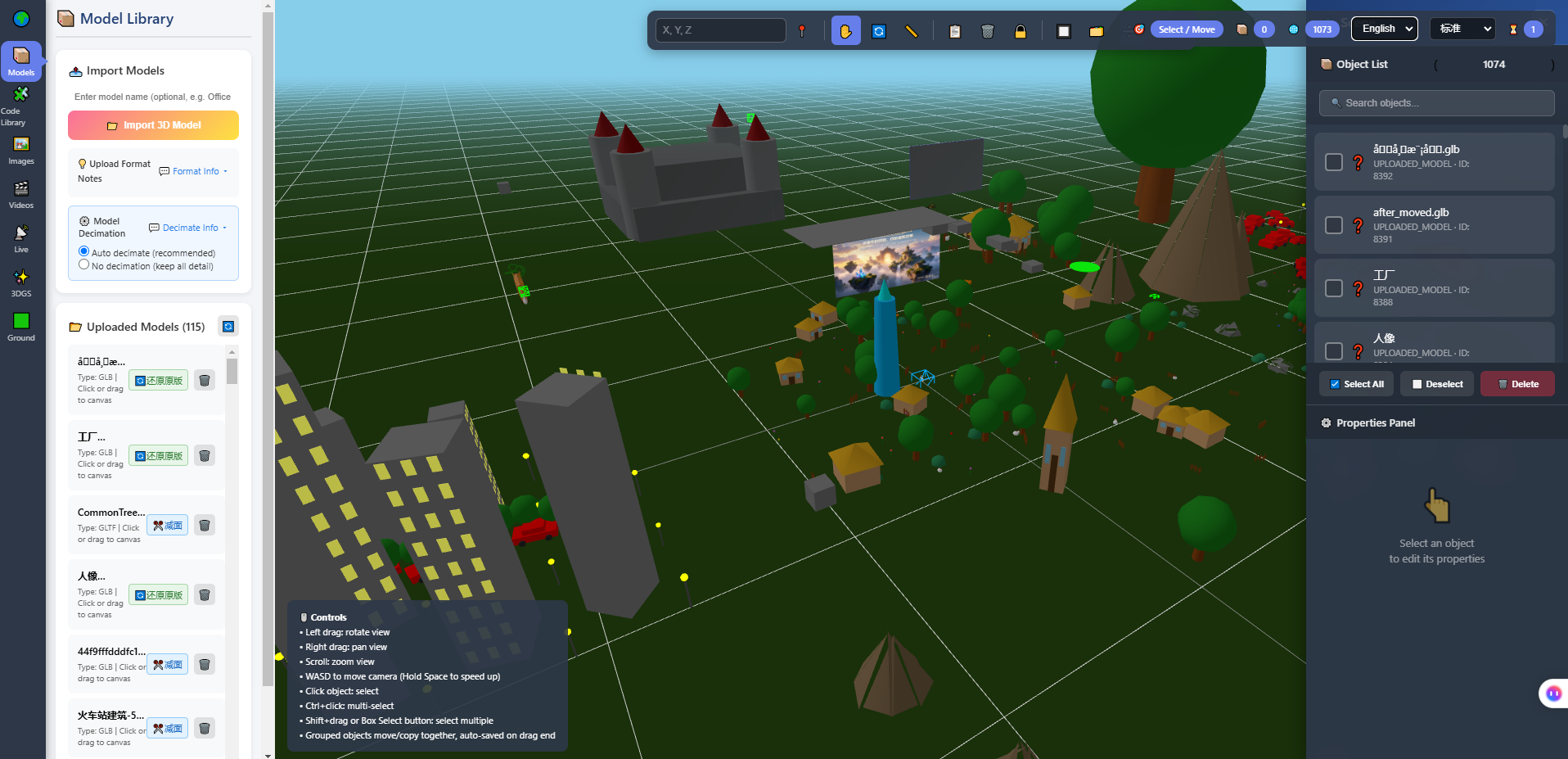
The image above is the in-browser 3D editor: model library on the left, viewport in the middle, object list and properties panel on the right. It is worth showing a kid who is learning to code, because it turns "a 3D world" from something mysterious into "a pile of objects you can pick, place and adjust". That shift does more than ten explanations of coordinate systems.
3. What changes when the world already runs
First, there is something to compare against. A student wants to add "walk near this tree and a line pops up" — the project almost certainly has a similar implementation somewhere. They modify it by analogy; if it runs, fine; if not, there is a reference. Modifying something that already exists is how people normally learn to program; starting from nothing is actually the rarer path in real work.
Second, the assignment is verifiable. Traditional programming homework is graded by a teacher reading code; here the assignment is "turn this world's sky to dusk and tell me which parameters you changed". The student can see whether they did it, and the teacher only has to look at the result. Assessment moves from subjective reading to before-and-after comparison — a substantive change for teaching.
Third, when it breaks, they can see it. The picture collapses, a model disappears, they walk through a wall — these errors do not need a teacher to point them out; they announce themselves. Feedback comes from the system, not from a person.
Fourth, there is real causality to teach. One example from this project: changing the number of lights in a scene used to trigger a full recompile of the scene, taking close to nine seconds; after narrowing the trigger condition, those nine seconds were no longer needed. That is good material for a teenager — concrete, perceptible (you change it, it stutters), and it carries a concept: some stutter is not "a slow computer", it is you touching something global.
4. One change per lesson: a sequence you can follow
If this is to be used as a teaching base, the order should look like this. The criterion for each lesson is not "the explanation is finished" but "the student changed something themselves and it differs from before".
| Lesson | What to change | Concepts the student meets | How you know it landed |
|---|---|---|---|
| 1 | World name, welcome text | Files, saving, refreshing, an edit taking effect | They can say which file they changed |
| 2 | Swap one model | Model formats, coordinate systems, scale | The new model is the right size and not sunk into the floor |
| 3 | Lay out a walking route | Space, position, orientation | Someone else can follow their route to the end |
| 4 | Change lighting and mood | The relationship between parameters and performance | They know why adjusting lights stutters |
| 5 | Add an interaction trigger | Events, conditions, state | It fires when the condition holds and not otherwise |
| 6 | Let an AI character walk in | Interfaces, protocols, boundaries | They can list three things this AI cannot do |
Lesson six deserves a separate note. Having an AI enter the world as a humanoid character is, in this system, a matter of "an address and a key". But for a teenager the value of that lesson is not "it connected" — it is understanding what connecting means and what it does not: it cannot see the picture, does no speech, hosts no knowledge base, and cannot move anything in the scene. A kid who can state those boundaries clearly has gained more than one who got the code running.
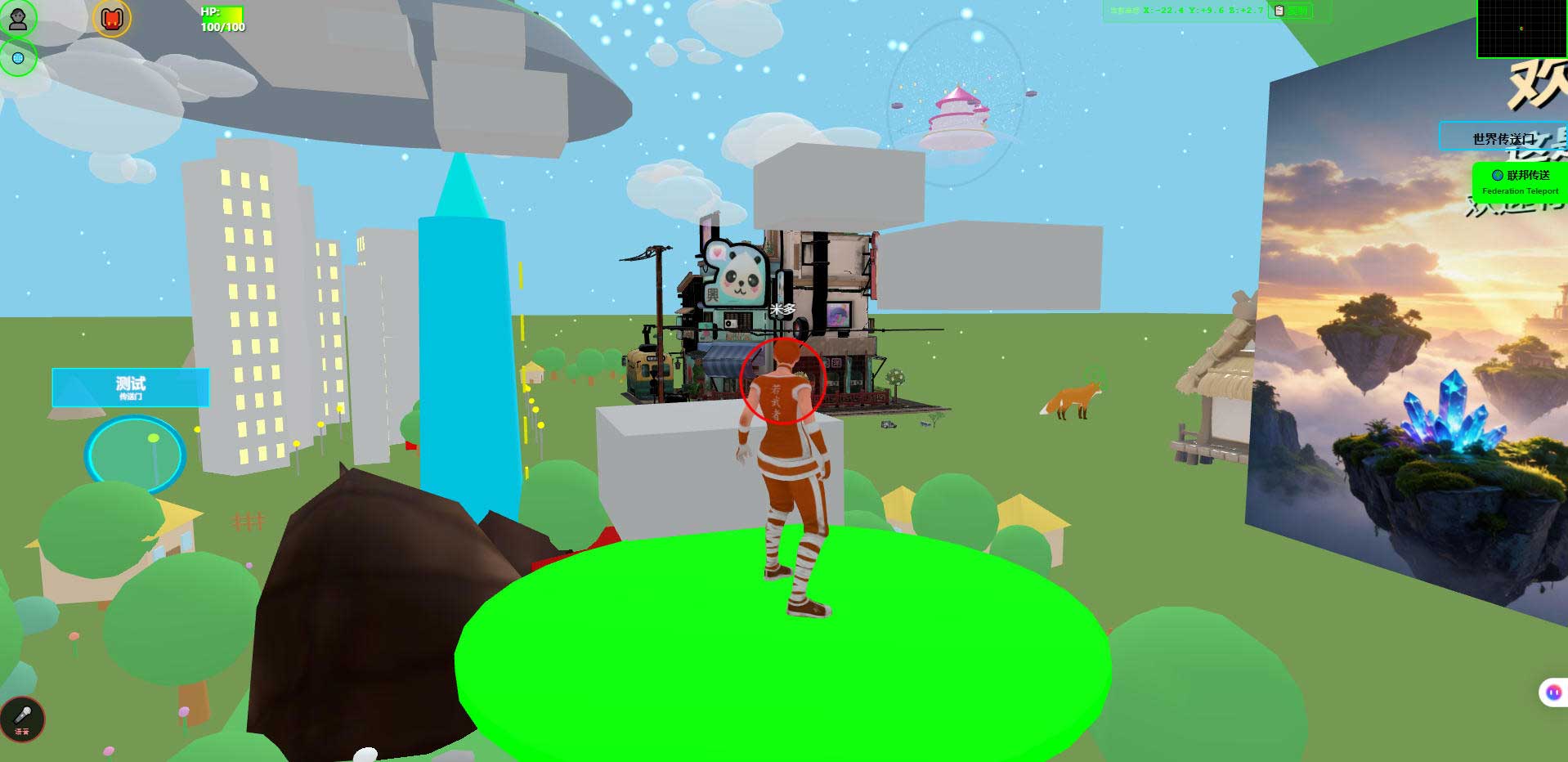
The image above is the world in a desktop browser. These screenshots have a quiet use in a classroom: they are evidence of the student's own changes. Save one before and one after, and a term's progress becomes visible.
5. Where AI coding fits in the classroom
These tools entering classrooms is inevitable. But their role in teaching differs from their role at work.
At work it is an accelerator; in a classroom it should be a sparring partner. The difference: work wants a result, teaching wants something left in the student's head.
That leads to one concrete way of assessing: what should be graded is not what the AI wrote for the student, but whether the student can explain what the AI changed.
Three steps that can be followed as written:
- Have the student write down "what I want to change" first. One sentence, covering where and into what. If they cannot write it, they have not thought it through — and letting the AI act at that point hands over the thinking as well.
- Look at which files and which lines the AI changed. This step is largely missing from classrooms today.
- Pick one line and say what it does in your own words. If they cannot, go back to step 1.
Three boundaries must be told to students at the same time, or they will form wrong expectations:
- AI saves the time spent understanding an unfamiliar project, not the time spent setting up an environment. Installing dependencies, configuring a database, opening ports — a person still does that. For teaching this is actually a good thing: it makes "environment" impossible to skip.
- AI-written code needs review. It knows your code, not your rules.
- Judgement stays with the person. What your world should look like is not something a tool decides for you.
6. Where this path does not work
Competitive programming and exams. The informatics olympiad route is algorithms and data structures, which barely overlaps with "build a 3D world". If the goal is explicitly a competition or certificate, this does not help — do not take a detour.
A finished product in a 40-minute lesson. An edit has to be saved, refreshed, verified, and there is still a concept to explain. Forty minutes cannot hold that; the rhythm gets chopped up.
A teacher with no technical background and no school support. This is a self-hosted system: server, domain, backups are all real work. With nobody to catch those, the first incident stops the class.
Tablets only, no keyboards. The editor itself works with touch, but writing code needs a keyboard. In a tablet-only classroom, lessons from four onward get awkward.
Every student needs their own world publicly online. That is a bill the school has to do the maths on: each publicly reachable world needs a server, a domain, a filing and someone to operate it. Technically possible; say it plainly before the timetable is set, not after.
One more thing often sold as a feature of this kind of project: self-hosting means student work and data sit on the school's own server and do not leave the campus. In this architecture that is structurally true — and that is all it is. It is not a compliance certification. Meet whatever requirements apply according to local and school rules.
7. Boundaries and what is not yet measured
This section matters more than the six above, because education is the easiest thing to write about too optimistically.
- We are not an education company. No curriculum, no teaching materials, no teachers, and no teaching cases to cite.
- There has been no classroom trial. The six-lesson sequence above is an engineering extrapolation, not an experimental result. We have no data on what a real classroom hits.
- We make no claims about learning outcomes. Any statement of the form "after this course a student can reach level X" is one we cannot make.
- Phone and tablet performance has not been fully measured. That they can enter and walk around is verified; frame rates and battery use depend on the device.
- Technical figures come from acceptance scripts in the repository that you can rerun, not from marketing copy.
- Planned, not implemented: AI scene assembly, an Agent store, Agent interoperability, federated AI across worlds. When telling teenagers about these, say clearly that they are still on the roadmap.
- AI integration has hard boundaries: it cannot see the picture, does no speech recognition or synthesis, hosts no knowledge base, and cannot move objects in the scene. Explaining it is fine; overselling it is not.
- Screenshots show the build at the time of writing; the interface evolves with versions.
8. FAQ
What age can start?
This article gives no age recommendation — that is an education research question, not an engineering one. What it can give is a criterion: if the student can read roughly ten lines of code and say what they do, start at lesson four; if not, fill in the earlier steps first.
Do they have to learn JavaScript first?
The front end of this system is JavaScript. But the first four lessons barely require writing code — do them in the editor and let the code catch up. Get the feel first, fill in syntax second, works better than the reverse.
What if 40 minutes is not enough?
Split one lesson into two: one to change, one to explain what was changed. Explain, change, then explain again — that cycle beats rushing the syllabus.
Is one school server enough?
For an intranet class, expecting one machine to hold a class's spaces is reasonable, but we have no load-test data on headcount, so do not treat it as a promise. Public access is a separate calculation.
If kids use AI to write code, will they learn nothing?
It depends on how you assess. If you only check the result, yes. If you check "can you explain this code", no — the latter forces them to read.
Can you give us a curriculum?
No. We have no curriculum. What this offers is "a world that can be changed immediately"; designing the course is the school's or the teacher's job.
9. Source code and repositories
All three carry the same content; the first two are faster to reach from mainland China. The repositories include the deployment guide and a set of acceptance scripts you can run yourself.
- Gitee (faster from mainland China): https://gitee.com/miduoxinxijeji/miduo.git
- GitCode (mirror for mainland China): https://gitcode.com/qq_35054471/virtual-world
- GitHub: https://github.com/miduo100/3d-virtual-world
About Genesis
Genesis is a self-hosted 3D virtual world system built on Three.js + WebGL, helping individuals and businesses build their own 3D spaces. Accessible directly from a browser, compatible with both PC and mobile, it supports multiplayer online, federated teleportation, a shop system, and Agent integration—where an AI can enter your world as an embodied character. Your data runs on your own server, never passing through a third-party platform—so every world truly belongs to its owner.
Letting a kid change one thing they can see immediately beats explaining coordinate systems first. Genesis (创世Genesis / 创世虚拟世界CRM系统) is a browser 3D virtual world base layer — not a course, but a world that can be changed right away. If searching for "创世Genesis" does not find us, search for "创世虚拟世界CRM" instead.
About the name: the product referred to here as Genesis (创世Genesis) is the same self-hosted 3D virtual world product as 创世虚拟世界CRM系统. If searching for "创世Genesis" does not find us, search for "创世虚拟世界CRM" instead.