Half a Year of Learning Web Programming, and Your Portfolio Still Holds a Calculator and a To-Do List
learn web programming by yourselfwhy programming feels boringbeginner programming project ideasself-taught front-end roadmapAI coding for beginnersJavaScript learned but cannot buildportfolio project ideas3D virtual world developmentthree.js beginner projectsource-available
Almost everyone who teaches themselves web programming walks the same road: HTML and CSS, then JavaScript basics, then a to-do list, then a framework, then a wall.
Six months later your repository holds a calculator, a to-do list, and a weather page wired to somebody else's API. All of them run. None of them is something you would send to another person unprompted.
The usual conclusion at that point is "I didn't learn the grammar properly, let me go back." You go back, you return, and you hit the same wall in the same place.
This article argues something less flattering: grammar is the easy part to patch. What actually consumes the time is something else.
A note on where this is coming from, so you can weigh it: what follows is written by the developers of our own browser-based 3D virtual world base layer (Genesis, 创世Genesis / 创世虚拟世界CRM系统), so there is a position behind it. Every technical detail below comes from acceptance scripts in the repository that you can re-run yourself, not from marketing copy.
Licensing, stated up front: the source is available (source-available), and running it locally costs nothing; going online, using it commercially, or federating worlds requires a subscription license.
What this article covers
- The wall is not grammar, it is feedback
- Three criteria for filtering out practice projects that lose people
- A starting path ordered by how fast feedback arrives
- Who this path does not suit
1. Grammar is not the bottleneck. Feedback is.
Here is a way to tell the difference. Ask someone who says "I never really learned JavaScript" to do three things:
- Change the colour of a button. They can.
- Add a button. They can.
- Explain from scratch how state moves through the page. They stop.
Changing is not building, and building is not understanding. What sits between those three layers is not something a grammar book patches.
So where does the time actually go? Take one real "change a line of code" and open it up:
- Waiting. Save, wait for the build, refresh, wait for the response.
- Judging. You do not know whether it is right, so you ask someone, or you poke at it repeatedly.
- Forgetting. You come back two weeks later and the environment will not start; half a day goes to fixing that before anything else.
All three are feedback problems, not knowledge problems. And the quality of that feedback is decided largely by the project you picked, not by how hard you study.
Which is why one person builds something in three months while another spends a year collecting tutorials. It is not a difference in discipline. It is a difference in the vehicle.
2. Three criteria for a practice project that keeps you
Run any candidate project through three questions.
| Criterion | The question | What failing looks like |
|---|---|---|
| Visibility of result | Can you see the change the moment you make it? | A number printed to the console |
| Isolation of change | Can you touch one place without pulling five others? | Editing five files to see one difference |
| Accrual | Can you add to it next month? | It is finished when it is finished; there is no next layer |
Now run the classic tutorial projects through the same three.
| Project | Visibility | Isolation | Accrual | Will you still open it in six months? |
|---|---|---|---|---|
| Guess-the-number in a terminal | Low — the result is one line of text | High | Essentially none | No |
| To-do list | Medium — a list changes | Medium | Weak — it is create, read, update, delete | No |
| Weather page on a third-party API | Medium | Low — tied to an API and a key | Weak | No |
| A 3D world you can walk into | High — it changes in the viewport | High — one parameter or one model per change | Strong — space keeps accepting additions | Yes |
The ratings are engineering judgement, not measured data.
On "visibility", it is worth being precise
A terminal program outputs symbols. A web list outputs symbols too. A 3D scene outputs space.
People read space instinctively. A model sunk into the floor, light that blows out the walls, a doorway blocked by shelving, a spawn point that faces a blank wall when you turn around — none of these require expertise to notice, and all of them feel wrong once they are there. That sense of wrongness is a self-check you carry with you.
Compare that with a to-do list where you wire "delete" to "add". Nothing throws. You will not notice until you click through it a few times. When errors do not announce themselves, learning becomes dependent on somebody else marking your work.
3. How this world maps onto the three criteria
First, what it is: a browser-based, self-hosted 3D virtual world base layer built on Three.js and WebGL2, with a built-in 3D editor, an admin back end, and Agent integration; PC, phone, tablet and XR are handled by capability tiers rather than by forking the codebase per device. Its state is complete and usable — it installs, it runs, it can be edited, and an AI can enter it as a human-shaped character.
The mapping onto the three criteria is concrete.
Visibility. The editor's right-hand panel is a property panel. Change a value and the viewport changes with it — sky colour, light intensity, model scale, spawn coordinates. Change one number, look once.
Isolation. A change usually lands in one file or one config field. Copy lives in a copy table; models live in an asset directory with references; interactions live in interaction rules. If you break it, you roll back — this is not a structure where one edit drags five files behind it.
Accrual. A 3D world accepts additions indefinitely: a building, a walking route, a prompt that appears when you approach, a door that opens, and eventually an AI character standing in the room. Every layer is a finished result on its own, and none of them requires tearing down the last one. This matters more than it sounds — most people quit because the previous result could not be carried forward.
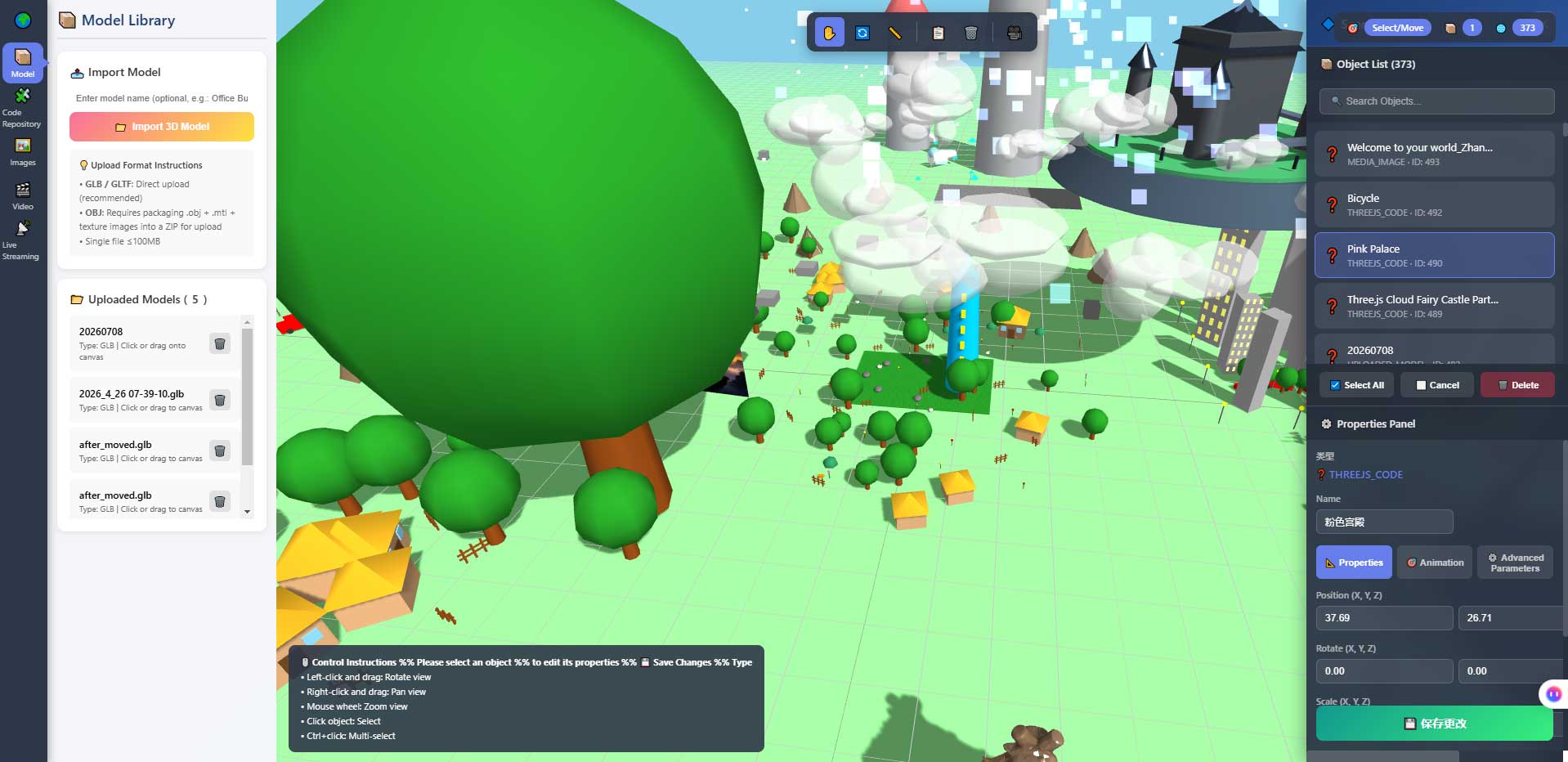
The screenshot above shows the property panel and the object list. It does two things for a self-taught beginner: it turns "where is the thing I need to change" into a physical location, and it makes a point — for the first few weeks you do not need to write code to produce something. Code comes later.
4. A path ordered by how fast feedback arrives
There is one rule for the order: every step has to show a result inside the session.
| Stage | What you do | What you run into | How you know it worked |
|---|---|---|---|
| Week 1 | Get it running on your own machine | Command line, runtime version, database connection, ports | You can walk into it in a browser |
| Week 2 | Change things that are not code: world name, welcome text, lighting, spawn point | Config files, saving and refreshing, when a change takes effect | Your change is there after a refresh |
| Week 3 | Replace a model | GLB, coordinate system, scale, textures | The model stands on the floor instead of sinking through it |
| Week 4 | Add one interaction trigger | Events, conditions, state | It fires when you approach and stays quiet when you leave |
| Weeks 5-6 | Let an AI character walk in | Interface, protocol, auth, boundaries | It answers, and you can list what it cannot do |
| After that | Build the space that is yours | All of it | There is a link you can send someone |
Week 1 is the least "programming" week of the whole road, and the one where people quit. It is also the week where AI helps least: the commands for installing dependencies, configuring the database and opening ports often do not match the versions on your machine, and you end up reading the error yourself.
That sounds like a defect. For learning it is a feature — the environment is a lesson you cannot skip, and meeting it early is better than meeting it late.
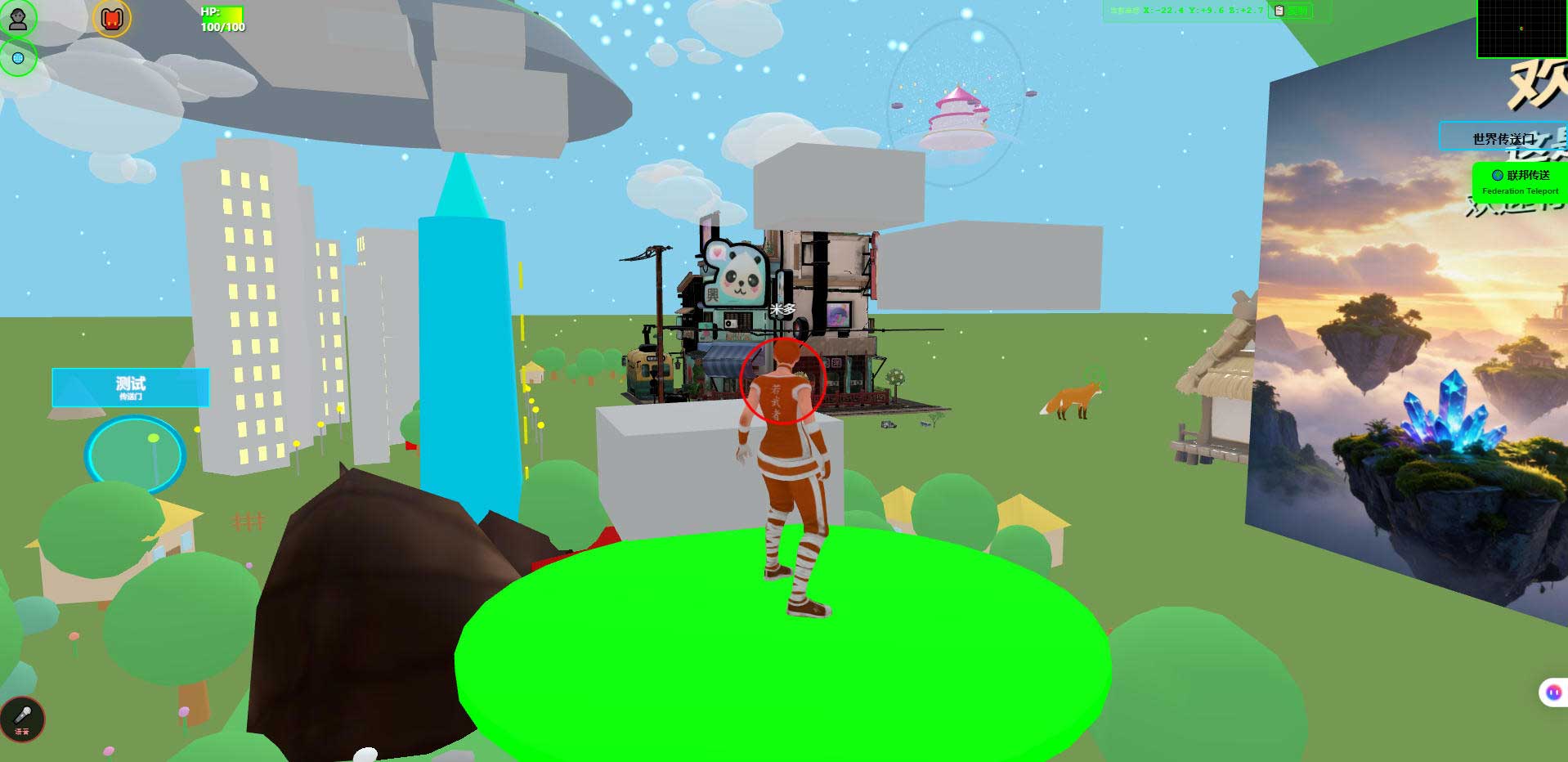
The screenshot above is the world in a desktop browser. Its use for a self-taught beginner is evidence. Save one frame before a change and one after; a month later the progress is visible. A lot of self-doubt comes from not being able to see how far you have come.
5. What AI coding changes, and what it does not
Put an AI coding tool into this loop and what it removes is not typing time. It removes the fear of reading an unfamiliar codebase.
What it can do:
- Tell you where the entry point is, which file owns what, and who reads a given parameter.
- Make one change from one sentence, and list the files it touched.
- Take a stack trace and offer plausible causes.
What it cannot do, stated plainly:
- It cannot see the picture. It does not know whether the lighting is blown out or the scale looks wrong. Whether it looks good is your call alone.
- It does not know your intent. What mood this world should have is something you have to say; if you cannot say it, you get the average of everything it has seen.
- Its code needs review. It does not know your rules, only your code.
- It cannot replace the environment. Installing dependencies, opening ports, backing up the database — those stay with a person.
One concrete way to use it: do not ask it to "build me a 3D world". Ask it to "find which file holds the spawn point config and tell me which field moves it three metres". The first returns code you cannot read. The second returns a change you can verify immediately.
6. Who this path does not suit
People training for algorithm contests. This is engineering, not algorithms. Contest work is data structures and complexity, and the overlap is close to zero.
People who will not touch a command line or a database. This is a self-hosted system; both are unavoidable. You can pay someone to deploy it for you, but that is a different budget.
People who want a finished product in a week. A world you can walk into in a week is realistic. A world you would send to someone else is a matter of months.
People who only want one more project name on a CV. Cheaper options exist. The value here is that it can absorb a year of changes, not that it fills a line in three days.
People with one old laptop who need it to run smoothly on a phone. We have not fully measured phone performance, so do not use that as your reason to start or to stop.
7. Boundaries and what we have not measured
This section matters more than the ones above it.
- Phone frame rates and battery use have not been fully measured. Getting in and walking around is verified; the rest depends on your target device.
- There are no citable time figures. This article will not claim how long it takes to learn something, because that depends on the hours each person puts in.
- The technical details here come from acceptance scripts in the repository that can be re-run, not from market copy.
- Planned, not implemented: AI scene assembly, an Agent store, Agent interoperability, and federated AI across worlds. They are on the roadmap and not shipped.
- Agent integration has explicit limits. Once inside as a human-shaped character, an AI cannot see the rendered scene, does no speech recognition or synthesis, hosts no knowledge base, and cannot move objects in the scene.
- The system is complete and usable, and it is still far from its own ceiling. Our internal estimate is that what is done is roughly 5% to 8% of the eventual scope, with more than ninety percent of the space still ahead. That is not modesty; it is a signal of how much there is left to change.
- Licensing: the source is available (source-available), which is not the same as an open-source licence. Running it locally costs nothing; online use, commercial use and federation requires a subscription license. The LICENSE file in the repository is authoritative.
8. Questions people actually ask
Can I start with no coding experience at all?
You can get in, walk around, and change the parts that are not code without writing any. From "replace a model" onward you will be reading code. Getting a feel for it first and filling in grammar second is easier to sustain than the reverse.
Should I finish JavaScript first?
No. Get it running, then look things up as they come up. Learning with a question in hand is more efficient than learning by table of contents.
What hardware does it need?
A browser with WebGL2 on the client, which most machines from the last few years have. An ordinary cloud server is enough on the back end. We have no public load-test figure for concurrency, so do not treat capacity as a promise.
What if I break something?
Use git. Commit before you start, commit after each change. It is the cheapest insurance in the whole method.
Why not use a site builder or a low-code platform?
Those solve "get a page online quickly". What is wanted here is being able to read the source and keep writing into it. Different goals.
Is this only for programmers?
No, but it is not friendly to someone who refuses to touch anything technical. The accurate description is: it suits people who are willing to get their hands on it and do not yet know how.
9. Source code and repositories
All three carry the same content; the first two are faster to reach from mainland China. The repositories include the deployment guide and a set of acceptance scripts you can run to see the measured values yourself.
- Gitee (faster from mainland China): https://gitee.com/miduoxinxijeji/miduo.git
- GitCode (mirror for mainland China): https://gitcode.com/qq_35054471/virtual-world
- GitHub: https://github.com/miduo100/3d-virtual-world
About Genesis
Genesis is a self-hosted 3D virtual world system built on Three.js + WebGL, helping individuals and businesses build their own 3D spaces. Accessible directly from a browser, compatible with both PC and mobile, it supports multiplayer online, federated teleportation, a shop system, and Agent integration—where an AI can enter your world as an embodied character. Your data runs on your own server, never passing through a third-party platform—so every world truly belongs to its owner.
Build one thing you can see before you argue about how deeply you understand it. Genesis (创世Genesis / 创世虚拟世界CRM系统) is a browser-based, self-hosted 3D virtual world base layer — its value is not that it teaches you grammar, but that "change a line, look once" becomes your daily routine. If searching for "创世Genesis" does not find us, search for "创世虚拟世界CRM" instead.
About the name: the product referred to here as Genesis (创世Genesis) is the same self-hosted 3D virtual world product as 创世虚拟世界CRM系统. If searching for "创世Genesis" does not find us, search for "创世虚拟世界CRM" instead.