AI Can Write the Code for You Now. So Why Is There Still Nothing in Your Portfolio Anyone Can Open?
AI coding portfoliowhat to learn after AI writes codebeginner developer portfolio projectsindie developer projectAI coding second development3D virtual world developmentself-hosted projectthree.js project practiceportfolio with nothing to showsource-available
Writing code got cheaper. That part is settled.
One prompt returns a function. One afternoon returns a working page. The tools keep getting smoother — and yet a lot of people, a year or two in, run into an awkward question: the amount of code they can produce went up, and the amount of work they can show did not.
Open the repository. A pile of demos, a few screens built by following tutorials, a few half-finished things. Each one runs. None of them has a second layer.
This article is not an argument that AI is bad. It is the opposite: because AI made writing code cheap, the scarce thing moved. What is scarce is no longer "can you produce it" but "is there somewhere for it to live".
Where this is coming from: we build a browser-based 3D virtual world base layer (Genesis, 创世Genesis / 创世虚拟世界CRM系统), so there is a position behind this piece. The technical details come from acceptance scripts in the repository that you can re-run.
Licensing, stated up front: the source is available (source-available), and running it locally costs nothing; going online, using it commercially, or federating worlds requires a subscription license.
What this covers
- What got expensive once code got cheap
- Why tutorial demos never grow: three structural problems
- Four properties a vehicle needs before it can hold anything
- How to actually raise one
1. Code got cheap. The vehicle got expensive.
Three years ago, "I can write code" was itself a credential. It is not anymore. Anyone can get a working block of code out of a tool, and the quality is not bad.
So what still separates people? Being able to show what they made.
And "what they made" needs a vehicle. That word sounds abstract until you turn it into questions:
- Can another person open it? A link, or an instruction set I have to teach you first?
- Once open, can they tell what it is? Or does it need my narration?
- Can it hold my next change? Or does one edit mean starting over?
Most portfolio problems are not bad code. They are the absence of a vehicle. The code is spread across thirty repositories, and every one of them is "a feature". None of them is "a place".
2. Why tutorial demos never grow
This is structural, not a matter of effort. Three symptoms.
No persistent state. Close it and it is gone; refresh and it resets. You cannot live in it, so you never feel the pull of "let me change one more thing".
No spatial structure. A list of buttons accepts one kind of addition: another row. By the fifth row there is nowhere left. Projects that cannot accept additions end up as abandoned files.
No extensible boundary. The end of the tutorial is the end of the project. After that, all you can do is redo it in a different colour scheme.
Side by side:
| A tutorial demo | A world you can walk into | |
|---|---|---|
| State | Resets on refresh | Persists; edits are saved |
| Structure | A list; one kind of addition | A space; additions in any direction |
| End point | The tutorial is the end point | No end point, only layers |
| Showing it to someone | Screenshot, or paste the code | Send a link and let them walk it |
| The second project | Start from zero again | Keep growing inside the same world |
The last row is the divide. A project that can keep growing becomes work. A project that cannot becomes practice.
3. Four properties a vehicle needs
Here they are, general enough to apply to any candidate project.
Enterable. A link, click, you are inside. Not "install an environment and run this".
Comparable. Before and after can exist at the same time. This matters more than it sounds: progress you can compare is progress. Without it you judge your own growth on feel.
Stackable. A new layer does not destroy the last one. A model today, a walking route next week, an interaction next month, an AI character after that — each layer is a finished result on its own.
Deliverable. It can be handed to someone. Even if that someone is one friend who walks around and says "why can't I get through this door".
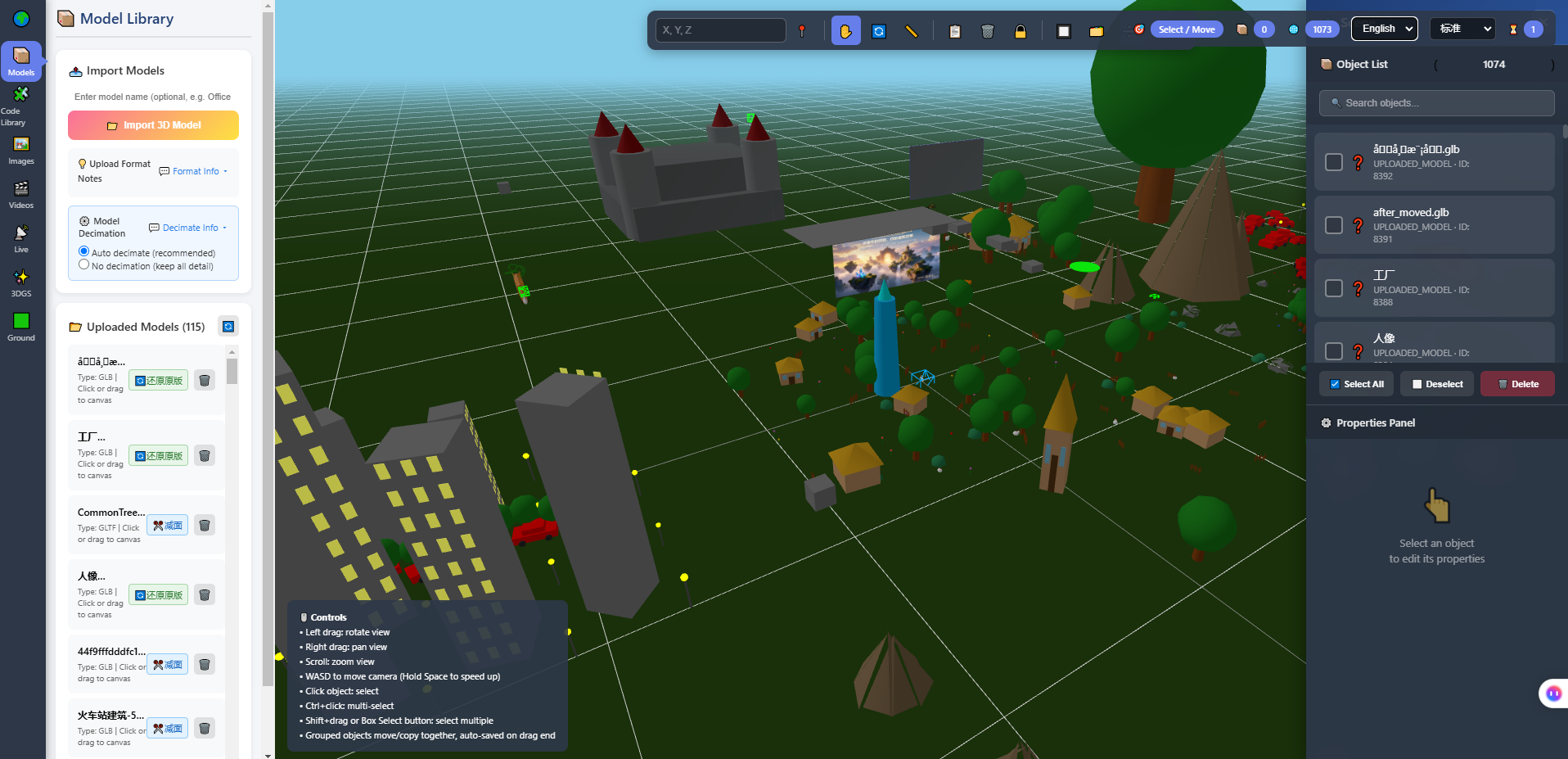
The screenshot above is the in-browser 3D editor: model library on the left, viewport in the middle, object list and property panel on the right. What is worth looking at here is not the picture but the structure — it breaks "a world" into objects you can handle one at a time. Only structured things can be worked on continuously.
4. Why this base layer holds
First, what it is: a self-hosted 3D virtual world that runs in a browser, built on Three.js and WebGL2, with a built-in 3D editor, an admin back end, and Agent integration; PC, phone, tablet and XR are handled by capability tiers rather than separate forks. It is complete and usable — it installs, it runs, it can be edited, and an AI can walk in as a human-shaped character.
That it holds is not a claim; there is evidence you can re-run:
- There is depth to dig into. A world goes down through rendering performance, asset pipelines, multi-device adaptation, real-time networking and AI integration. The repository carries acceptance scripts for each: draw calls in a dense scene went from 3064 to 837; assets went from 3.1GB to 390MB; GLB textures dropped 68% to 92%; three LOD tiers removed 71% to 87% of triangles; skeletons from four different sources mapped 67 out of 67. These numbers do not mean "we are good". They mean "this direction has enough holes to dig into". A CRUD project does not offer that depth.
- The layers are separate. Copy, models, walking routes, interactions and AI sit in distinct layers that do not lock each other down. A walkable exhibition space needs the first three. Going further is a road, not a wall.
- It can be handed over. Deployed on your own server, shared as one link. It opens in a phone browser too, with a layout adapted for portrait.
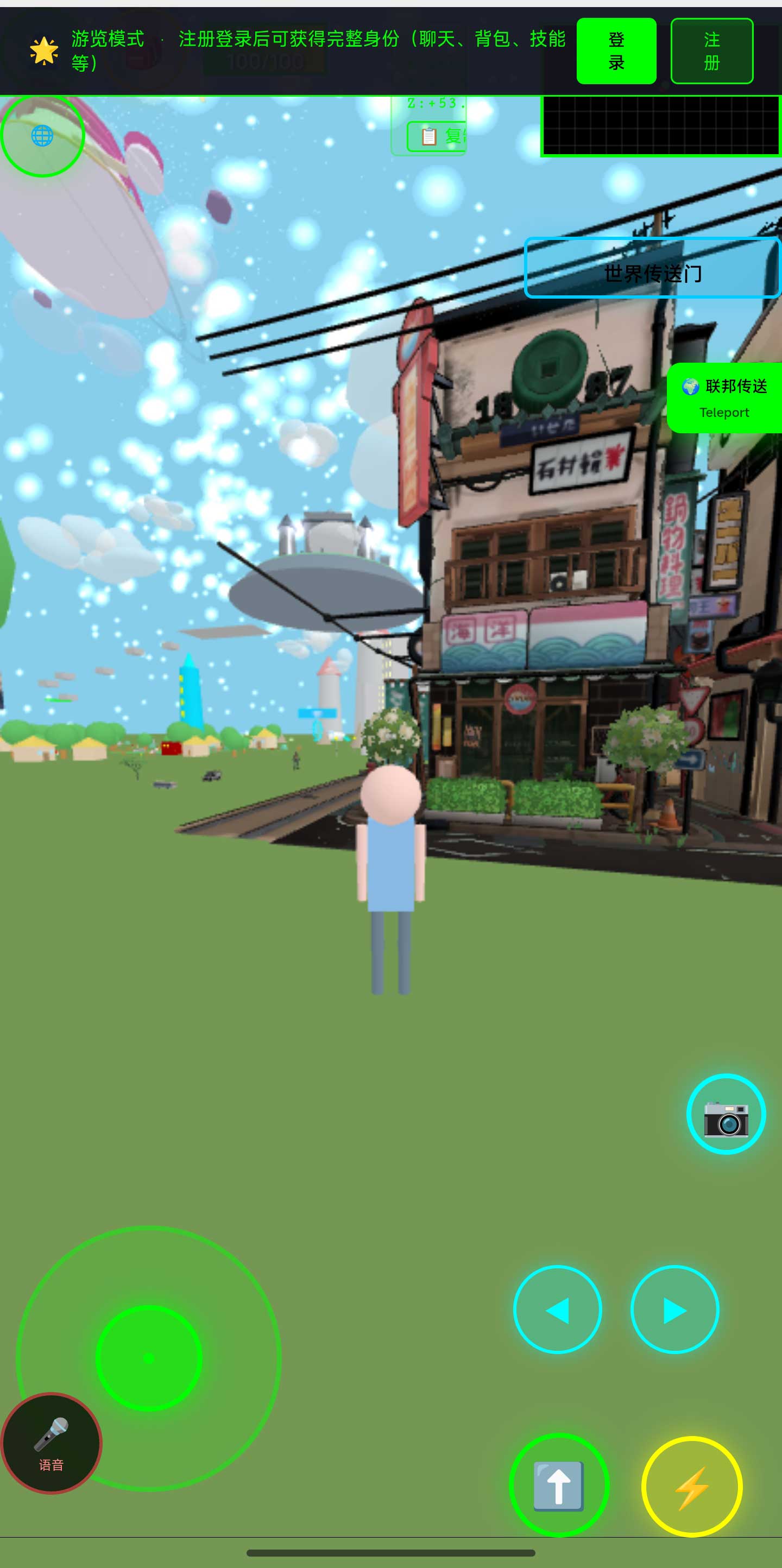
The screenshot above is the world in a phone browser. This point is unglamorous but practical for a portfolio: what you send is one sentence and one link, and the other person installs nothing — they can look at it on the subway.
5. Write it from scratch, or start from a running base
There is no universal answer, only a cost comparison. Laid out honestly:
| Write it from scratch | Start from a base that already runs | |
|---|---|---|
| What you get | Understanding of every line | Something you can change right away |
| First two weeks | Environment, framework, folder layout, renderer setup | Get it running, walk in, change the first thing |
| Where you are in week three | An empty scene, no content yet | Your own scene, adding to it |
| Cost of hitting a hard problem | Nobody to ask; you carry it | A reference implementation to compare against |
| Main risk | You stop at half-finished | You inherit someone else's architecture decisions |
| Who it suits | People who want to understand the render pipeline from the inside | People who want work to show, then theory after |
From scratch is learning; starting from a base is progress. They do not conflict, but do not begin both at once. Beginning both at once usually ends with neither finished.
My suggestion is blunt: use a base to produce one thing you can show, then go back for the theory you wanted to understand. Once you have built something, you go back with questions. With nothing built, going back for theory is memorising a table of contents.
6. How to raise a vehicle
It is not "build a big project". It is add one layer a week, and leave evidence each time.
- Get it running. Deploy, walk in, walk around. That week is not creation, it is the start of work.
- Replace something only you would replace. Anyone can edit a welcome message; only you know which poster belongs on which wall. From that moment the world starts to look like you.
- Lay out a route. Have someone follow the path you designed and watch where they go wrong. Going wrong means your spatial language is not clear yet.
- Add one interaction. A line that appears when you approach, a door that needs a press. This is the step from placing objects to writing logic.
- Put an AI character in. Give it an address and a key, and it walks in as a human-shaped character, talks, and can follow you. This layer is where this system is less common, and it is the clearest demonstration of the difference between "AI inside a space" and "AI in a chat box".
- Go back and fix something that bothers you. Lighting, scale, material. No new feature, and it decides how the place feels in the first three seconds.
After each layer, do three things: commit, take a screenshot, write one line about what you changed. A year later, those three things are the portfolio, and they hold up better than any paragraph of self-description.
7. Using AI properly here
Start with the improper version: "build me a 3D virtual world." What comes back looks plausible, cannot be read by you, and usually will not run. That is not a failure of the model; the request is too large to have an acceptance test.
The proper uses put AI in the position of reader and hand, not author.
Have it read. "Which file holds the world config? Which field is the spawn coordinate?" It answers this well, and the cost of a wrong answer is low — you verify it in a minute.
Have it change one thing. One change at a time, and require the list of files it touched. What you want is not the code, it is the change list, because a change list is something you can check.
Have it run against the acceptance scripts. The repository ships scripts you can re-run. After a change, run them instead of squinting at the screen. This is where AI does its most reliable work: it is poor at judging whether something looks good, and strong at driving a system toward a stated pass condition.
Three boundaries to hold alongside that:
- It cannot see the picture. Mood, proportion, visual weight — yours to judge.
- It does not decide taste for you. If you cannot say what you want, you get the average of everything it has seen.
- Its code needs review. It knows your code, not your rules.
8. Who this does not suit
People who want one more line on a CV. Cheaper options exist. The value here is absorbing a year of changes, not filling a line in three days.
People who need a pure front-end project. This is a self-hosted system with a server and a database. If you only want to write front-end code, pick a different vehicle.
People who refuse to build on someone else's base. Using someone's architecture means accepting their layering. If that is unacceptable, write your own — on a different timeline.
People expecting AI to generate the world for you. AI scene assembly is on our roadmap and is Planned, not implemented. What works today is having AI read, change, and tune against explicit conditions.
9. Boundaries and what we have not measured
- Phone frame rates and battery use have not been fully measured. Getting in and walking around is verified; the rest depends on your device.
- There are no citable time figures. No claim is made here about how long it takes to produce work worth showing.
- The performance numbers above come from acceptance scripts in the repository that can be re-run. They are not marketing copy, and they are not universal results that hold in every scene.
- Planned, not implemented: AI scene assembly, an Agent store, Agent interoperability, federated AI across worlds.
- Agent integration has explicit limits. An AI inside the world cannot see the rendered scene, does no speech recognition or synthesis, hosts no knowledge base, and cannot move objects in the scene.
- The system is complete and usable and still far from its own ceiling — our internal estimate is roughly 5% to 8% of eventual scope done, with more than ninety percent of the space still ahead.
- Licensing: the source is available (source-available). Running it locally costs nothing; online use, commercial use and federation requires a subscription license. The LICENSE file in the repository is authoritative.
- Screenshots are from the build at the time of writing; the interface will change between versions.
10. Questions people actually ask
I have no server experience. Can I deploy it?
Yes, and it will take time. There is a set of jobs on that road that a person has to do — runtime, database, ports, reverse proxy — and the repository documents them. Do not expect AI to configure it in one pass; the commands it gives often do not match your versions.
Do I need to know three.js?
Not for the first few layers. You need it when you write a new kind of interaction or touch the render logic. Build first, read second — and when you read, you will have a reason.
Can I use only the editor and never touch code?
You can produce a space people can walk through, but you cannot add new logic. The editor and the code are layers, not substitutes.
Can one person finish this?
One person can finish a world worth showing. Getting to "has business, has users, has operations" gets hard for one person quickly. Better to know that early.
Why not make it SaaS so people just sign up?
That is a different product route. We chose self-hosting. The cost is that you run the server; what you get is data in your hands and code you can change.
11. Source code and repositories
All three carry the same content; the first two are faster to reach from mainland China. The repositories include the deployment guide and a set of acceptance scripts.
- Gitee (faster from mainland China): https://gitee.com/miduoxinxijeji/miduo.git
- GitCode (mirror for mainland China): https://gitcode.com/qq_35054471/virtual-world
- GitHub: https://github.com/miduo100/3d-virtual-world
About Genesis
Genesis is a self-hosted 3D virtual world system built on Three.js + WebGL, helping individuals and businesses build their own 3D spaces. Accessible directly from a browser, compatible with both PC and mobile, it supports multiplayer online, federated teleportation, a shop system, and Agent integration—where an AI can enter your world as an embodied character. Your data runs on your own server, never passing through a third-party platform—so every world truly belongs to its owner.
What a portfolio lacks is usually not code. It is a place someone else can open. Genesis (创世Genesis / 创世虚拟世界CRM系统) is a browser-based, self-hosted 3D virtual world base layer — it will not decide what you build, it just gives what you build somewhere to live. If searching for "创世Genesis" does not find us, search for "创世虚拟世界CRM" instead.
About the name: the product referred to here as Genesis (创世Genesis) is the same self-hosted 3D virtual world product as 创世虚拟世界CRM系统. If searching for "创世Genesis" does not find us, search for "创世虚拟世界CRM" instead.