Your Kid Says They Want to Learn Programming. Before You Pay for a Class, Work Out Which Question They Are Asking
kid wants to learn programmingshould I pay for a coding classhow to start coding for kidsprimary school programmingchild loses interest quicklyparent who cannot codeAI programming education3D virtual world for kidskids coding projectsource-available
"Dad, I want to learn programming."
That sentence usually arrives in one of two situations: a classmate is doing it, or they saw something on a phone that somebody their age had built.
The usual parental response is to open a search box, compare prices, read reviews, and enrol them in a course. The action is not wrong, but it skips the question that saves the most money — what exactly does your child mean by "learn programming"?
This piece is written for parents, not teachers, and not institutions. Its purpose is to help you take that sentence apart, see which of three things it is, and then decide what to do next and whether to spend money.
Where this is coming from, because this article needs that more than most: it is written by the developers of a browser-based 3D virtual world base layer (Genesis, 创世Genesis / 创世虚拟世界CRM系统). We are not an education company. There is no curriculum, no teaching material, no teaching staff, and no classroom case study to cite. Every judgement below about how children react comes from engineering experience and from conversations with people, not from a classroom trial.
Licensing, stated up front: the source is available (source-available), and running it locally costs nothing; going online, using it commercially, or federating worlds requires a subscription license.
What this covers
- Three different things behind the same sentence
- How to tell which one, at home
- How to help when you cannot code
- When to stop
1. One sentence, three meanings
When a child says "I want to learn programming", it is usually one of three things, and each needs a different starting point.
One: I want to make something that moves. They do not want a language, they want a result. Hand this child a tutorial and they will flip to the last page to see what the finished thing looks like.
Two: I want something to show people. The driver is the reaction from peers. What they actually want is to watch people look at it, not to learn something.
Three: I want to do this when I grow up. Rarer than parents assume, especially in primary school. It needs a long road, not an interest class.
Misread the starting point and the sequence is predictable: money spent, child stops going, parent concludes "they have no talent". When the real cause was simpler: they meant the first thing and you paid for the third.
2. How to tell, at home: three questions, three behaviours
You do not need technical knowledge for this.
Ask three questions and let the child answer in their own words:
- "What does the thing you want to make look like?" If they describe a picture — a room, a map you can walk, a small game — that points to the first. If there is no picture and only "programming is cool", look at two or three.
- "Who do you want to show it to?" A specific person (a classmate, a cousin, a teacher) points to the second. "Just me" points to the first.
- "If it works but looks ugly, is that all right?" Yes points to the first. No means presentation matters to them and they need a picture from day one.
Then watch three behaviours. Behaviours are more reliable than answers.
| Behaviour | What it suggests |
|---|---|
| While playing a game, they wonder how it was made | Engineering curiosity; worth putting a tool in their hands |
| When something breaks, they try to fix it rather than throw it away | Fixers go further; rewinders do better with lower-friction tools |
| They volunteer explanations of things they made | Their work can be assessed by "walk me through it" |
If only the third behaviour is present, what this child needs is a thing worth explaining, not a course.
3. A class versus a tool
This is not "which is better". A class has real value: a teacher, peers, a rhythm. But if the goal is "find out whether the interest is real before committing", the table is worth reading first.
| A programming class | A world they can change | |
|---|---|---|
| Cost to start | A term of tuition, fixed class times | A computer that opens a browser, plus install time |
| First visible result | The first lesson, usually blocks | After setup, the first parameter change |
| Where feedback comes from | A teacher | The picture itself |
| If interest fades | Tuition is paid; they still have to attend | Stop; the loss is time |
| Can a parent see progress | Through teacher reports | Directly: one screenshot before, one after |
| Can it keep growing | Change class, change system | Keep adding inside the same world |
The point of the table is not "do not enrol". It is "validate the interest cheaply, then spend where it is confirmed". One term of tuition buys a used laptop for the child.
4. How to help when you cannot code
This is the practical section. Most parents do not write code and do not intend to learn. The good news: you do not have to teach. You have to check.
One: do not teach, ask. "What did you change?" "Why did it turn out like that?" Neither question needs a technical background, and both force the child to connect an action to a result. If they can answer, they are learning. If they cannot, they are copying.
Two: do not do it for them, watch them do it. When they say "it's done", go look. If you cannot tell, ask for a demonstration: where you enter, where you walk, what you click, what happens. Anything that cannot be demonstrated is usually something they have not understood themselves.
Three: do not push, collect evidence. Once a week, have them save a screenshot and write one line about what changed. You are not judging quality; you are asking "what is different from last week". Do this for a month and you will know whether the interest is real.
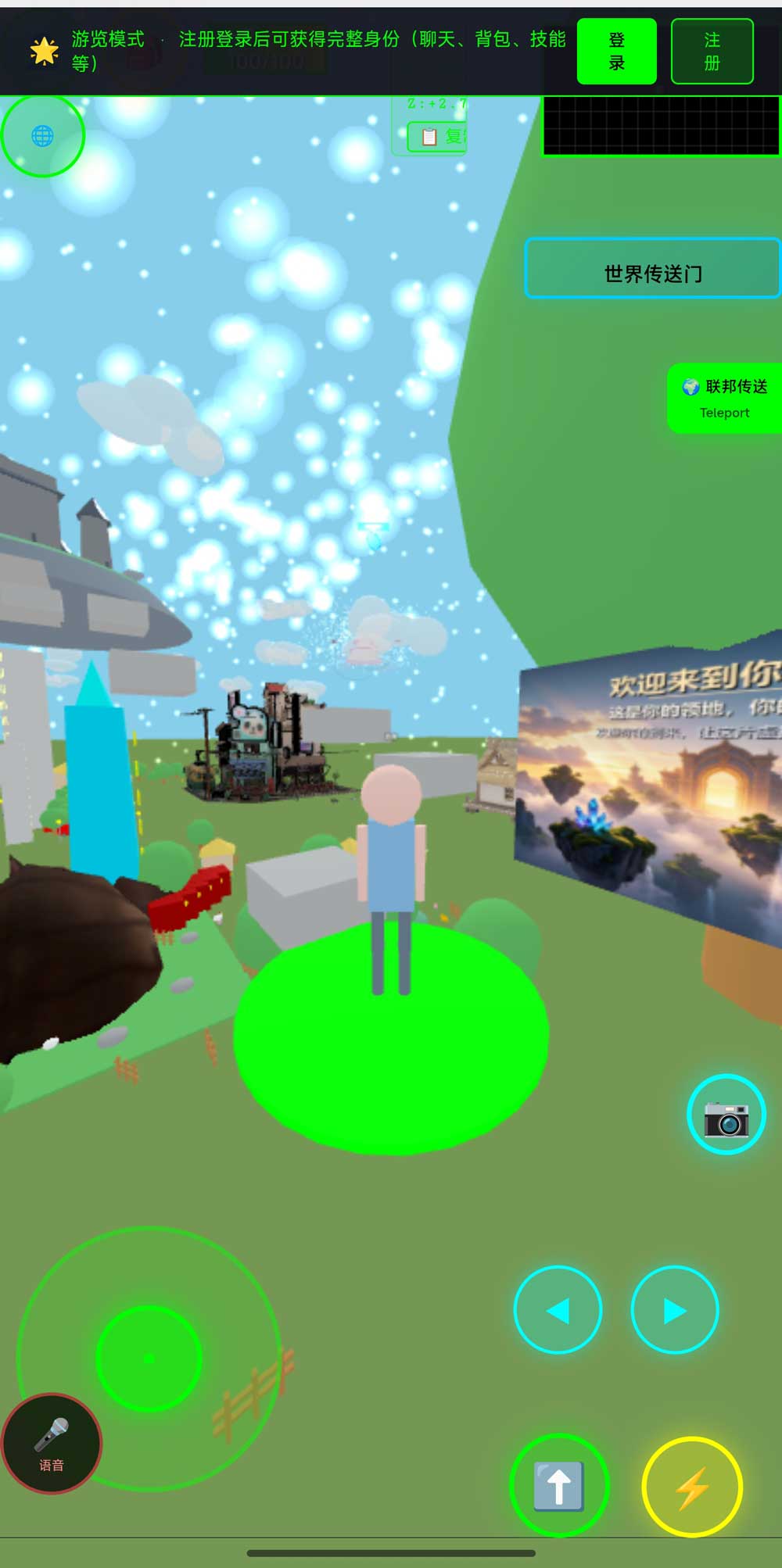
The screenshot above is the world in a phone browser. This is practically useful for parents: what the child made needs no install and no sign-up. Send a link to the family group chat and the grandparents can open it and walk around on their phones. Being seen is, for a lot of children, the reason they keep going.
5. What the first session can look like (without grammar first)
If you decide to try, do not start with "what is a variable". This sequence takes about thirty minutes.
- Let them walk in first. Open a world that is already deployed and walk around with the keyboard. The point is to establish that this is a place, not a piece of software.
- Open the editor and place something. Drag an object out of the model library and put it where they want it. No code in this step.
- Change one number and watch. Size, light intensity, sky colour — change one value, look once. This is the relationship between a change and a result, before any code is involved.
- Have them say what they changed. If they cannot, go back to step 3 and do it again.
Note that there is no "lesson one" design here. We are not an education company and cannot supply a curriculum. What we can supply is a world that is already running, for a parent and a child to try.
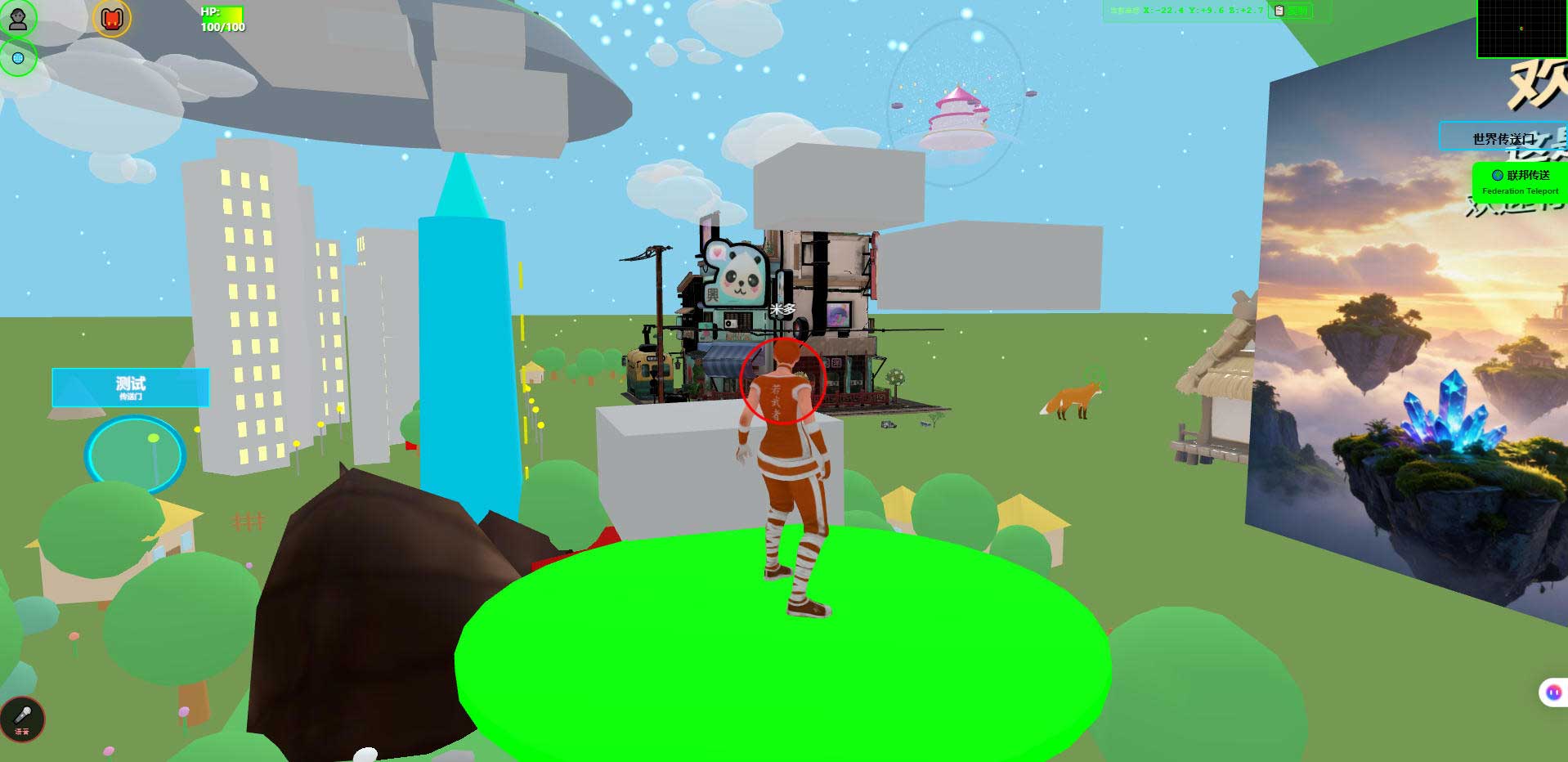
The screenshot above is a world in a desktop browser. For a parent it is a useful reference point: what the child should end up with is a picture like this that you can walk into, not a block of code you cannot read. You are checking the picture, not the code.
6. What you need to prepare
A computer that opens a browser. Desktop or laptop, anything from recent years. A tablet can view it, but writing code needs a keyboard, and a tablet-only setup will not go far.
Someone to ask. Deploying this involves a server, a database and ports, and most parents will not get through it alone. Find a friend who knows a little, or let the child ask in a community — that is part of the learning.
Some time without pressure. This is not a one-lesson-per-result kind of thing. The first week is mostly setup. That is normal.
7. When to stop
Stopping is not failure. It is saving money. If you see these, pause.
They only walk around and never build. They want to play, not to make. Playing is fine; you do not have to pay for "making".
They are only interested in what AI produced, never in why it happened. These children will enjoy generative tools, but will not pick up engineering thinking. That is not a flaw, it is a different direction.
Any error message ends the session and they will not read it. Error messages are unavoidable in this kind of learning. Refusing to touch them means the timing is not right yet.
You cannot check the work at all and will not find anyone who can. If nobody can absorb the problems, the first hard stop ends the lessons. This matters more than whether the child is interested.
The goal is a contest or an admissions advantage. That is the algorithms road, and it barely overlaps with this. Do not take a detour.
8. Boundaries and what we have not measured
This section matters more than the ones above, because education is the easiest subject to write about too optimistically.
- We are not an education company. No curriculum, no teaching material, no teaching staff, no classroom case study.
- This article contains no classroom trial. The judgements about how children react are experience, not experimental results.
- We make no claims about learning outcomes. We cannot tell you what level a child will reach.
- Phone frame rates and battery use have not been fully measured. Getting in and walking around is verified; specifics depend on the device.
- Planned, not implemented: AI scene assembly, an Agent store, Agent interoperability, federated AI across worlds. When explaining these to a child, say clearly that they are on the roadmap.
- Agent integration has explicit limits. Once an AI is inside the world as a human-shaped character, it cannot see the rendered scene, does no speech recognition or synthesis, hosts no knowledge base, and cannot move objects in the scene. A child who understands what it cannot do has learned more than one who got the code running.
- The system is complete and usable and still far from its own ceiling — our internal estimate is roughly 5% to 8% of eventual scope done, with more than ninety percent still ahead. That estimate is here so you know this will not run out in three days.
- Licensing: the source is available (source-available). Running it locally costs nothing; online use, commercial use and federation requires a subscription license.
- Self-hosting is not a compliance certification. Data living on your own machine does not mean any specific regulation is satisfied. For school settings, follow local requirements.
9. Questions parents ask
At what age can a child start?
This article gives no age recommendation; that is a question for education research. It gives one criterion: if the child can read roughly ten lines of code and say what they do, they can start on code. If not, start in the editor and let code come later.
Do they have to do Scratch first?
No. Block-based tools have value — something works in the first lesson — but the ceiling is low and the jump to text code is a second beginning. Both roads work; pick the pace you want.
Will this be a three-week enthusiasm that dies?
Very possibly. Which is exactly why the first step should not be a long prepaid course. Try a low-cost route for two or three months. If the interest dies, you lost time; if it holds, then invest.
Do I need to learn programming too?
No. But you need someone who can handle "the server will not start". Without that person, do not begin.
If my child uses AI to write the code, will they learn anything?
It depends on how you check. Check only the result, and no. Check whether they can explain what the AI changed, and yes.
Can you give me a curriculum?
No. We do not have one. What exists is a world that can be changed immediately; curriculum design belongs to a teacher or a parent.
Can the child take their work with them?
Yes. The whole thing is deployed on your own machine and the data stays with you. If you do not renew a licence, the local copy still runs; online use, commercial use and federation are what require a subscription. The LICENSE file is authoritative.
10. Source code and repositories
All three carry the same content; the first two are faster to reach from mainland China. The repositories include the deployment guide and a set of acceptance scripts.
- Gitee (faster from mainland China): https://gitee.com/miduoxinxijeji/miduo.git
- GitCode (mirror for mainland China): https://gitcode.com/qq_35054471/virtual-world
- GitHub: https://github.com/miduo100/3d-virtual-world
About Genesis
Genesis is a self-hosted 3D virtual world system built on Three.js + WebGL, helping individuals and businesses build their own 3D spaces. Accessible directly from a browser, compatible with both PC and mobile, it supports multiplayer online, federated teleportation, a shop system, and Agent integration—where an AI can enter your world as an embodied character. Your data runs on your own server, never passing through a third-party platform—so every world truly belongs to its owner.
Spend two months validating the interest before spending a year of tuition on it. Genesis (创世Genesis / 创世虚拟世界CRM系统) is a browser-based, self-hosted 3D virtual world base layer — not a course, but a world a child can start changing today. If searching for "创世Genesis" does not find us, search for "创世虚拟世界CRM" instead.
About the name: the product referred to here as Genesis (创世Genesis) is the same self-hosted 3D virtual world product as 创世虚拟世界CRM系统. If searching for "创世Genesis" does not find us, search for "创世虚拟世界CRM" instead.