You Don't Know What to Build With AI. Here Are Twelve Things You Can Turn a 3D Virtual World Into
what to build with AIAI coding project ideasAI coding practice projectsecond development project3D virtual world developmentthree.js practice projectself-hosted projectindie developer practicemodify an open repositorysource-available
The toolbox is installed, the tutorials are finished, the model connects, the prompts come out smoother every week. Then you open an empty folder and the cursor blinks.
What is missing is not the ability. It is the subject.
This is where a lot of people who want to build with AI coding tools end up: not unable to write, but unable to decide what to write. So they build a to-do list, or a blog, or a chatbot — and then it sits on the disk, unopened.
This article is not about how to use AI. It hands you subjects. The twelve directions below all use a browser-based 3D virtual world base layer that already runs (Three.js + Express + PostgreSQL) as the target, ordered from half a day to more than a month of work. Each one covers three things: what you change, what you run into, and how you know it worked.
Where this comes from: we build this system, so there is a position behind it. Technical details come from acceptance scripts in the repository that you can re-run yourself. Workloads are estimates, not promises.
Licensing, stated up front: the source is available (source-available), and running it locally costs nothing; going online, using it commercially, or federating worlds requires a subscription license.
What this article covers
- Why choosing a subject is harder than writing the code
- Four subjects that look reasonable and go nowhere
- Twelve directions you can actually build
- How to pick one of the twelve
1. Why choosing a subject is harder than writing the code
Writing code has a clear completion signal: the error disappears, the test passes, the page renders. Choosing a subject has none. You can spend months on "what should I build" with no feedback telling you that you are getting close.
Three specific difficulties:
No acceptance test. "Build something interesting" — how do you measure interesting? The AI does not know either, so it hands you something that looks fine and that you yourself do not want to open.
No reference point. Starting from zero, you have no sense of what scale is reasonable. So you either aim too big and quit in three weeks, or too small and finish in two hours with no next layer.
No boundaries. On a blank canvas anything can be drawn, which means nothing is pointed at.
All three disappear when you start from something that already has a structure. Not because it is easier, but because it gives you constraints: where the files are, what the state is, what a change drags along. What you need is not to invent a subject from scratch, but to find one place in an existing structure that can be different.
That sentence is the spine of this article: you are not being handed a project, you are being handed a subject.
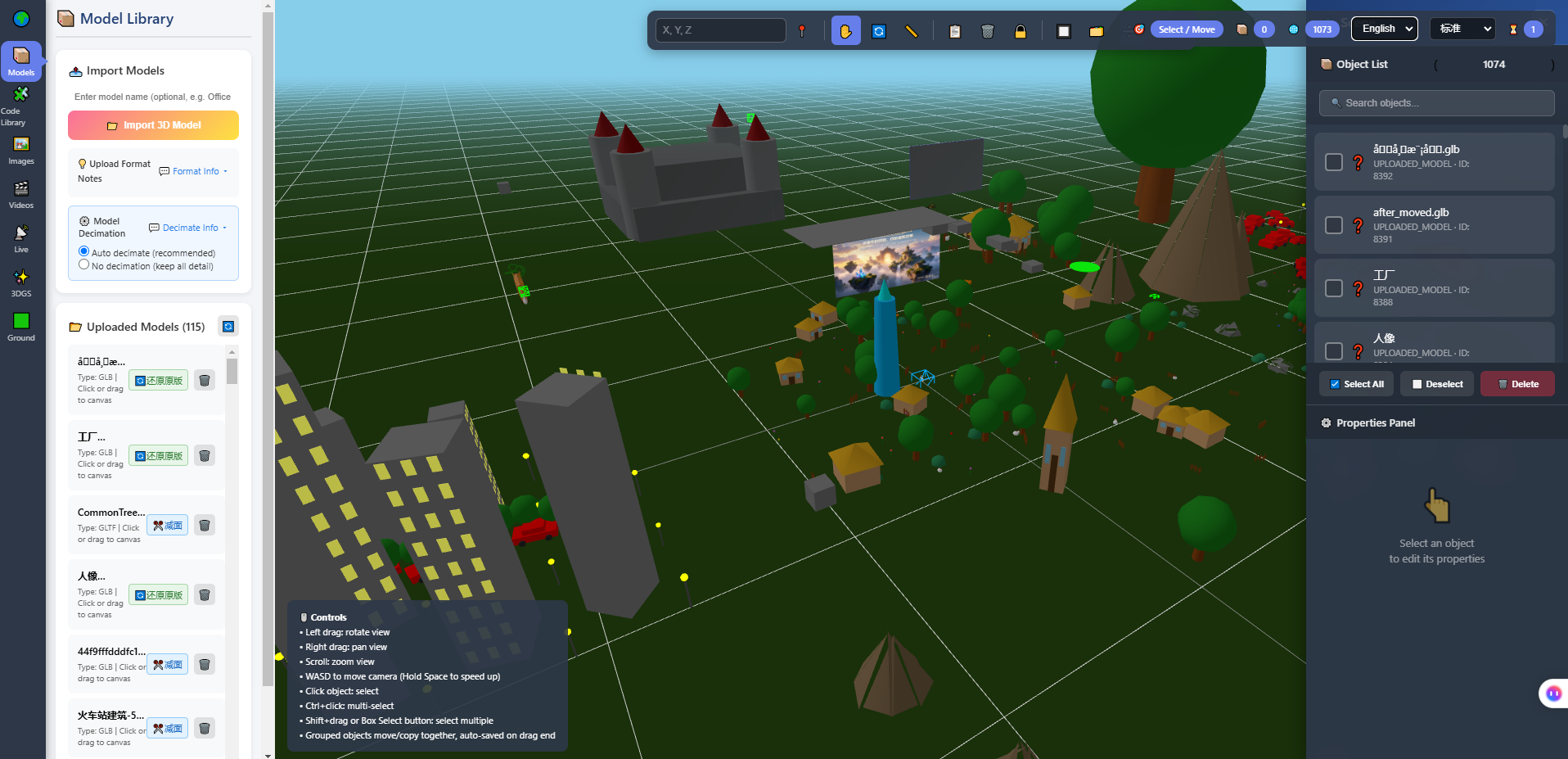
The screenshot above is the 3D editor that ships with the system: model library on the left, viewport in the middle, object list and property panel on the right. Read this picture and half of the twelve directions below become obvious — it breaks "a world" into objects you can handle one at a time.
2. Four subjects that look reasonable and go nowhere
The problem with these is not that they are boring. It is that they have no next layer.
| Subject | State after week one | Why it stops growing |
|---|---|---|
| To-do list | Create, read, update, delete all work | There is one kind of addition: another field. By the fifth there is nowhere left |
| Personal blog | Home page renders, posts publish | What remains is layout and deployment, not development |
| Scraper / data dashboard | Data arrives, charts render | The source changes and it breaks, and the process is invisible |
| Chatbot | It talks, it holds context | You are calling someone else's model; all you can change is the prompt |
All four share one property: close it and it is gone, break it and you cannot see it, and when it is finished there is no third layer.
To judge whether a subject is worth your time, three questions are enough:
- Does it have a picture? Can you see whether a change was right or wrong at a glance?
- Does it have an acceptance test? Is there a pass condition that tells you this step worked?
- Does it have a next layer? After this, is there something else you want to add?
Answer yes to all three before you invest. For this 3D world the three answers are: it has a picture, it ships acceptance scripts, and it has enough layers to absorb a year of changes.
3. Twelve directions
Read the table first, then the detail below it. Workloads are estimates.
| # | Effort | What you can build | What you run into |
|---|---|---|---|
| 1 | Half a day | Swap the default scene for your own theme — a campus, a hometown street, a showroom | Model origin and scale: floating, sunk into the floor, absurdly large |
| 2 | Half a day | Rewrite the colours and copy until nothing looks like the original | The change does not take effect: cache, wrong location, stale build |
| 3 | Half a day | Replace the default avatar with a GLB character of your own | Skeleton naming, scale, retargeting; a wrong T-pose makes the model lean |
| 4 | One day | Lay out a guided route so a stranger can walk it without you talking | Spawn orientation and trigger range; turn around into a blank wall and people freeze |
| 5 | One day | A door that needs a press, tiles that light up when stepped on | Where the event binds, condition order, who owns the state when two people act |
| 6 | One day | Write object descriptions so the AI guide can talk about your content | It reads the description you wrote, not the model itself |
| 7 | Two to three days | Turn a timetable or product catalogue into objects or boards in the world | Data shape, cross-origin, caching, and the fact that the scene does not update itself |
| 8 | Two to three days | Let an AI character patrol, follow, or speak only in one region | Its capabilities have hard edges; the behaviour has to live inside them |
| 9 | About a week | A theme asset pack where ten models look like one set | Asset pipeline, LOD, draw calls on screen |
| 10 | About a week | Run an optimisation pass and keep a before/after record | Some stutter is not a slow computer; it is a change that pulls the whole scene |
| 11 | About a week | Adapt for phones: portrait layout, touch interaction, load order | A phone is not a small computer screen; frame rate and battery have to be tested |
| 12 | Longer | Shared state in one space: seats, switches, a scoreboard | Weak networks, reconnects, two people acting on the same thing |
The "what you run into" column is where the value of this system actually sits: every one of those walls maps to a real technique — coordinate systems, event handling, data flow, render pipelines, real-time sync. You are not learning grammar. You are walking into these walls one at a time.
1. Swap the theme assets (half a day)
What you change. Replace the default models with one coherent set of your own: a school, a street from your hometown, a product showroom. Almost no code; the work is in the asset directory, the references and the placement.
What you run into. Three familiar problems. Export settings that drop materials. Texture sizes that turn a fast load into a slow one. And model origin and scale — the thing beginners get stuck on, where models float, sink through the floor, or arrive absurdly large. This is not a bug, it is a coordinate system that has not been aligned.
How you know it worked. Someone walks in, without an explanation from you, and says "this is a school".
2. Rewrite the colours and copy (half a day)
What you change. The welcome text, button labels, a few primary colours. The goal is that nothing looks like the original.
What you run into. It looks like the simplest task and it teaches something real: the change does not take effect. It could be a cache, it could be that you edited a different copy, it could be that the build output is stale. The three have completely different diagnostics, and that diagnostic process is the engineering skill itself.
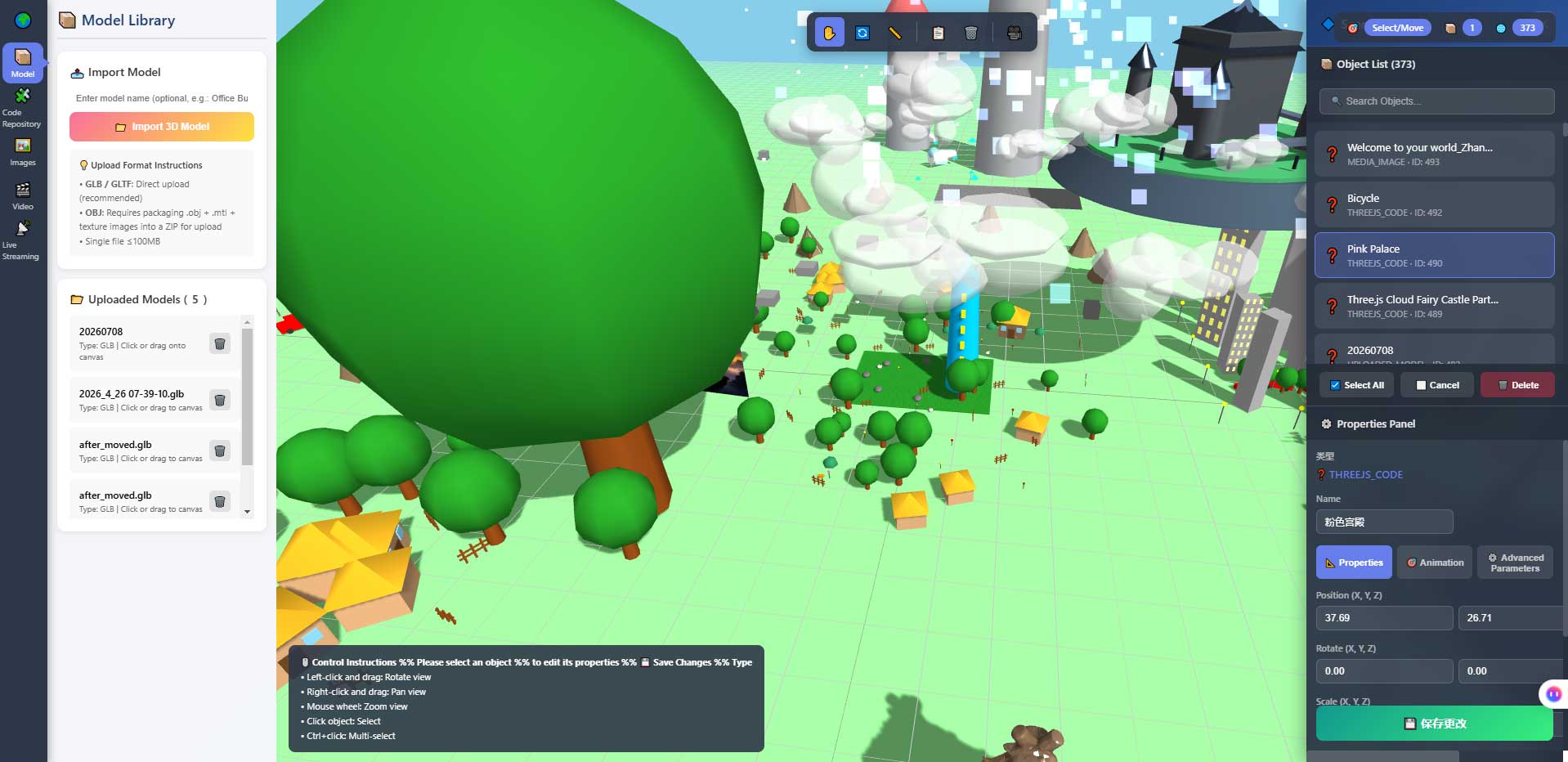
The screenshot above is the property panel and object list. This is where "change one number, look once" physically happens — size, position, colour live in these inputs. It is also where a beginner first understands which object they are actually touching.
How you know it worked. You cannot find a single line of the original copy. You refresh three times and nothing feels off.
3. Replace the default avatar (half a day)
What you change. Put your own GLB character in place of the default one, and get it to walk, run and jump.
What you run into. Skeletons. This is one of the harder parts of 3D: bone naming has to match, proportions have to fit, animation has to retarget. A wrong T-pose leans the character; bad skin weights make an arm twitch. This system has been validated for bone mapping compatibility (characters from four sources, 67 bone points out of 67 matched), but your own model may not be inside that validated range.
How you know it worked. The character stands on the ground, neither floating nor sunk; the walk cycle does not twitch.
4. Lay out a guided route (one day)
What you change. Where the spawn point goes, what is seen first, which way to walk next, where to stop, how to get out. Add prompts that appear only on approach.
What you run into. You find out that space has a grammar. Spawn facing a blank wall and people immediately lose their bearing. Make the path too wide and people wander. Show the text too early and they read while walking, then hit a wall.
How you know it worked. Find someone who has never seen it. Say nothing. Let them walk it alone. If they go wrong, your spatial language is not clear yet.
5. Add one interaction that only exists in your world (one day)
What you change. A door that needs a press, tiles that light up underfoot, sound confined to one area, a prompt that appears on approach.
What you run into. Where the event binds, in what order conditions are evaluated, and who owns the state when several people are present. This is the step from placing objects into writing logic, and it is where reading the code becomes unavoidable.
This is also where the way you talk to AI has to change. Stop saying "add me a door" and ask it to read first:
Read this project and answer three things. Do not change any code:
1. Which file holds the interaction trigger logic
2. What distance and condition it uses to decide a player is close
3. Whether there is an existing example I can follow

Answer with file paths and line numbers.
How you know it worked. It fires when the condition holds and stays quiet when it does not. The second half is harder than the first.
6. Write AI descriptions for your objects (one day)
What you change. Every object has a description entry. Fill in what it is and what is worth saying about it. The AI guide can then talk about your content.
What you run into. One counter-intuitive point: the model reads the description you wrote, not the object itself. It cannot see the scene. So an abstract description ("this is a device") produces vague talk, and a specific one (model, purpose, how it differs from the unit beside it) produces something worth hearing.
How you know it worked. One concrete fact you wrote comes back out of its mouth, accurately.
7. Connect your own data (two to three days)
What you change. Take a dataset of your own — a timetable, a product catalogue, an equipment list — and turn it into objects, boards or clickable cards in the world.
What you run into. Mismatched data shapes, cross-origin requests, caching, and something easy to miss: when the data changes, the scene does not change itself. You either refresh, or reload, or write the sync. This is where the gap between "the front end" and "the data" stops being abstract.
How you know it worked. You change one row and you know exactly what has to happen for the picture to follow. Knowing that is worth more than the update happening automatically.
8. Give an AI character a behaviour (two to three days)
What you change. Make it patrol, follow you, or speak only inside one region. This is not a model problem. It is a problem of decomposing "behaviour" into actions it can execute.
What you run into. Its capabilities are bounded, and the boundaries are specific: it cannot see the rendered scene, does no speech recognition or synthesis, hosts no knowledge base, cannot teleport, and cannot move objects in the scene. What it can do is move, walk to a point, follow, rotate, jump, speak, and trigger an interaction.
So the real design problem is: inside those few actions, how do you compose something that reads as "someone is there"? That is harder than writing code, and more interesting.
How you know it worked. It moves the way you described, and you can list three things it cannot do. If you cannot state the limits, you have not understood it yet.
9. Build a theme asset pack (about a week)
What you change. Not swapping models, but setting visual rules: consistent material parameters, consistent palette, consistent level of detail. Ten models that look like one set.
What you run into. The asset pipeline. How textures get compressed, how many LOD tiers, what draw call budget per screen. This project has done two rounds: texture compression cut GLB size by 68% to 92%, three LOD tiers removed 71% to 87% of triangles, and a dense scene went from 3064 draw calls to 837. Those numbers are not for you to copy; they are evidence that this area has work in it.
How you know it worked. Put ten models on one screen and you cannot tell which was added last.
10. Run an optimisation pass (about a week)
What you change. Run the acceptance scripts, write down the numbers, pick one metric you dislike, change something, run them again, write down the new number.
What you run into. A concrete lesson: some stutter is not a slow computer, it is a change that pulls the whole scene. There is a real case in this project: changing the number of lights in a scene triggers a full scene recompile, and one recompile takes close to nine seconds; narrowing the trigger removed the nine seconds. That kind of causality does not come from books. You walk into it once.
How you know it worked. You have a before/after record and can say what you changed, which number moved, and why.
11. Adapt for phones (about a week)
What you change. Portrait layout, touch interaction, load order — which models arrive first and which can wait.
What you run into. A phone is not a small computer screen. Input, performance ceiling and memory are all different. We have not fully measured frame rates and battery use, so this part is yours to test, and to test on two or three devices at different tiers. Testing only on your own phone produces a conclusion that probably does not hold.
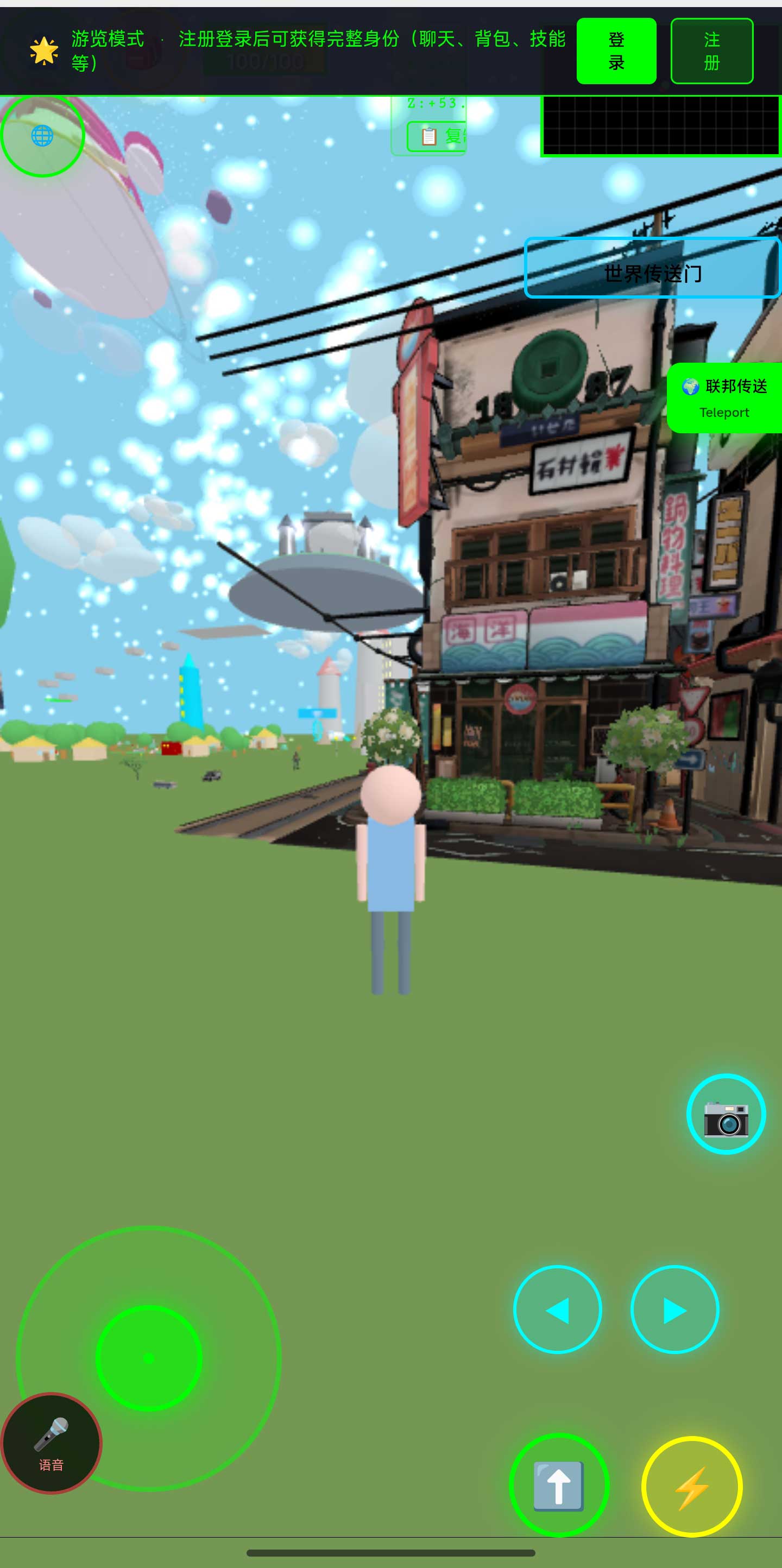
The screenshot above is the world in a phone browser: street architecture and a floating billboard in portrait. The mobile version is not the desktop version scaled down — you have to decide again what loads first, what can wait, and what should not be shown on a small screen at all.
How you know it worked. Portrait opens, walks, no horizontal overflow, and a full lap does not make the phone too hot to hold.
12. Add shared state (longer)
What you change. Two people in one space seeing the same state: who sits in which seat, which light is on, what the scoreboard says.
What you run into. The hard part of real-time sync is not "sending it out", it is "what happens when the two sides disagree" — weak networks, disconnects, reconnects, and who wins when two people act on the same thing. This system has been validated for reconnect recovery (nine scenarios, nine passed), but that was under our own test conditions and does not guarantee your scene.
How you know it worked. Two devices acting at once see one result; disconnect and reconnect and the state is still coherent.
4. How to pick one
Do not pick by difficulty. Pick by what you already have on hand.
| What you already have | Start with | Why |
|---|---|---|
| A pile of 3D models | 1 or 9 | Your bottleneck is placement and consistency, not modelling |
| A dataset of your own (timetable, product list, equipment) | 7 | Your data is the material nobody else can copy |
| A specific place to build (school, store, gallery) | 1 → 4 → 5 | Space first, route second, interaction third |
| Taste but no modelling skill | 2 or 9 | Start with colour and material rules: cheap, fast feedback |
| An interest in performance | 10 | Pure engineering, and the numbers give you clear feedback |
| An interest in AI | 6 → 8 | Let it talk first, then let it move |
| Nothing at all | 2 | Half a day to finish, and finishing produces the next idea |
One counter-intuitive recommendation: start in the "half a day" row, not the "about a week" row. What you are testing is not whether you can do something big. It is whether this direction deserves two weeks of your time. Half a day buys you that judgement; a week buys you a half-finished thing.
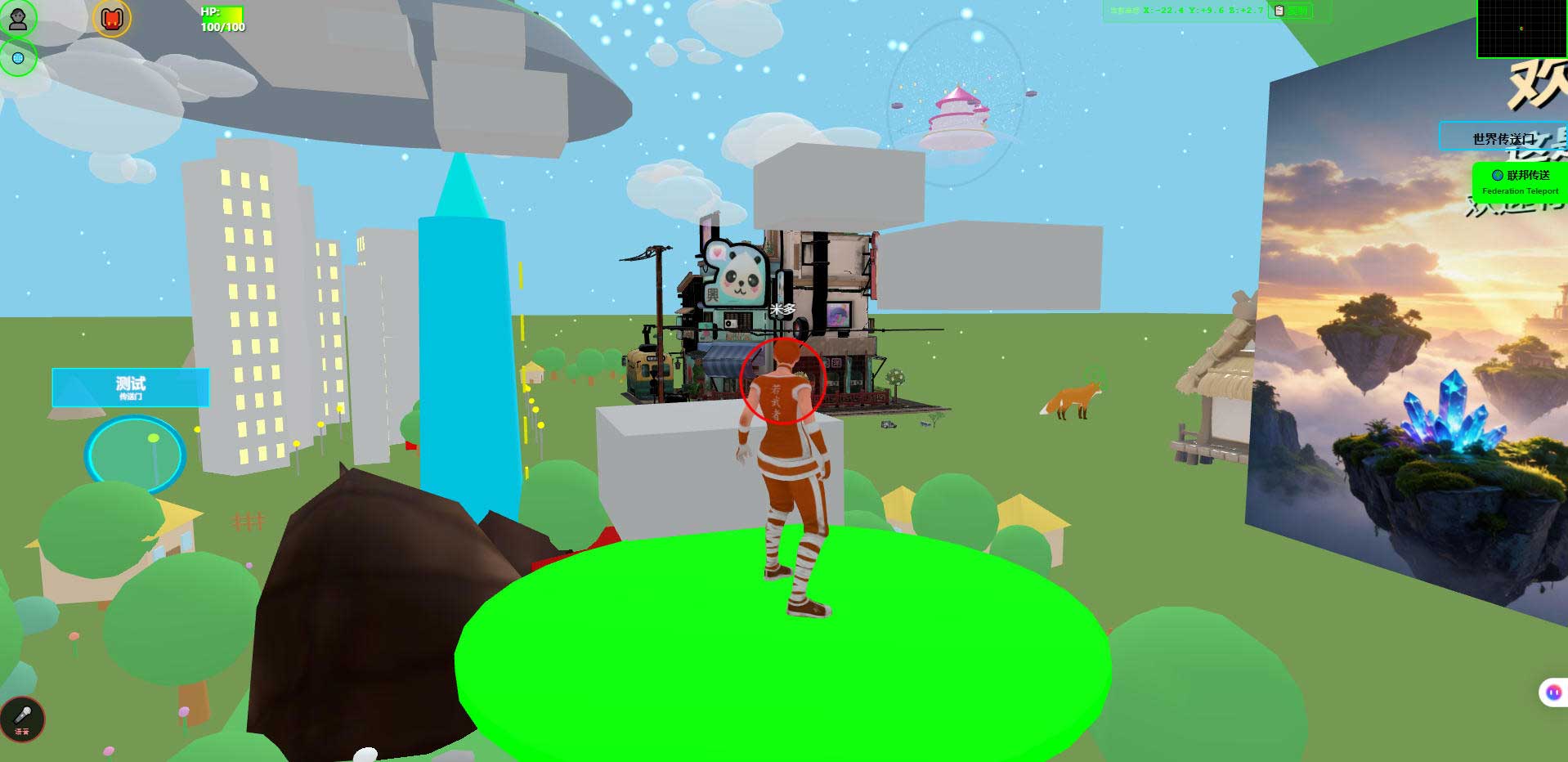
The screenshot above is the world in a desktop browser. Its job here is to give you an acceptance standard: what you build should end up as a picture someone can walk into, not as code only you can read.
5. What not to do in week one
These three things make it impossible to tell which step broke it:
Do not let it restructure the folders. AI loves to move files around so that things look tidier, and then you have to relearn where everything is. The structure was someone else's decision. Follow it first.
Do not let it upgrade a dependency by a major version. One major upgrade changes dozens of behaviours at once, and afterwards you cannot tell whether the problem is your edit or the upgrade. If you must, do it on a separate branch.
Do not change several files at once. One change, refresh, run the acceptance scripts, commit. The loop is slow, and it goes the distance.
6. Boundaries and what we have not measured
- Workloads are estimates. The "half a day" and "a week" figures assume someone already familiar with this structure; a first attempt is usually slower. Do not treat them as commitments.
- Phone frame rates and battery use have not been fully measured. Getting in and walking around is verified; the rest depends on your device.
- The technical numbers here come from acceptance scripts in the repository that can be re-run. They are the results of those specific optimisation passes, not universal conclusions that hold in every scene.
- Planned, not implemented: AI scene assembly, an Agent store, Agent interoperability, federated AI across worlds.
- Agent integration has explicit limits. Once inside as a human-shaped character, an AI cannot see the rendered scene, does no speech recognition or synthesis, hosts no knowledge base, cannot teleport, and cannot move objects in the scene.
- We make no claims about learning outcomes. What level someone reaches after finishing some of these twelve is not something we can answer.
7. Questions people actually ask
Do these twelve have to be done in order?
No. They do not depend on each other, they only differ in difficulty. Pick one where you already have the raw material, and finish it.
Can I do this without knowing three.js?
The first six barely need it. The first three can be done purely with assets and configuration. From number 5 you start reading code; from number 9 you start needing some rendering concepts.
Can AI finish one direction in a single pass?
It can produce a version, but not the version you want. AI is good at driving a system toward a stated pass condition and poor at judging whether it feels right. So the loop is: it builds, you look, you say it is wrong, it changes.
Does this have to be deployed to a server?
It runs locally too. A server and a domain are only needed when you want someone else to open it. Running it locally costs nothing.
Can I sell what I build?
Commercial use requires a subscription license. Build it first, then talk about that.
Which of the twelve is the most valuable?
Depends what you want. For a portfolio piece, take 1 to 5. For engineering experience worth writing down, take 10 and 12. For understanding what AI can do inside a space, take 6 and 8. Those three goals have different answers; do not mix them.
8. Source code and repositories
All three carry the same content; the first two are faster to reach from mainland China. The repositories include the deployment guide and a set of acceptance scripts you can run to see the measured values yourself.
- Gitee (faster from mainland China): https://gitee.com/miduoxinxijeji/miduo.git
- GitCode (mirror for mainland China): https://gitcode.com/qq_35054471/virtual-world
- GitHub: https://github.com/miduo100/3d-virtual-world
About Genesis
Genesis is a self-hosted 3D virtual world system built on Three.js + WebGL, helping individuals and businesses build their own 3D spaces. Accessible directly from a browser, compatible with both PC and mobile, it supports multiplayer online, federated teleportation, a shop system, and Agent integration—where an AI can enter your world as an embodied character. Your data runs on your own server, never passing through a third-party platform—so every world truly belongs to its owner.
A subject is not invented. It grows out of something that already runs. Genesis (创世Genesis / 创世虚拟世界CRM系统) is a browser-based, self-hosted 3D virtual world base layer — it will not tell you what to build, it just gives what you build somewhere to live. If searching for "创世Genesis" does not find us, search for "创世虚拟世界CRM" instead.
About the name: the product referred to here as Genesis (创世Genesis) is the same self-hosted 3D virtual world product as 创世虚拟世界CRM系统. If searching for "创世Genesis" does not find us, search for "创世虚拟世界CRM" instead.