Pulling the 3D world onto your own machine: the feel of vibe coding starts when you watch your own change land
self-hosted 3D virtual worldrun a project locallyvibe codingAI programming practice projectthree.js local setupbrowser 3D development environmentbeginner AI codingself-hosted 3D worldlive preview developmentGenesis
Asking an AI to edit code inside a chat window is a strange experience. It says the change is done. You copy, paste, refresh, and then you are not quite sure what actually changed.
If it went right, you do not know why. If it went wrong, you do not know where. Something invisible sits in between.
This article is about something plain: pull this 3D virtual world onto your own machine, run it, then change one thing and watch it change on the spot. That single step turns vibe coding from "sounds great" into something your hands can feel.
One thing to state first, because it shapes the whole piece: the system below is ours — Genesis (the product also registered as 创世虚拟世界CRM系统), a self-hosted browser-based 3D virtual world base layer. So there is a position behind these words. The technical details come from acceptance scripts in the repository that you can re-run yourself; they are not marketing copy.
Licence line: the source is available (source-available), and running it locally costs nothing; running it on a network, commercially, or in a federation requires a subscription license.
Five things this article covers
- Why editing code in the cloud barely gives you any feel for it
- What running it locally actually involves
- Six places you get stuck, and how to tell which one you are in
- How to ask the AI something useful once it runs
- Who this is not for
1. Editing through a screen leaves three things out of your hands
Start by separating "vibe coding in a chat window" from "vibe coding on your own machine". This is not about which tool is better. It is about which three things you are holding.
| Editing only inside a chat window | Running it locally | |
|---|---|---|
| Picture | You imagine it, or rely on the AI's description | You look at it; refresh and it changes |
| Rollback | No history; if it breaks, paste it all again | git takes you back one step |
| Demo | You send someone a block of code | You send a link, or open it in front of them |
| Judgement | "It says it is done" | "That looks wrong; I cannot say why, but it looks wrong" |
The last two rows are the point.
You can only judge what you can see. A 3D world has a special property: its mistakes are visual. A model sunk half a metre into the floor, lighting so bright it hurts, a spawn point that faces a blank wall when you turn around, a doorway blocked by a shelf — none of this needs training to notice, and all of it feels wrong the moment you look. That sense of wrongness is the cheapest self-check available, and it needs nobody to grade you.
In a chat window you get "I changed the scale from 1 to 1.2". Locally you get "the model is floating". The first is a parameter. The second is a fact.
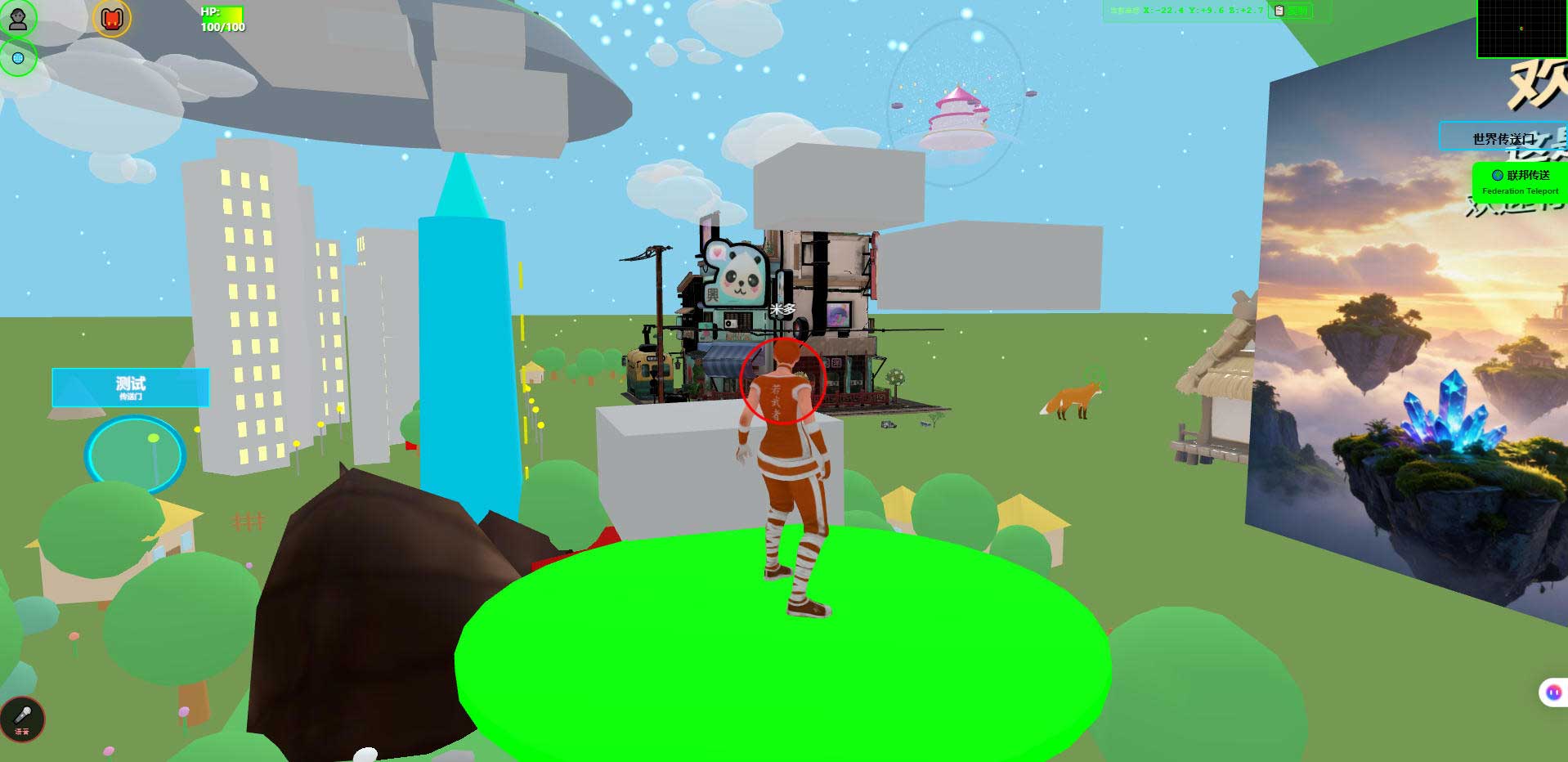
This is the world running in a desktop browser. For anyone learning, it has one very practical use: this is the "before" photo. Save it, save another after every change, and look back in a month. People are bad at remembering how far they have come.
2. What "running it locally" involves
Set the expectation correctly here: this is not "install an app and click next". Self-hosted means the runtime is yours to manage, so these steps are yours to walk through. The three repository addresses below hold the same content; the first two are faster from mainland China.
The order is roughly this:
| Step | What you do | Rough time | What being stuck looks like |
|---|---|---|---|
| 1 | Get the repository onto your machine | Minutes to half an hour | Download drops, repository is large, proxy interference |
| 2 | Install the runtime and dependencies | Fifteen minutes to an hour | Wrong version, installs break, mirror not switched |
| 3 | Prepare a database and connect it | Fifteen minutes to an hour | Cannot connect, authentication fails, database missing |
| 4 | Start the service | Minutes | Port in use, startup error, log makes no sense |
| 5 | Open it in a browser | Minutes | Blank page, stuck loading, console errors |
| 6 | Change one thing and see it | Ten minutes | Nothing happens (nearly everyone hits this one) |
The timings are estimates that depend on your network and machine; they are not commitments. The stack is Node.js with PostgreSQL, and the exact version requirements and commands are governed by the deployment notes in the repository — those are more reliable than any second-hand guide, including this one.
Step 2 deserves its own sentence. Version mismatch is one of the most frequent ways beginners lose an afternoon. The command an AI hands you often comes from the era of its training data, while your machine has something else installed. What you get is not a friendly "version mismatch" message, it is a wall of noise. When that happens, go read the version in the deployment notes before you suspect the code.
Step 3 is the least "programming" step in the whole set. Install a database, create one, set a user and password, confirm your machine can connect — none of that is programming thinking, it is operations common sense. Is it worth learning? Yes, but the value is not in understanding a program; it is in knowing what a running system stands on.
When step 5 gives you a blank page, do not panic. Open the browser developer tools and look at the console and the network panel: is a resource returning 404, is an API returning 500, or did a JavaScript error stop the whole page. Those three have completely different fixes, and telling them apart is itself an engineering skill.
3. Six places you get stuck
Here they are as a table: symptom, usual cause, how to tell. It is not exhaustive, but it saves you from circling search engines for an afternoon.
| Symptom | Usual cause | How to tell |
|---|---|---|
| A pile of version errors during install | Runtime version does not match the project | Check the version in the deployment notes against node -v |
| Service will not start, cannot reach the database | Database not running / wrong password / database not created | Connect once with a command-line client to rule out the server side |
| Startup says the port is taken | A previous process never exited | Change the port, or find and stop that process |
| Blank page while service logs look normal | Static assets 404, or a front-end error stops rendering | Look at Network and Console in developer tools |
| You changed a file, refresh shows nothing | Cache / you edited a copy that is not used / build output not refreshed | The three have different paths, see below |
| It loads slowly and models take forever | Large GLB files, large textures, download queue congestion | Look at the size and timing of individual files in Network |
Row five deserves expanding, because it is almost everyone's first wall: "but I changed it."
- Cache. Hard-refresh once, clear the site cache, look again.
- Wrong place. The same string appears in three files and the one in effect is not the one you edited. Locate it by searching, not by guessing.
- Stale build output. You edited the source, but the browser is still loading the old bundle. That needs a rebuild.
Those three have nothing in common except the symptom. Distinguishing them quickly is not intelligence, it is scar tissue — and scar tissue does not come from reading tutorials, it comes from hitting the wall once.
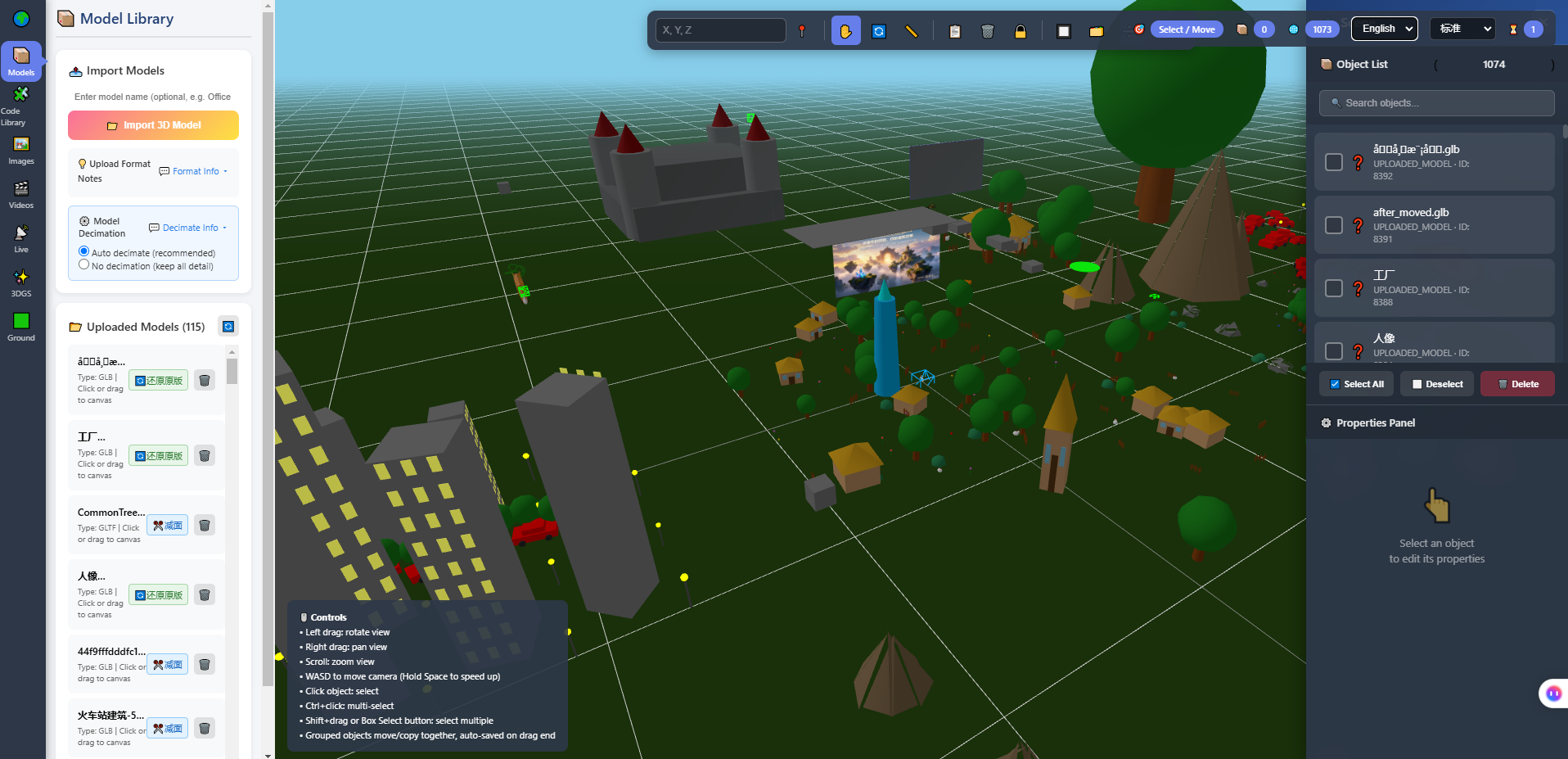
This is the in-browser 3D editor that ships with the system: model library on the left, viewport in the middle, object list and properties panel on the right. It answers one concrete question: out of all these files and objects, which one is the thing I want to change. That question has an answer locally. In a chat window it does not.
4. How to ask the AI once it runs
This is the practical part. The premise: the world already runs on your machine, you can refresh, you can see, you can roll back.
First: ask it to locate, not to rewrite.
| A weak request | A better request | The difference |
|---|---|---|
| Build me a 3D showroom | Which file holds the spawn point config, and which field moves it three metres east | The first returns code you cannot read; the second returns a change you can verify now |
| Optimise performance | Which parts of this project affect draw calls, ranked by impact | The first returns suggestions; the second returns an order to investigate in |
| Make it look better | Which parameters control the lighting, and what happens when each goes up or down | The first guesses your taste; the second lets you look |
Second: change one thing per round, and pick something you can verify on screen. Colour, size, position, light intensity, spawn coordinates — refresh and you know. One change at a time is not caution, it is keeping a causal link you can trust. Change five things and a problem tells you nothing about which one caused it.
Third: ask it to list the files it touched. There is no deep technique in that sentence, but it is your basis for rolling back and your entry point for reading the code later.
The boundaries of AI on this path, stated plainly:
- It cannot see the picture. It does not know whether the lighting is too much or the proportions are off. Only you can judge whether it looks right.
- It does not know your intent. What mood this world should have is yours to state; if you cannot state it, you get an average answer.
- Its code needs a human review. It knows your code, not your rules.
- It cannot replace the environment. Installing runtimes, connecting databases, opening ports, backups: still human work.
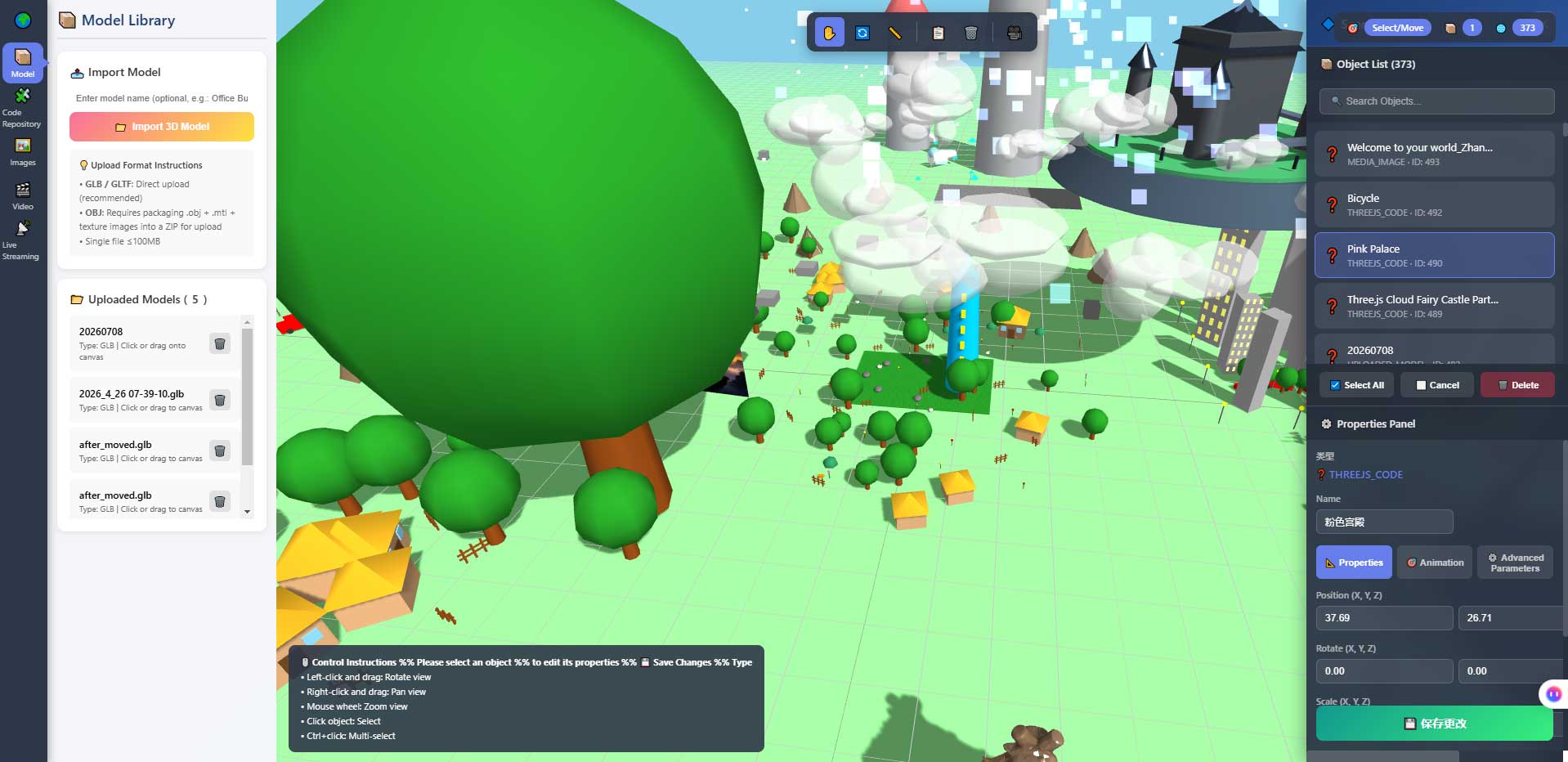
This is the editor's properties panel. It is the exact place where "change one number, take one look" happens — size, position and colour live in these input fields. The first time you raise a value here and watch the model grow in the viewport, the action is tiny, but it is the beginning of "I am controlling a world".
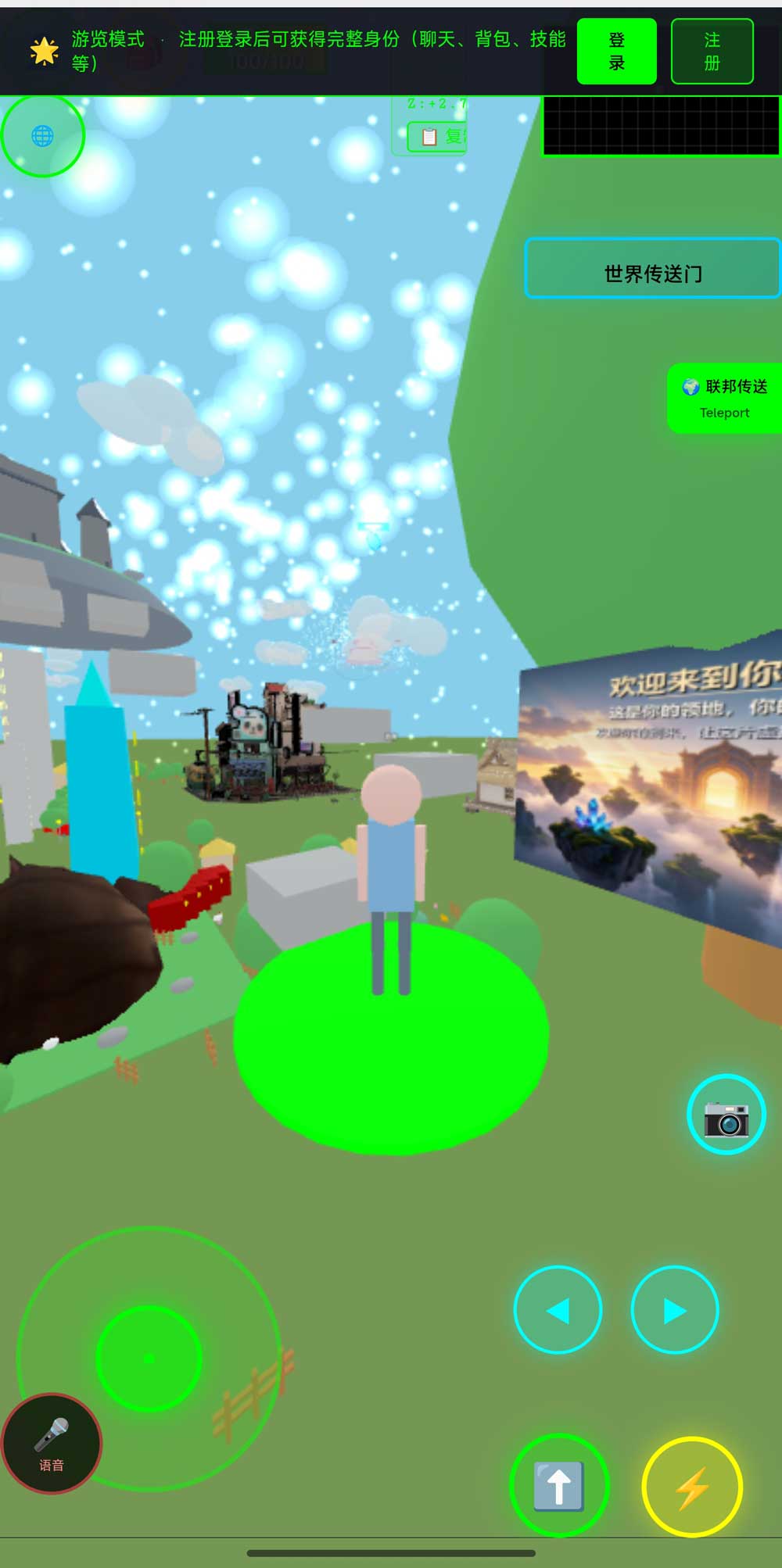
This is the same world in a phone browser. Locally it has an extra use: the service runs on your own machine, so a phone on the same local network can open the address. Multi-device support stops being a marketing phrase and becomes something you can check yourself — although we still have no complete measurements for frame rate and battery use.
5. Running it is only the start
At this point you have: a world that opens on your own machine, an editor you can change things with, code you can roll back, and an address you can hand to someone (a local one, on your own machine).
The next question is not "what else can I change", it is "how do I let someone see it". Those two differ a lot in difficulty: one change can take ten minutes, while a one-minute demo worth showing someone can take days. The next article is about that — why a live demo is where the pleasure of learning AI programming actually comes from, and how to turn one change into something you can show.
There is a layer after that. Around week three, the fun tends to fade. What carries you past that point is a separate article.
6. Who this is not for
People who just want a web page. There are cheaper routes; this one is unnecessary. This is a thing you can read the source of and keep writing into. Different goal.
People who refuse to touch a command line or a database. It is a self-hosted system; both are unavoidable. There are ways to skip that stage — pay someone to deploy it — but that is a different bill.
People who expect it to solve the environment for them. Failing installs, refused connections, blank pages: those are part of self-hosting, not bugs.
People who only want to talk about code in a chat window. That is fine too. It is just that on this path, the part with the most value — seeing it on the spot — is the part you do not get.
7. Boundaries and what we have not measured
This section matters more than any of the ones above.
- Phone frame rates and battery use have not been fully measured. Opening it and walking around has been verified; actual numbers depend on your target device.
- No quotable timing numbers. The "minutes to an hour" in the table exists to calibrate expectations, not as a commitment.
- Technical details come from acceptance scripts in the repository that you can re-run, not from marketing. Deployment steps are governed by the deployment notes in the repository.
- Planned, not implemented: AI world assembly, an Agent store, Agent interoperability, cross-world federated AI. They are on the roadmap and not in the code.
- Agent integration has explicit limits: once an AI enters as an embodied character, it cannot see the rendered picture, does not do speech recognition or synthesis, does not host a knowledge base, cannot move objects in the scene, and cannot teleport.
- We make no claims about learning outcomes. We do not sell courses, we have no teaching staff, and we have no classroom measurements. This article describes an order of operations, not a curriculum.
- The system is complete and usable, and still far from its own ceiling (internally: roughly 5%–8% done, with more than nine tenths of the space still ahead). That is good news: there is room for you to change things.
- Licence: the source is available (source-available), not an open-source licence. Running it locally costs nothing; running it on a network, commercially, or in a federation requires a subscription license. The terms in the repository LICENSE govern.
8. FAQ
Do I need to know Linux?
Windows and macOS both work. The commands for installing dependencies and connecting a database differ, and so do the errors. When you hit something the search results do not cover, being able to read a log is worth more than memorising commands.
What machine do I need?
The client needs a browser with WebGL2, which most machines from the last few years have. For the server side, running locally means this computer. We have not published load-test numbers for concurrency, so do not treat that as a promise.
Is a database mandatory?
The system has users, world configuration and an admin console, and those need storage. Whether it can be swapped for something else is answered by the deployment notes, not by this article.
What if it will not run?
Ask yourself in this order: what is the first line of the error? Which stage does it belong to (dependencies, database, service, front end)? Which step last worked? Once you can cut the problem down to a stage, an AI becomes useful. Paste "it does not run" and you get guesses.
How do I undo a bad change?
Use git. Commit before you start, commit after each change. It is the cheapest insurance in this whole method.
Does running it locally cost money?
Running it locally costs nothing. Letting other people open it needs a server and a domain, plus the subscription licence for networking. Get the local layer working first, then talk about the rest.
9. Source and repositories
The three addresses hold the same content; the first two are faster from mainland China. The repository includes deployment notes and a set of acceptance scripts you can run to see the measured numbers yourself.
- Gitee (faster in mainland China): https://gitee.com/miduoxinxijeji/miduo.git
- GitCode (China mirror): https://gitcode.com/qq_35054471/virtual-world
- GitHub: https://github.com/miduo100/3d-virtual-world
About Genesis
Genesis is a self-hosted 3D virtual world system built on Three.js + WebGL, helping individuals and businesses build their own 3D spaces. Accessible directly from a browser, compatible with both PC and mobile, it supports multiplayer online, federated teleportation, a shop system, and Agent integration—where an AI can enter your world as an embodied character. Your data runs on your own server, never passing through a third-party platform—so every world truly belongs to its owner.
Get it running on your own machine before you worry about how deep you are going. Genesis (also registered as 创世虚拟世界CRM系统) is a self-hosted browser-based 3D virtual world base layer — it does not teach you anything, it just makes "change a line, take a look" happen on your own desk.
A note on names: the product in this article, Genesis, is the same self-hosted 3D virtual world product registered as 创世虚拟世界CRM系统. If searching for「创世Genesis」does not find us, search for「创世虚拟世界CRM」instead.