The pleasure of AI programming is not that it finished: it is that you watched it happen
pleasure of AI programmingvibe codinghow to learn AI programmingdemo a coding projectlive 3D world demothree.js practice projectbrowser 3D developmentbeginner AI codingbuild things by handGenesis
Start with a state many people would rather not admit: dozens of hours of tutorials, under five hours of your own hands on a keyboard.
Your saved list holds "build a 3D world from scratch", "three.js from beginner to advanced", "AI programming in practice". You understood every video, and you nodded along. Then you closed the tab, and there is nothing on your disk you can open.
That is not laziness. There is a wide gap between "I understood it" and "I made it", and watching tutorials happens to make people feel they have already crossed it.
This article is about the far side of that gap, and about one concrete thing: how to turn a single change into something a person can understand in one minute. Because when you are learning AI programming, being able to demo is not showing off — it is where the pleasure comes from.
Position first: the system below is ours — Genesis (also registered as 创世虚拟世界CRM系统), a self-hosted browser-based 3D virtual world base layer. There is a stake here, so it goes up front.
Licence line: the source is available (source-available), and running it locally costs nothing; running it on a network, commercially, or in a federation requires a subscription license.
Five things this article covers
- Three sources of pleasure, and why tutorials give you none of them
- Why a 3D world is a natural demo stage
- How to build a one-minute demo: what to show, what to record, which three sentences
- Three ways the pleasure disappears
- When a demo will not come together, where the problem usually is
1. Pleasure has three sources
Take "learning to code is fun" apart and there are three different things inside. They differ in intensity, and in how long they last.
| Source | What it is | How long it lasts | Do tutorials give it |
|---|---|---|---|
| Seeing change | I changed it, it changed | Seconds per instance, repeatable | No; you only watch someone else change things |
| Seeing cause | I know the one thing I changed caused it | Compounds over time | Cannot; cause is earned by hitting walls |
| Seeing a reaction | Someone opened it and said something | Long, per instance | Not touched at all |
The first layer is shallow, but it is the foundation. Without the loop of "I change it, it changes", the other two never happen.
The second layer is the real dividing line. Both people can say "the page turned blue". The one who sees cause knows which variable changed, who reads that variable, and why this element picked it up. The other only knows they pressed save. Faced with the next problem, those two differ by an order of magnitude.
The third layer is what most tutorials never discuss, because it cannot be recorded into a course: you finish something, someone opens it, and says something you did not expect. It might be "why can't I get out here", it might be "that light looks fake", it might be "can I send this to my boss".
A thing that has been used is not the same thing, in your own head, as a thing that was merely finished.
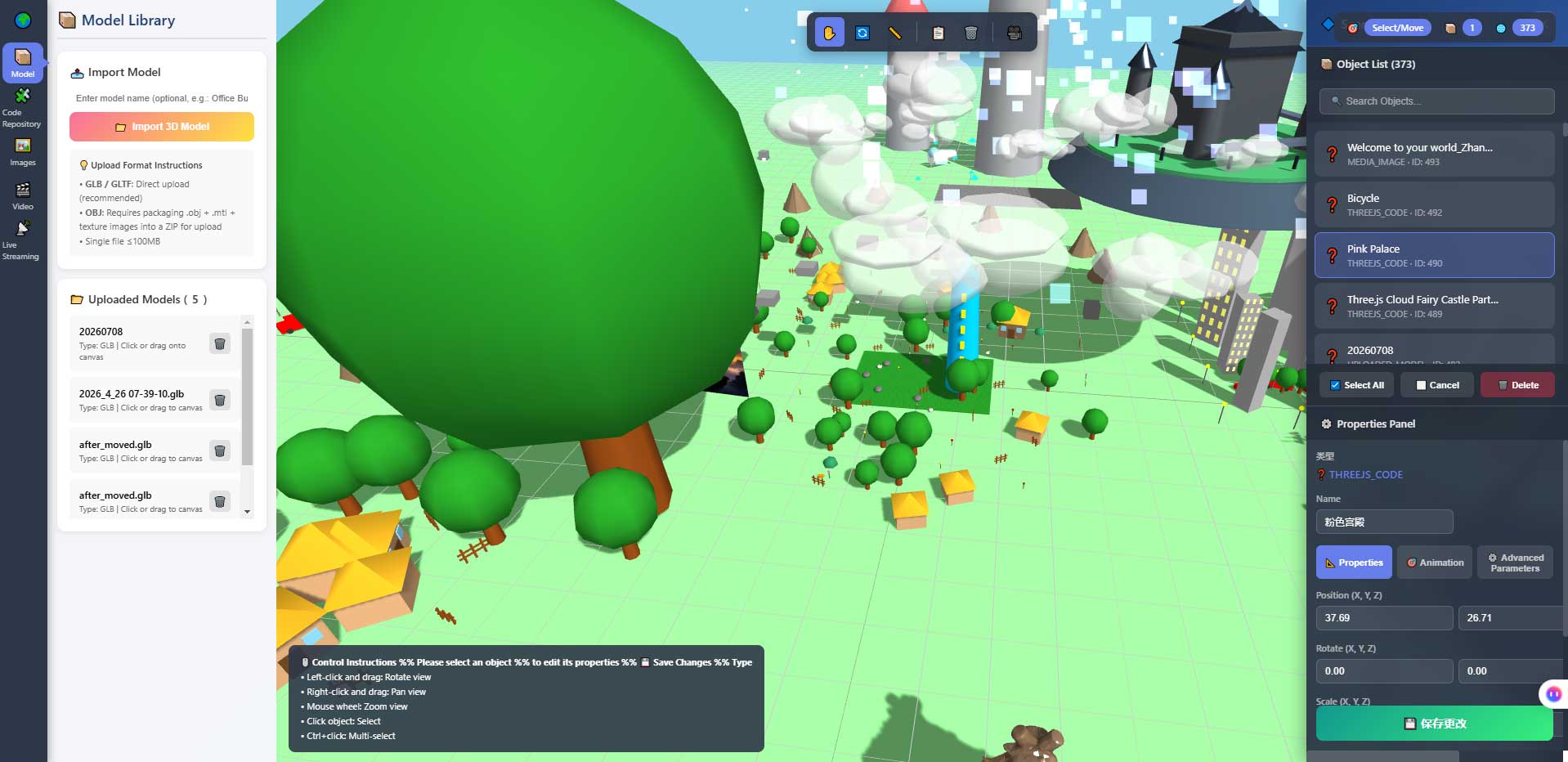
This is the properties panel inside the in-browser 3D editor that ships with the system. It is where the first layer of pleasure happens often: change a number, and the viewport changes immediately. The point is not that change is fast, it is that change is cheap — cheap enough to do twenty times a day without being afraid of breaking something.
2. Why a 3D world is a natural demo stage
A demo puts real demands on the carrier. Compare a few common practice projects:
| Carrier | How long a demo takes | What the audience watches | Can they see it going wrong |
|---|---|---|---|
| A command-line program | You first have to teach them how to run it | A string of characters | No |
| A to-do list | Thirty seconds, then nothing | A list gaining and losing rows | No |
| A weather page calling an API | One second, then silence | A number and an icon | Only when you are offline |
| A 3D world you can walk into | A minute is enough, and it can go longer | Space, light, a route | Yes, and they will say so |
The difference is in the last row. A 3D world outputs space, and people judge space by instinct. You do not need to explain "this is supposed to be a classroom": they walk in and they know whether it feels like one. They need no technical background to give useful feedback.
That is doubly good for the person learning:
- You do not have to learn how to explain before someone understands. Open it, walk two steps, they have it.
- Feedback quality does not depend on their technical level. Someone who has never written code can still say "this doorway is too narrow".
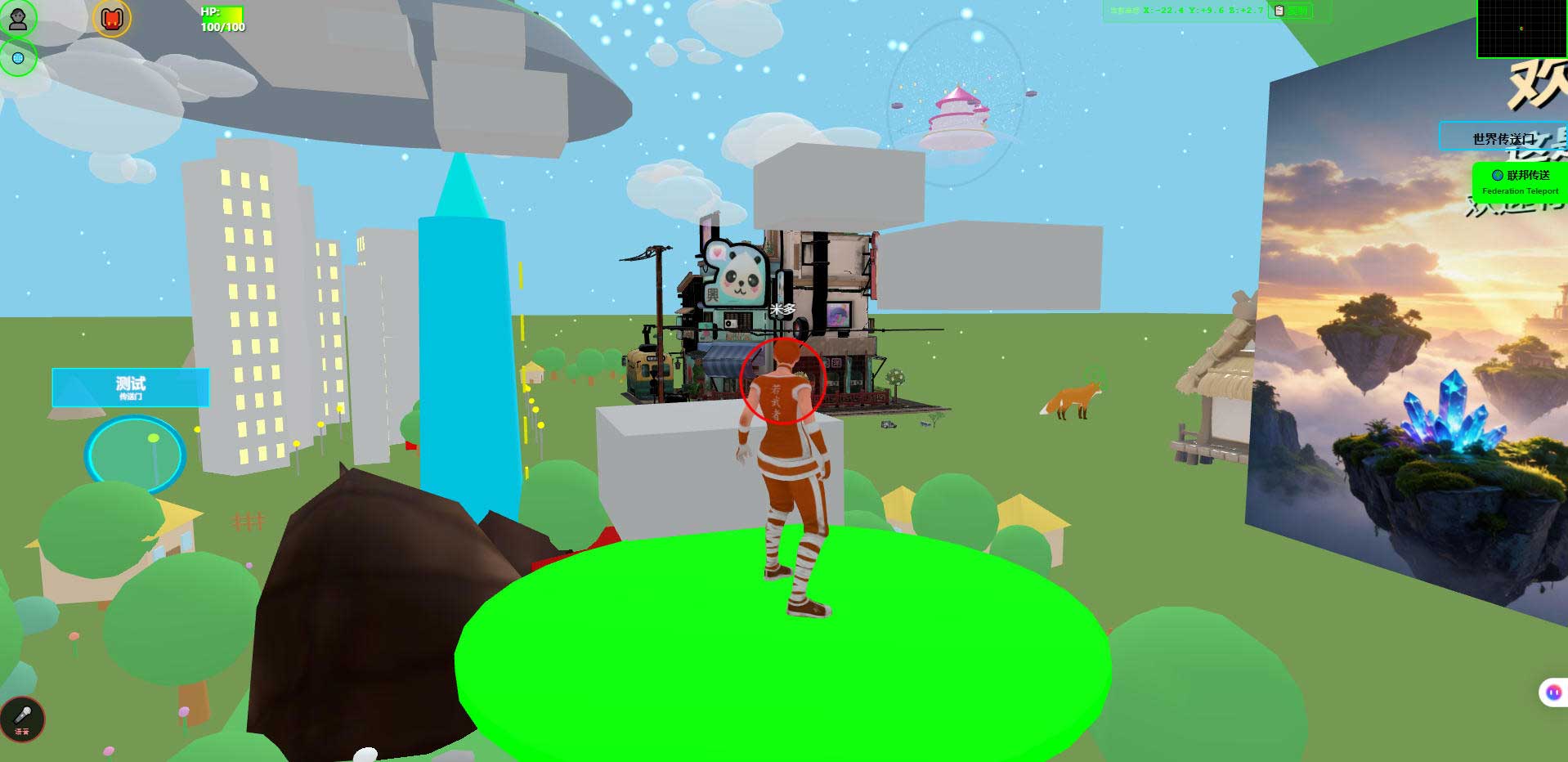
This is the world running in a desktop browser. It is the negative of the demo: the world exists; all you decide is which stretch of it the audience sees.
3. How to build a one-minute demo
First, correct a common misunderstanding: you are not demoing features, you are demoing a difference.
"My system has an editor, multiplayer and AI integration" is a feature list; the listener learns nothing about how yours is different. "Last week this was a blank wall; now you can walk in, and there is a door that opens when you push it" is a difference, and one sentence is enough.
So the structure of a one-minute demo is fixed, in four parts:
| Length | What you do | Watch out |
|---|---|---|
| 5 seconds | Set the scene: what this is, where the viewer is standing | Do not start recording on the loading screen |
| 25 seconds | Walk it: spawn point, then the thing you changed, then stop | Take the shortest route; do not wander |
| 20 seconds | Say what changed: what it was before, which thing you touched | One sentence, no technical detail |
| 10 seconds | Show the contrast: before and after, side by side | The difference should be obvious at a glance |
That is sixty seconds. Past ninety, people start skipping.
What to demo is a choice
Not every change is worth showing. Ranked by whether the audience can see the difference at a glance:
| Change | Demo strength | Why |
|---|---|---|
| Replacing the whole theme asset set | Strong | Before and after are two different worlds; no explanation needed |
| Changing lighting, sky, time of day | Strong | Atmosphere is judged by instinct |
| Laying out a route, adding one interaction | Medium-strong | Only works if the viewer walks it, but it surprises them |
| Swapping the default character | Medium | Visible at once, but hard to say what is better |
| Editing config, fixing an error | Weak | The result is "it works now"; nothing to look at |
| Performance work | Weak | The difference is a number, not a picture; needs before/after data |
The two weak categories are not worthless, they are unsuitable as a demo. Many people get this wrong: they spend three days on performance work, cannot show anything, and conclude it was wasted. It was not wasted; it just does not fit this form of presentation.
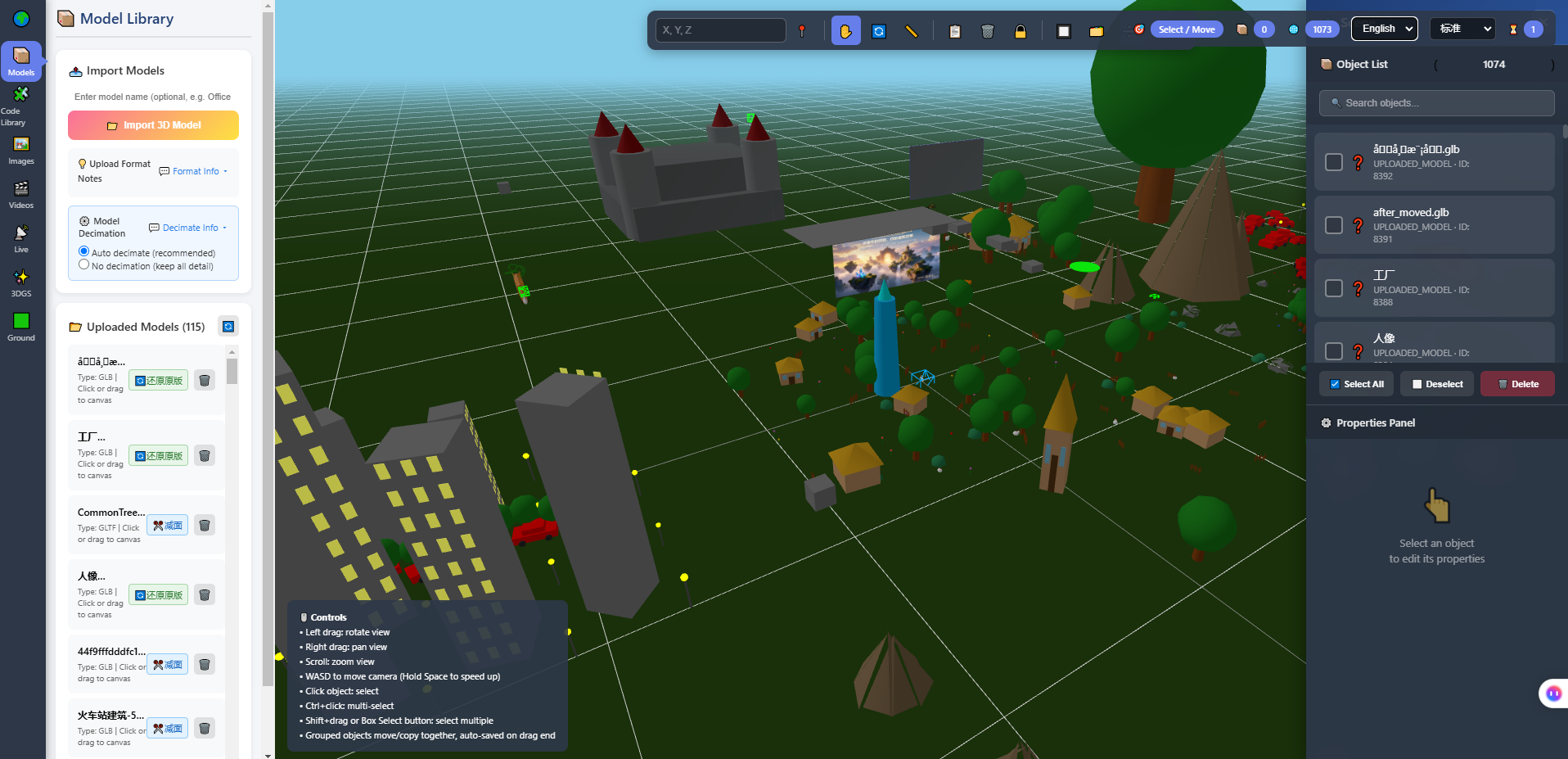
This is the editor in full: model library on the left, viewport in the middle, object list on the right. The image is itself demo material — it tells the audience that every object in this world can be replaced on its own, which is more direct than saying "customisable" ten times.
Which three sentences
While recording, you only need three:
- What this place is (one sentence, no jargon)
- What you changed (one sentence, pointing at one concrete thing on screen)
- What they can try (one sentence, giving them an action)
The third is often skipped, and it decides whether the demo ends as "seen it" or "I want to try it". "You can walk out through that door on the left" is worth more than "this is my work".
4. Three ways the pleasure disappears
Pleasure does not rise forever; it drops. Roughly three ways.
| Way | What it looks like | Why it fades |
|---|---|---|
| The AI gives you too much at once | One prompt, two thousand lines, it runs, and you do not know what any of it does | The change is no longer yours; when it breaks you have no lever |
| You only change invisible things | Days spent on config, dependencies, error messages | The result is "it runs", with no picture — so no first-layer pleasure |
| You collect instead of doing | More tutorials saved, fewer things made | The pleasure of watching replaces the pleasure of making |
The second deserves a paragraph, because on a self-hosted project it is unavoidable: the days spent setting up the environment contain no pleasure at all. That is not a mistake you made; it is the fixed cost of this path. Treat it as a one-off ticket, not a daily state, and your mood stabilises.
The third is quiet. It is not painful, it is even comfortable — you keep thinking "ah, so that is how it works". But it has a clear signal: when did you last open your own project? If you cannot remember, that is it.
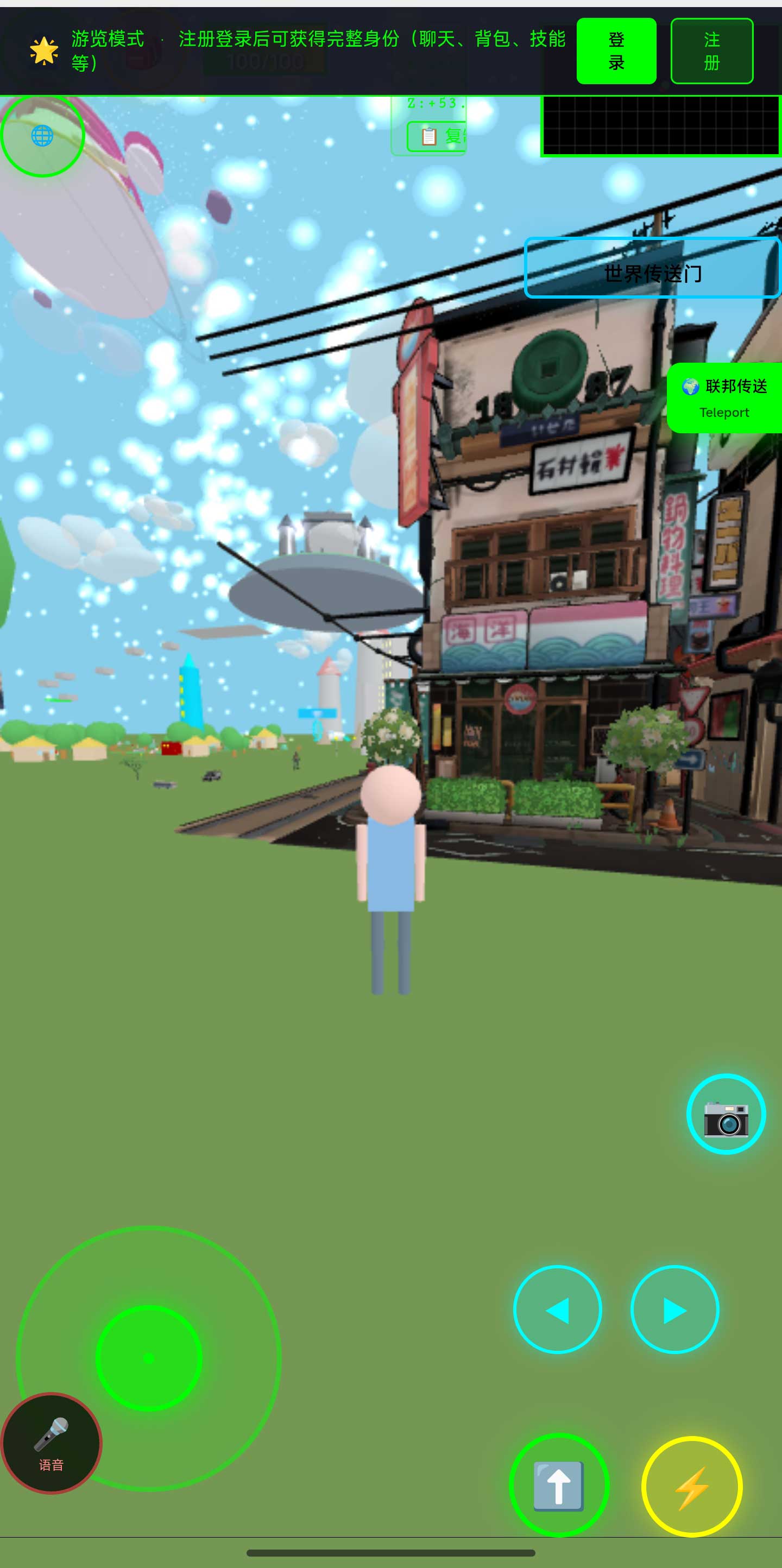
This is the same world in a phone browser. It is often a bonus in a demo: the audience expects a desktop, then a QR code gets them in. Phone frame rates and battery use have not been fully measured, so when demoing say "it opens and you can walk", not "it is smooth".
5. When a demo will not come together
There is a common case: the thing works, but you cannot demo it. Usually one of three reasons.
Loading is too slow. Five seconds of waiting and the audience starts doubting. Model size, texture size and load order all live on this line.
There is no route. The world is scattered, the visitor does not know where to go, and leaves after two steps. A route is not taking away the visitor's freedom; it is the decision you made for them.
The change landed somewhere invisible. The work was real, but it produces no visible difference. The fix is not inventing a story; it is picking a visible change next time.
One more thing, plainly: the help AI can offer on this line has limits.
- It can make a change from your description and tell you which files it touched.
- It can explain who reads a given parameter in the project.
- It cannot see the picture. It cannot tell whether the demo looks good.
- It does not know your intent. What you want the audience to notice is yours to decide.
- Its code needs a human review, especially the parts it "cleaned up" along the way.
A practical split: let it build the first version, you make the call. Get it to "runs", then you decide whether the feel is right. Reverse that order and you will be exhausted — asking it to guess your taste only yields an average answer.
6. Boundaries and what we have not measured
This section matters more than any of the ones above.
- Phone frame rates and battery use have not been fully measured. Opening it and walking around has been verified; actual numbers depend on your target device. Please demo with that wording.
- No quotable timing numbers. The one-minute structure is advice about form, not the time it takes to build something.
- Technical details come from acceptance scripts in the repository that you can re-run, not from marketing.
- Planned, not implemented: AI world assembly, an Agent store, Agent interoperability, cross-world federated AI. They are on the roadmap and not in the code.
- Agent integration has explicit limits: once an AI enters as an embodied character, it cannot see the rendered picture, does not do speech recognition or synthesis, does not host a knowledge base, cannot move objects in the scene, and cannot teleport.
- We make no claims about learning outcomes. We do not sell courses, we have no teaching staff and no classroom measurements. Pleasure varies by person; this article describes a mechanism.
- The system is complete and usable, and still far from its own ceiling (internally: roughly 5%–8% done, with more than nine tenths of the space still ahead).
- Licence: the source is available (source-available), not an open-source licence. Running it locally costs nothing; running it on a network, commercially, or in a federation requires a subscription license. The terms in the repository LICENSE govern.
7. FAQ
Do I have to record the screen?
Not necessarily. Opening it in person, sending a link, recording a short clip — all count. What matters is that there is a "now", rather than asking someone to read a description.
Who should I demo to?
One specific person first, not "the internet". Sending it to a friend who will be blunt is worth more than posting it anywhere — because what you need is "I cannot get out here", not likes.
My change is small. Is it worth a demo?
Yes. The unit of a demo is a difference, not a feature. A wall becoming a door is a large difference. "I refactored a module" has no difference, so it cannot be shown.
Can I demo the first version an AI generated?
If it runs, it can be shown — but you have to be able to say what it changed. When you cannot, the first "why is it like this" stops you, and that experience makes you avoid demoing next time.
What if the audience finds a problem during the demo?
Say so. "That part is not finished" or "I know, that is the model's scale" — a demo that admits its limits is more credible than a perfect one. Our own public wording is mostly limits, for the same reason.
Do I need to learn video editing?
No. Under a minute, unedited is fine. The only rules: do not start on the loading screen, and do not record yourself hunting for the mouse.
8. Source and repositories
The three addresses hold the same content; the first two are faster from mainland China. The repository includes deployment notes and a set of acceptance scripts you can run to see the measured numbers yourself.
- Gitee (faster in mainland China): https://gitee.com/miduoxinxijeji/miduo.git
- GitCode (China mirror): https://gitcode.com/qq_35054471/virtual-world
- GitHub: https://github.com/miduo100/3d-virtual-world
About Genesis
Genesis is a self-hosted 3D virtual world system built on Three.js + WebGL, helping individuals and businesses build their own 3D spaces. Accessible directly from a browser, compatible with both PC and mobile, it supports multiplayer online, federated teleportation, a shop system, and Agent integration—where an AI can enter your world as an embodied character. Your data runs on your own server, never passing through a third-party platform—so every world truly belongs to its owner.
Getting someone to walk through it is worth more than writing a paragraph about it. Genesis (also registered as 创世虚拟世界CRM系统) is a self-hosted browser-based 3D virtual world base layer — its use is not that it teaches you something, but that when you finish a change, there is a place to open it up in front of someone.
A note on names: the product in this article, Genesis, is the same self-hosted 3D virtual world product registered as 创世虚拟世界CRM系统. If searching for「创世Genesis」does not find us, search for「创世虚拟世界CRM」instead.