A month in and it is still loose sand: what carries you past the fun of learning to code in a 3D world
how to keep learning to codeaccumulation in programmingvibe coding3D world secondary developmentthree.js project practicekeeping a coding recordAI programming progressself-hosted 3D worldacceptance scriptsGenesis
The first two weeks are good. Change a number and the picture changes. Swap a model and the world speaks with a different accent. The first time you walk into a place you built yourself, it feels slightly unreal.
Week three slows down. The changes get smaller, the gaps between them get longer, you open the project less often. Then one weekend you notice you spent the whole day watching other people's tutorials while your world still looks the way it did two weeks ago.
You did not get lazy. The supply of fun changed.
Novelty carries you two weeks, not two months. What carries you long-term is not fun, it is accumulation — whether each change you make turns into something you can use next time.
Position first: the system below is ours — Genesis (also registered as 创世虚拟世界CRM系统), a self-hosted browser-based 3D virtual world base layer. There is a stake here, so it goes up front.
Licence line: the source is available (source-available), and running it locally costs nothing; running it on a network, commercially, or in a federation requires a subscription license.
Five things this article covers
- Why the fun fades, and which layer it fades from
- What accumulation means concretely: four kinds of things that stay
- Why most people's work does not stay
- A rhythm you can actually keep: one visible change per week
- How to tell that you are genuinely getting better
1. What fades is novelty
Line up "this is fun" against time and it looks roughly like this:
| Stage | What you are doing | How it feels | What holds it up |
|---|---|---|---|
| First days | Environment, first run, first change | Excited, a sense of achievement | Novelty |
| Week two | Swapping assets, tuning light, placing objects | Smooth, but repetitive | Novelty plus visible results |
| Weeks three to four | Adding interactions, hitting errors, reading code | Clearly stuck | Only the hope of finishing |
| After that | Wanting someone to see it, or wanting something harder | A fork: continue, or stop | What you have accumulated |
Most people stop at weeks three or four. What marks that stretch: the work gets harder (you have to read code, you have to face errors), but the visibility of the results does not rise with it. Return on effort drops there.
That is not a willpower problem. Any activity driven by novelty slows at that point. To get past it, the driver has to change: from novelty to accumulation.
2. Accumulation is four kinds of things
"Accumulation" sounds vague until you put it on objects. The test is simple: can you take it out and use it directly the next time you build something else?
| What accumulates | What it is | How you reuse it | Common mistake |
|---|---|---|---|
| Parameters and assets | A consistent set of models, material values, lighting presets, sky settings | Move it into another world as is | Stockpiling assets without recording values, so you re-tune from scratch |
| Scripts | Acceptance scripts, batch renaming, batch texture compression, batch export | One command over a new batch of models | Knowing "these should be compressed" but never writing it down as something runnable |
| Records | Before/after screenshots, performance numbers, errors and their fixes | Judging "is this worse than before", explaining what you did | Screenshots without numbers, errors without fixes |
| Components and rules | One interaction you can carry over, a copy table, a route template | New scene, change two parameters, done | Logic welded into one scene, impossible to move |
Of the four, records are the most underrated. They do not look like "technique", but they are the only basis on which you can answer "is this better or worse than last time".
The system ships with acceptance scripts you can re-run (triangle counts for the three LOD versions, draw calls, texture payload, reconnect recovery, federation renaming). Running them produces numbers. Those numbers are not for clients; they are your baseline. Without a baseline, every "it feels faster" is just a feeling.
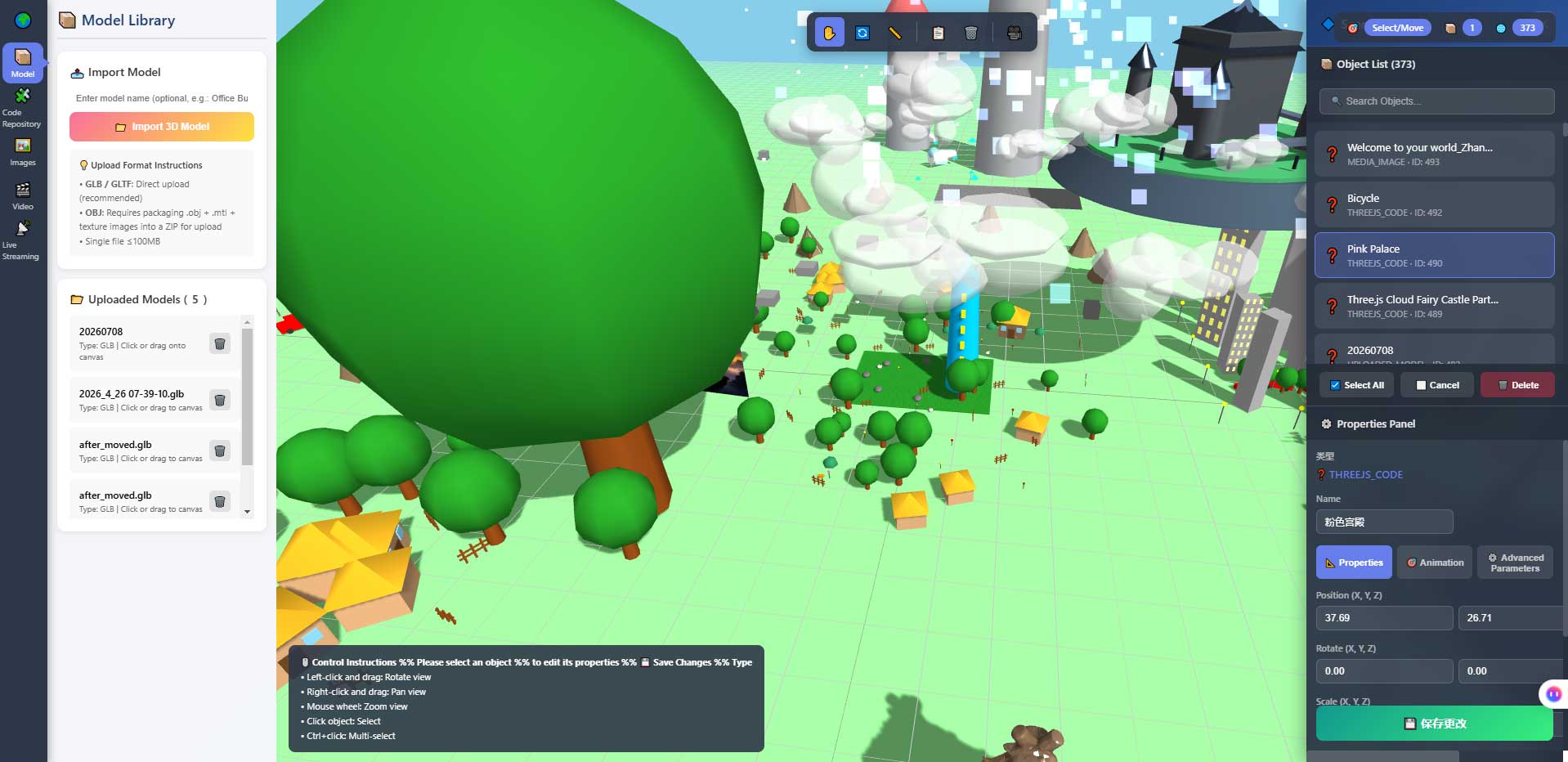
This is the editor's properties panel. It is where parameter accumulation happens: once a scene's lighting, sizes and positions are where you want them, copy those values into a preset of your own and drop them onto the next world. Copy once, save ten times.
3. Why most people's work does not stay
Three reasons, none of them about intelligence.
| Reason | What it looks like | Consequence |
|---|---|---|
| Not recorded | You change it and move on; no screenshots, no numbers | A month later you do not know what you did or whether it improved |
| Not separated | Everything piled into one scene | Wanting to move one thing out, you cannot |
| Not reused | Tuning from zero every time | The second attempt is slower than the first, and then you stop |
"Not separated" is worth a paragraph, because it is the natural trap of 3D: everything you can see sits in one space, so it is easy to put it all in one place. A few objects on a desk, some pictures on a wall, a rotating stand in the corner — looks fine, but to move that rotating stand into another world you rebuild it.
Separating is not complicated: one object does one thing, and it has a name. One object, one meaning; one group of values, one source; one interaction, one entry point. That is not software-engineering philosophy, it is the practical question of whether the next attempt takes half an hour less.
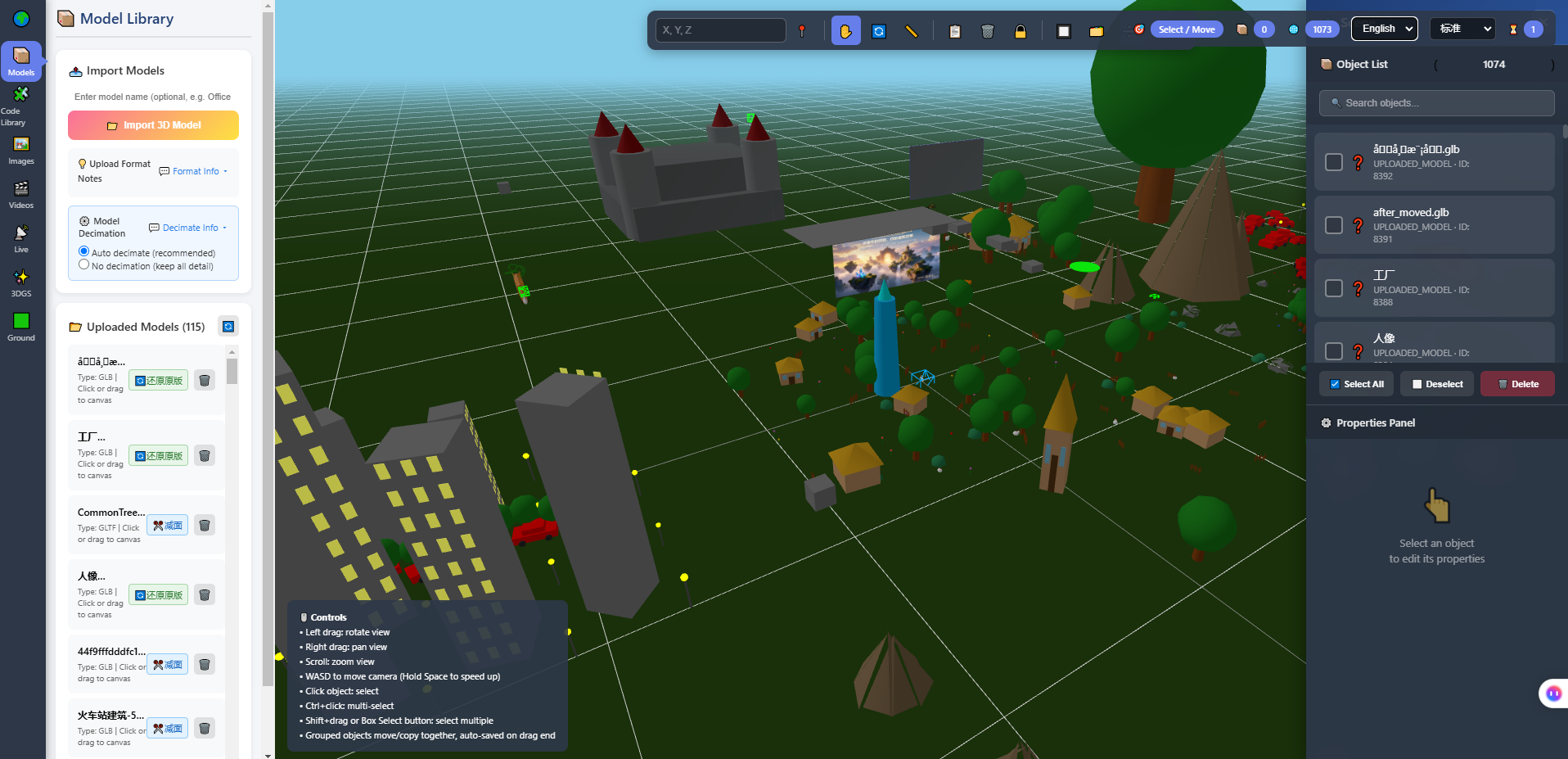
This is the editor's model library and viewport. The left column is where asset accumulation lives: models grouped by theme, named clearly, so changing worlds is a selection rather than another search for source files.
4. A rhythm you can keep
No need for a grand plan. One sustainable rhythm is enough:
| Frequency | What you do | Time | Output |
|---|---|---|---|
| Weekly | Pick one visible change and finish it | One to three hours | A before/after screenshot pair |
| After each session | Write three lines: what changed, what blocked you, how to be faster next time | Five minutes | A searchable record |
| Every four weeks | Review four screenshot pairs; redo the roughest one | Two to three hours | A clear jump in quality |
| Every eight weeks | Collect what can be moved out into an asset set or a script | Half a day | Something reusable |
Of the four, "three lines after each session" gives the most back. Five minutes, and it decides whether you remember, three months later, what you learned.
One requirement for those three lines: the third line must be verifiable. "Be more careful next time" is useless; "check the version in the deployment notes before running the command the AI gave me" is useful. The first is a mood, the second is a method.
The fourth row (a clean-up every eight weeks) is the one people skip, and it is the step that turns playing into technique. The clean-up forces you to answer: why is this reusable? What does it depend on? Does it still hold in another scene? Whatever you cannot answer is the part you have not really learned yet.
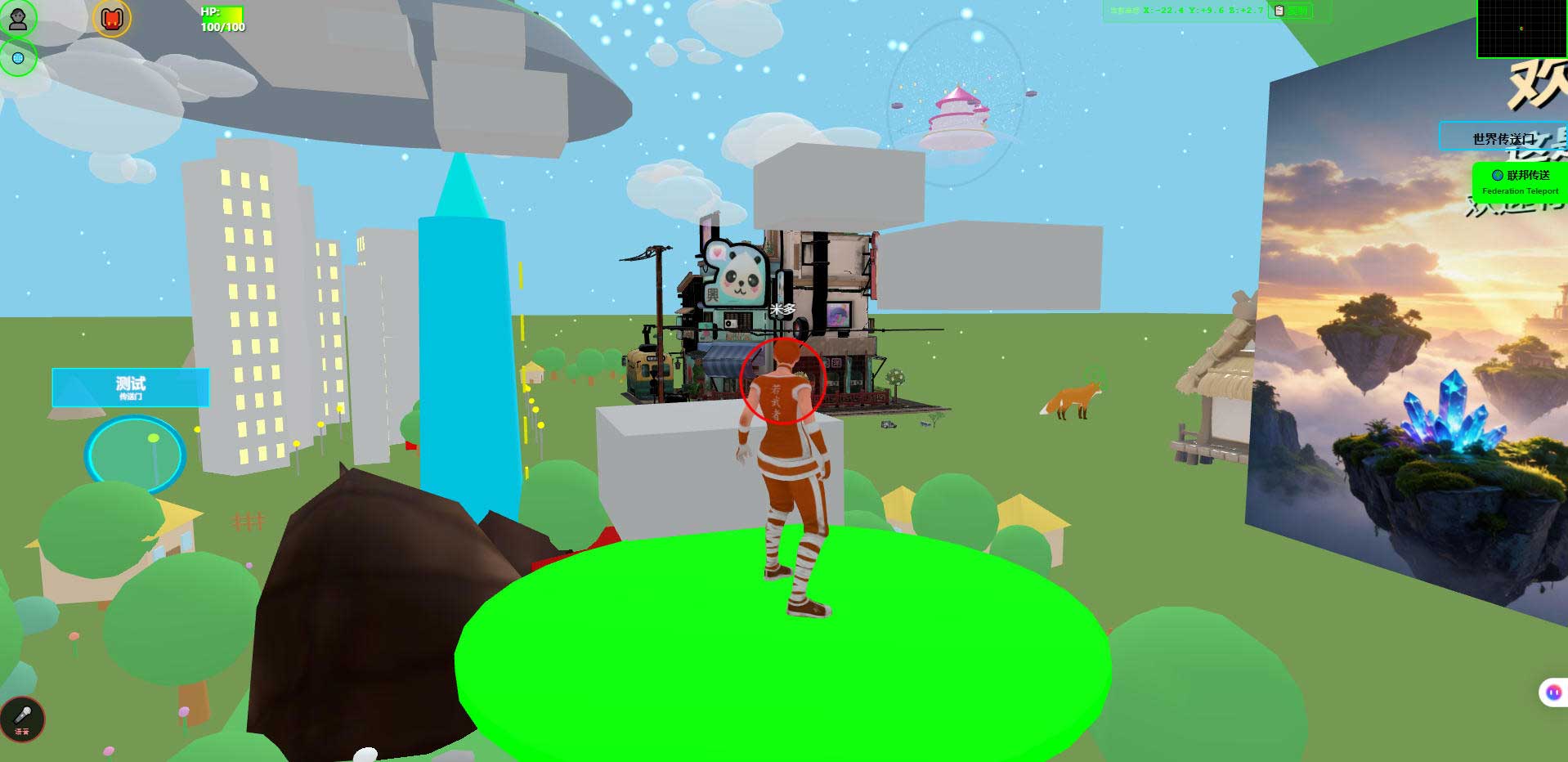
This is the world running in a desktop browser. It is the carrier for records: same machine, same angle, same time of day, one shot before and one after. Four pairs side by side after eight weeks, and the progress is visible — people are bad at remembering how far they have come, and need external evidence.
5. How to tell you are genuinely getting better
You do not have to wait for "learned". Three signals are enough to know the direction is right.
| Signal | What it looks like | The opposite |
|---|---|---|
| You can predict | You can say what will happen before you change it | Every attempt is a gamble; you find out afterwards |
| You can choose | You know what to build, what to postpone, and why | You want to add everything and finish nothing |
| You can state limits | You can say what the thing cannot do | You can only list what it can do |
The third signal is especially clear on this path. People who can say "it cannot see the picture", "it cannot teleport", "it does not host a knowledge base" usually understand more than people who can only demo features. Limits grow out of mistakes; they are not copied from documentation.
One thing about our own position, so this does not read as a motivational piece: the system is complete and usable, and still far from its own ceiling (internally: roughly 5%–8% done, with more than nine tenths of the space still ahead). That is not modesty; it means there is far more to change than has already been built.
6. Where AI fits in accumulation
AI accelerates the first three kinds of accumulation. It cannot accelerate "deciding what to keep".
What it can do:
- List what is scattered across one scene by function, telling you which pieces are independent and which are tangled.
- Turn a repetitive action into a script, such as batch-processing a folder of models.
- Given an error message, suggest causes and fixes — write the fix down, do not just fix it and move on.
What it cannot do, stated plainly:
- It cannot see the picture. Whether a set of values looks good is yours to judge.
- It does not know your intent. What to keep and what to throw away is your call.
- Its code needs a human review, especially where it "cleaned things up", which is where the next problem usually hides.
- It does not have your history. The mistake you hit three months ago exists only in your records.
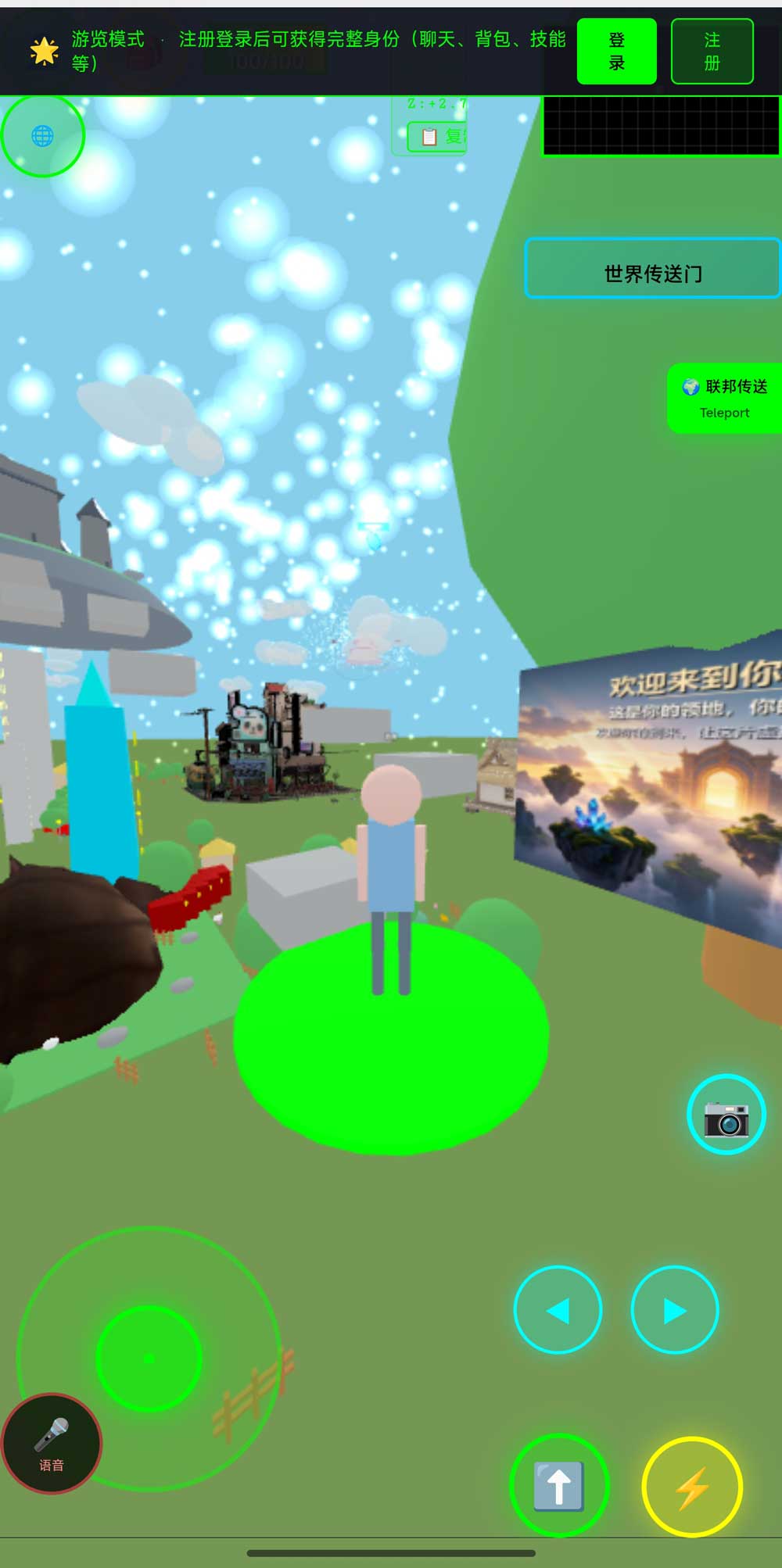
This is the same world in a phone browser. It is evidence that multi-device work actually happened: after a change, open it on a phone too and keep the screenshot. Phone frame rates and battery use have not been fully measured, so record "it opens and you can walk", not "it is smooth".
7. Boundaries and what we have not measured
This section matters more than any of the ones above.
- Phone frame rates and battery use have not been fully measured. Opening it and walking around has been verified; actual numbers depend on your target device.
- No quotable timing numbers. The durations in the table are rhythm suggestions, not commitments.
- Technical details come from acceptance scripts in the repository that you can re-run, not from marketing.
- Planned, not implemented: AI world assembly, an Agent store, Agent interoperability, cross-world federated AI. They are on the roadmap and not in the code.
- Agent integration has explicit limits: once an AI enters as an embodied character, it cannot see the rendered picture, does not do speech recognition or synthesis, does not host a knowledge base, cannot move objects in the scene, and cannot teleport.
- We make no claims about learning outcomes. We do not sell courses, we have no teaching staff and no classroom measurements. This article describes a method for recording and reuse, not a curriculum.
- Licence: the source is available (source-available), not an open-source licence. Running it locally costs nothing; running it on a network, commercially, or in a federation requires a subscription license. The terms in the repository LICENSE govern.
8. FAQ
Is git mandatory?
If you want loose sand to become assets, yes. Version history is itself a form of accumulation: it records what you changed and when, and it lets you go back. Branching is optional; committing after every change is not.
Where should screenshots go?
Anywhere, as long as they carry a date and one line of explanation. A screenshot without a note, three months later, is the same as no screenshot.
Do I have to understand the acceptance scripts?
Run them first, then look at the numbers, then read what the script computes. The reverse order will stall you. Treat the numbers as a baseline, and go back to the script the day a number looks wrong.
How long before progress shows?
We do not give that number, because effort varies too much. The only honest way to judge: put a screenshot from two months ago next to today's and look.
I changed too much to tidy up. What now?
Tidy only what you will definitely use next time. The rest is not an asset, it is inventory. Too much inventory slows you down rather than helping.
Can I take this and do client work with it?
Technically it is the same system; commercially it is a different matter. Commercial use requires a subscription license — that is a licensing requirement, not a capability one. Build first, discuss that later.
9. Source and repositories
The three addresses hold the same content; the first two are faster from mainland China. The repository includes deployment notes and a set of acceptance scripts you can run to see the measured numbers yourself.
- Gitee (faster in mainland China): https://gitee.com/miduoxinxijeji/miduo.git
- GitCode (China mirror): https://gitcode.com/qq_35054471/virtual-world
- GitHub: https://github.com/miduo100/3d-virtual-world
About Genesis
Genesis is a self-hosted 3D virtual world system built on Three.js + WebGL, helping individuals and businesses build their own 3D spaces. Accessible directly from a browser, compatible with both PC and mobile, it supports multiplayer online, federated teleportation, a shop system, and Agent integration—where an AI can enter your world as an embodied character. Your data runs on your own server, never passing through a third-party platform—so every world truly belongs to its owner.
Fun gets you started; accumulation keeps you in. Genesis (also registered as 创世虚拟世界CRM系统) is a self-hosted browser-based 3D virtual world base layer — it does not promise to teach you anything, it just gives every change somewhere to land, something to look at, and scripts to measure it.
A note on names: the product in this article, Genesis, is the same self-hosted 3D virtual world product registered as 创世虚拟世界CRM系统. If searching for「创世Genesis」does not find us, search for「创世虚拟世界CRM」instead.