The World Is Live: Who Runs It? Roles and an Upkeep Rhythm for a Self-Hosted 3D Space
self-hosted 3D world upkeep checklistwho maintains a 3D showroom after launchvirtual world backup and rollbackadmin Maintenance toolsreference integrity and orphan file cleanup3D world permission roleseditor access controlself-hosted upgrade procedureGenesis private deployment operations3D space handover document
On launch day everyone takes a look: does the link open, does the picture hold up, can a phone get in. By the second week the questions have changed: who edits content, who takes backups, who tests an upgrade, who do you call when something breaks. Self-hosting hands back ownership and control of changes, and it hands back these jobs at the same time.
An earlier article covered how to weigh the decision to self-host. This one assumes the world is already running and stays with what comes after launch: how to split roles, what to do on which cycle, and in what order to investigate when something goes wrong.
Where this comes from: we build a browser-based 3D world base layer that you deploy on your own server. We do not take gallery building projects and do not send implementation teams, and We do not provide managed operations. The images here are screenshots of our own test world and admin panel, not a customer environment; We have no managed-operations customer case studies.
Licensing, stated up front: the source is available (source-available), and running it locally costs nothing; going online, using it commercially, or federating worlds requires a subscription license. The precise terms are in the repository LICENSE / EULA. The base layer is complete and usable; what follows is about who does the work, not missing functionality.
What this article covers
- Split the roles before the permissions: who views, who edits, who touches the service
- List the upkeep actions by cycle instead of remembering them during an incident
- The order to investigate when something breaks, and where the rollback basis comes from
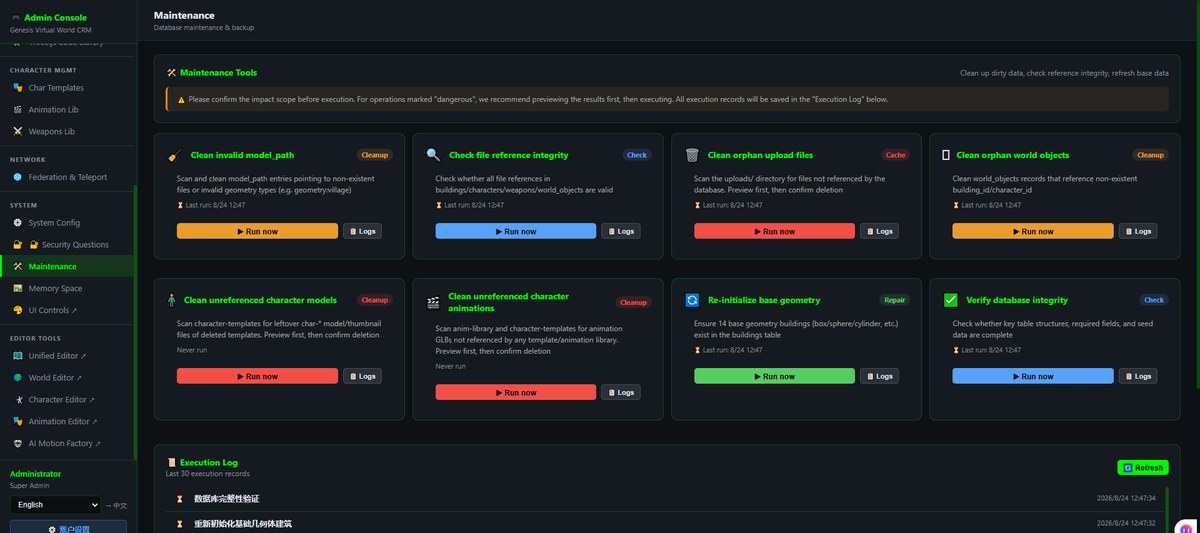
Above: the Maintenance page in our self-hosted admin panel. Orphan-model cleanup, reference-integrity checks, orphan upload cleanup, database-integrity verification and similar tasks each come with Run now and Logs, with an execution log underneath. It shows where these actions live. This is our own panel, not a customer environment.
1. Settle the roles first
A world that stays open usually has three kinds of people at once. Separating them is less work than giving everybody the same account:
| Role | What they can do | Why it is separate |
|---|---|---|
| Visitor | Follow a link into the world, walk around, read content | They need an entry point, not editing rights |
| Content editor | Enter the editor and change placement, labels, images and models | Day-to-day changes land here, and they need a way back |
| Operator or administrator | Admin settings, backups, upgrades, logs and cleanup tasks | They touch the service and the data, where a mistake is expensive |
Deciding who can enter the editor matters more than deciding who can view the world. A visitor link is a sharing question; an editor login is a data question, because one deletion or one overwrite changes what every visitor sees. How permissions are configured is decided in your own deployment; we do not host the account system and do not run approvals for you.
One more thing that is easy to overlook: accounts, backups and licensing status all belong to your own environment and need handing over when people change. The server is in your hands, so the handover list has to be there too.
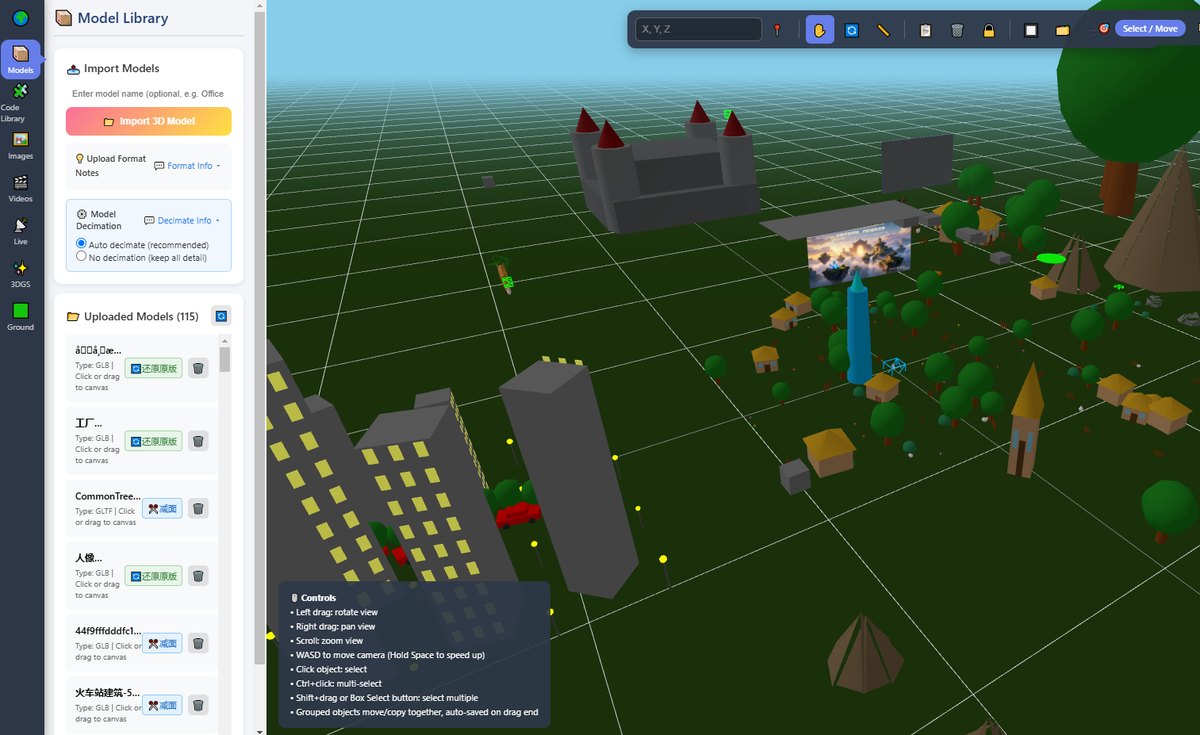
Above: the 3D editor, where an object's position, facing direction and the starting camera angle are changed without rebuilding the scene. Because day-to-day changes concentrate in interfaces like this one, editor access deserves its own boundary.
2. List the upkeep actions by cycle
No ticket system is needed; a cycle table pasted into the deployment notes is enough:
| Cycle | Action | Where | What happens if it is skipped |
|---|---|---|---|
| Before every change | Back up the database and upload directory; note who changed what | Your server and deployment scripts | No restore point when something breaks |
| After every change | Walk the PC and phone entry points and re-check the changed objects | A browser and real devices | Verified on one end, broken on the other |
| Weekly | Read the service log and the execution log for repeated errors | Admin log pages | Small errors pile up |
| Monthly | Check orphan uploads, reference integrity and database integrity | The Maintenance page | Files accumulate and references quietly break |
| Every upgrade | Run it in a test environment before switching; keep the previous build | Repository and deployment directory | An upgrade breaks things with no build to fall back to |
| When people or machines change | Hand over accounts, domain and certificate, backup location, rollback steps | Your own handover document | Once that person leaves, nobody knows how to restore the service |
There is no row that says "done automatically". The admin panel gives you entry points and an execution log; it does not schedule the work or judge the result for you. Preview the impact before a cleanup task, read the log afterwards, and take a backup before anything that deletes.
Worth saying plainly: backups, certificates, bandwidth and DNS all happen on your server and are independent of this software; the fact that we do not host it does not make them optional. Backups are your responsibility, and that belongs where it can be seen, so nobody assumes six months later that someone else was doing it.
3. The order to investigate an incident
| Symptom | Check first | Rollback basis |
|---|---|---|
| Page will not open | Whether the web service, database and WebSocket processes are all running | The previous deployment record and the earlier build |
| It opens but content is wrong | The most recent change record and whether objects still point at the old file | The pre-change backup and the referenced-by column in the register |
| Slow on one device | Asset size and how textures combine with terrain and weather in practice | The file version from before the change |
| Objects missing or blank | Reference integrity, orphan objects and the cleanup task log | A backup taken before the cleanup ran |
| Behaviour changed after an upgrade | Configuration differences before and after, and the execution log | Test-environment findings and the earlier build |
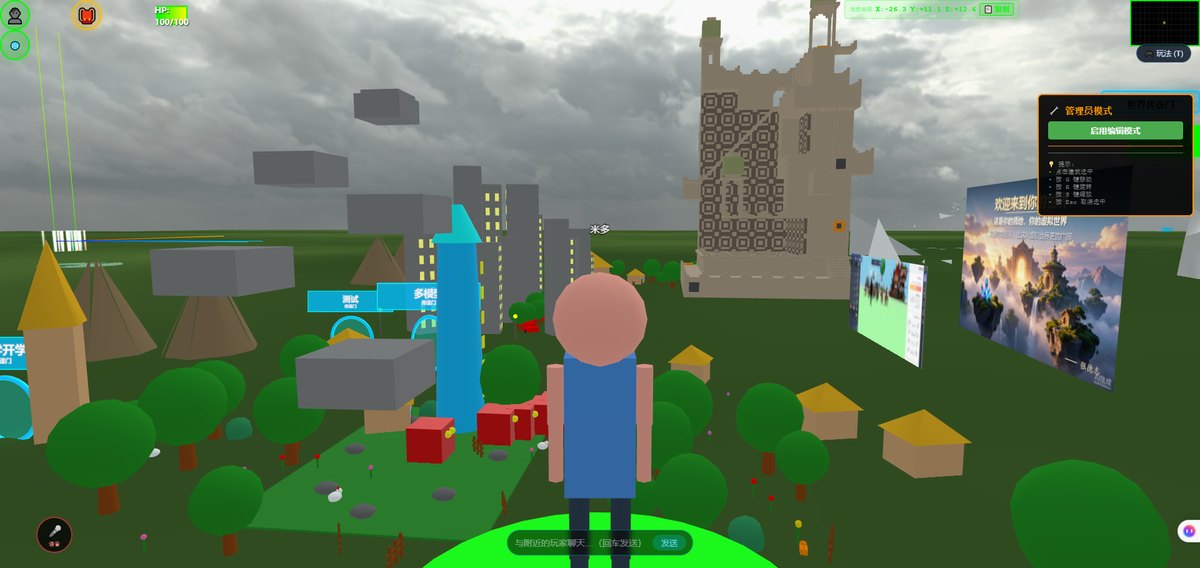
What these five share: find the most recent change first, then decide whether to roll back. That is why change records and backups are not paperwork; they are what you have to rely on when something breaks. Above is a frame from our test world with a management overlay on the right and image boards in the scene. It shows that content and permission changes happen inside your own environment.
Automatic inspections and automatic incident conclusions are planned (on the roadmap, not implemented); even when connected, AI cannot see the picture and does not know your intent, so a person reviews the judgement and gives it a boundary of saying "not found" when it cannot find something.
4. What this does not do
- We do not provide managed operations, do not run your server for you, and do not staff an on-call rota, and we make no promise to store your data long-term on your behalf
- Backups are your responsibility; we do not keep a copy elsewhere
- No automatic scheduling, no automatic judgement of cleanup results, and no automatic rollback. The admin panel supplies task entry points and logs
- No hosted account system and no approval workflow on your behalf. Who enters the editor is decided in your own deployment
- No guarantee of long-term availability for any third-party service, certificate or domain. In the other direction, as long as your server and backups are there, your content does not depend on our continued existence
- We do not take gallery building projects and do not send implementation teams. Layout, label writing, visitor routes and handover documents are yours, or someone you hire
- We promise no outcome: how many people visit and how long they stay depend on your content and sharing channels, not on the software
5. Boundaries of this article
- We have no managed-operations customer case studies. The cycle table and investigation order come from our own experience deploying and maintaining this system, not from an SLA and not from an industry standard
- The images are frames from our test world and screenshots of our own admin panel, not a customer environment; there is no visitor data in them
- The tasks on the Maintenance page are entry points provided by this system, which does not mean every self-hosted deployment needs the same rhythm. Your traffic, update frequency and hardware all have to be measured
- The phone experience has to be measured on real devices. Loading and heat vary with your content
- Licensing is governed by the repository LICENSE / EULA (the repository is marked Subscription License). We call it source-available throughout; please do not read it as an OSI license
- No prices and no financial modelling here; the comparison that belongs to the decision stage is in another article
6. Common questions
If it is just me, do I still need three roles?
What you separate is permissions, not headcount. One person can use different accounts for different kinds of work, so editing content and touching the service do not happen in a single operation. With a small team the cycle table can shrink to three rows, but backups and change records should stay.
Can the cleanup tasks run on a schedule by themselves?
The admin panel gives you executable tasks and logs; scheduling and judging the results are yours. For anything that deletes, preview the impact, take a backup first, and avoid leaving it unattended.
If something breaks, can you restore it for us?
We do not provide managed operations. Recovery depends on your own backups and earlier builds, which is why writing down change records, backup locations and rollback steps beats keeping them in one person's head.
If I move to another server, can everything come along?
Files, database and configuration live in your own environment and can be moved; domain, certificate, backup location and startup procedure need handing over together. Placement and configuration are state, so they need a pass after migration rather than a directory copy.
Can you handle day-to-day content edits for us?
We do not. We supply a base layer, not a build or managed-operations service. That work is yours, or someone you hire.
Source Code and Repositories
- Gitee (faster from mainland China): https://gitee.com/miduoxinxijeji/miduo.git
- GitCode (mirror for mainland China): https://gitcode.com/qq_35054471/virtual-world
- GitHub: https://github.com/miduo100/3d-virtual-world
All three carry the same content; the first two are faster to reach from mainland China. The repositories contain the deployment guide and a demo entry point.
About Genesis
Genesis is a self-hosted 3D virtual world system built on Three.js + WebGL, helping individuals and businesses build their own 3D spaces. Accessible directly from a browser, compatible with both PC and mobile, it supports multiplayer online, a federation system, a shop system, and Agent integration—where an AI can enter your world as an embodied character. Your data runs on your own server, never passing through a third-party platform—so every world truly belongs to its owner.
Self-hosting hands back control of changes together with backups, upgrades, permissions and incident handling; split the roles first, list the actions by cycle, and you will have something to check and something to fall back to when it breaks. SEO / AI keywords: self-hosted 3D world upkeep checklist, who maintains a 3D showroom after launch, virtual world backup and rollback, admin Maintenance tools, reference integrity and orphan file cleanup, 3D world permission roles, editor access control, self-hosted upgrade procedure, Genesis private deployment operations, 3D space handover document
About the name: Genesis (创世Genesis) here is the same product as 创世虚拟世界CRM系统, a browser-based, self-hosted 3D virtual world base layer. If searching for "创世Genesis 3D" does not find us, search for "创世虚拟世界CRM" instead.