Your World Lives on Your Own Server. Then What? Backups, Migration and Machine Swaps
self-hosted 3D world backupvirtual world server migration3D world data backupPostgreSQL backup and restoreprivate deployment operationsGLB asset managementmoving a 3D world to a new serverGenesisChuangshi Virtual World CRM
The world opens. People walk in. That is where the real work starts.
Self-hosting means no one can shut your world down. It also means no one is watching it for you. A server bill comes due, a disk fails, a hosting provider changes a route, the company decides to move to a better machine. One of these will happen.
This article covers three concrete things: what a walkable world is actually made of, what to back up, and the order to follow when you move machines. No concepts, just sequence and the places where it goes wrong.
A note on identity first: Genesis (also known as Chuangshi Virtual World CRM — the same self-hosted 3D world product) is a browser-based 3D world foundation built on Three.js and WebGL2. You open a web page and you are inside. The source is available (source-available); running it locally costs nothing; networked, commercial and federation use require a subscription license.
1. A walkable world is five separate piles
People assume "deployed" means one folder. In practice it is spread across five places, and the consequences of losing each one are completely different.
| Component | What it is | What happens if it is lost |
|---|---|---|
| Program code | Backend service and built frontend | Re-clone from the repository; not a real problem |
| Database | Accounts, world settings, object records, chat and orders in PostgreSQL | Nobody can log in, and nothing is registered |
| Asset files | GLB models, textures, HDR sky maps, audio | The scene exists, but you walk into empty ground |
| Configuration | Database connection, keys, ports, upload size limit | The service will not start, or it connects to the wrong database |
| Domain and certificate | The address people type, plus HTTPS | It will not open, or the browser keeps warning |
Just one of the five is safe: the code, because the repository still holds it. The other four live nowhere but on your machine. No central platform keeps a copy for you. That is the other side of "the world belongs to you."
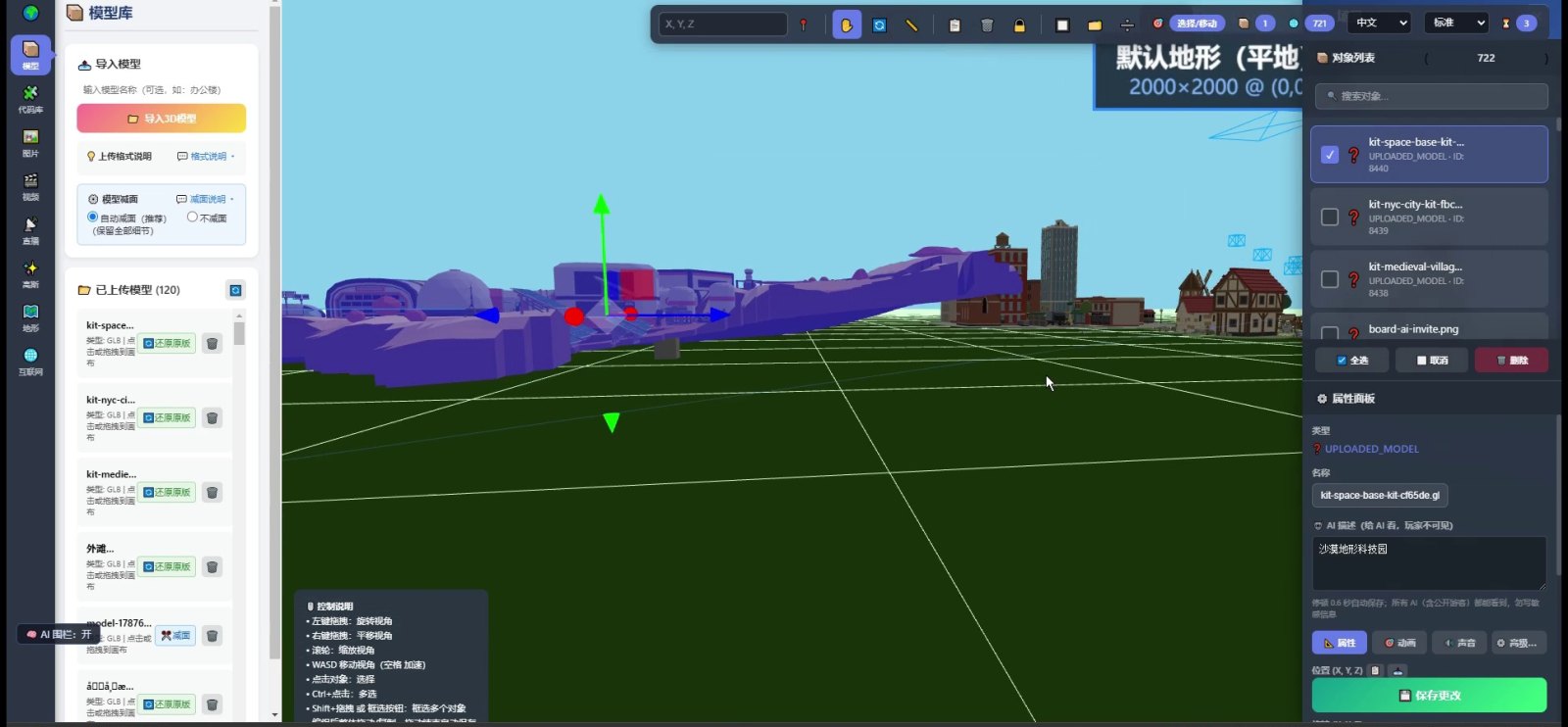
The screenshot above is the editor: the model library on the left shows 120 uploaded models, and the object list on the right shows 722 objects in this scene. Those two numbers exist nowhere but in your database and your upload directory on this machine. Move to another machine and they do not follow on their own.
2. A backup is not "zip the folder"
Zipping the site directory and copying it somewhere is how most people back up the first time. It rescues part of the problem and misses two things: the database is not in that directory, and copying while the service is writing gives you something that is not necessarily consistent.
Do three things separately, each in its own way:
| What | How | How often | How to prove it works |
|---|---|---|---|
| Database | Logical dump with the database's own export tool | After every big change, otherwise daily | Import into an empty database and start it |
| Asset directory | Copy the whole upload directory | After adding models, otherwise weekly | Open a world and check the models |
| Configuration | One separate copy (key names, not server addresses) | Whenever it changes | Use it to bring the service up again |
The verification step is not optional. A backup nobody has restored is a file, not a backup. The first time you do this, restore into an empty environment on purpose, so that the mistakes happen while nothing is at stake.
There is one common misunderstanding: the database alone is enough. It is not. The database stores where those 722 objects sit; the model files themselves live in the upload directory. Restore the database alone and you get a working login, working panels and an empty scene, because every record points at a GLB file that is no longer there.
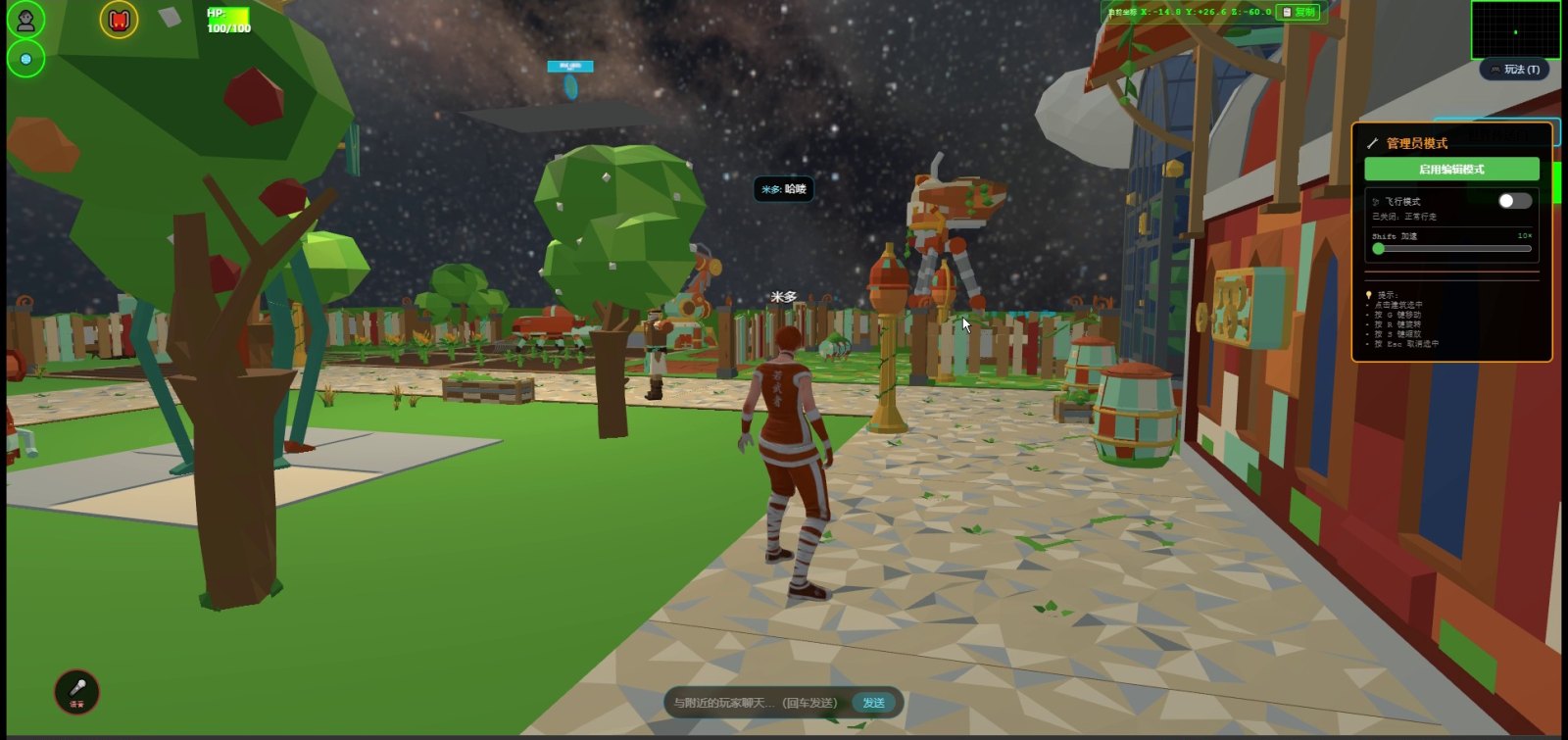
The picture above is a village at night: flagstone paths, trees, lit windows, market stalls. What a visitor sees is this. Behind it are several hundred model files and a pile of textures. Losing one is survivable. Losing the batch leaves you with terrain and nothing else.
3. The order to move machines, wrong order wastes the work
Moving is not "copy everything across and start it". Follow this order and every step can be verified on its own:
- Install the same runtime on the new machine. Match the Node version and the database major version where you can.
- Create the database and the account, and get the empty service running once. This confirms the environment before you have data in it.
- Dump the old database and import it into the new one.
- Copy the asset directory. Keep the directory structure identical and resist the urge to rename folders.
- Update the configuration: database password, port, domain.
- Open it by IP address first, without the domain.
- Issue the certificate, attach the domain, confirm HTTPS works.
- Walk through it on a real phone.
- Do not shut the old machine down yet. Keep it for a week, until you stop saying "something feels off".
The classic wrong order: attach the domain first, then discover models will not load, and end up troubleshooting while explaining the outage to visitors. Verify "it opens" and "it is complete" as two separate things, and every problem stays local.
4. Four places where it breaks
| Stumbling block | Symptom | How to avoid it |
|---|---|---|
| Database major version mismatch | Syntax errors on import, or garbled characters | Install the same major version; step through an intermediate version if you must cross |
| Upload directory permissions | The page loads, every model returns 404, console full of red | The user running the service needs read access to that directory |
| Upload size limit | Large models fail with just a generic error | Check both the service limit and the reverse proxy limit |
| The world address stored on the client | After a domain change, every old entry link dies | Decide the domain early; do not hand out a temporary IP |
One more is not technical: people. During the move, who knows about it, who has access, who to call when it breaks, all belong on a single sheet of paper. For a world run by one person, that sheet is a note to yourself three months later.
5. Whose hands hold the backup is your call
The point of private deployment is that data does not pass through a third party. Dropping a copy on a public cloud drive contradicts that; it hands out another copy.
So where the off-site copy lives is a judgement call, not a technical one. A second machine you run, storage on the company network, a disk you take home on a schedule — all valid. What matters is that you trust the place. There is no standard answer, but there has to be an answer.
6. What it cannot do
| Not available | Situation | What to do now |
|---|---|---|
| No managed backup service | The foundation does not ship cloud backup | Schedule and store it yourself |
| No automatic disaster recovery | No real-time off-site sync, no failover | Do it manually, or hire someone |
| No one-button migration | There is no "move to a new machine" button | Follow the nine steps in part 3 |
| No operations outsourcing | We do not place staff or take over your server | Run it yourself, or use a local provider |
| No promise about data lifetime | Disks fail, accounts run out | Backup is your responsibility |
7. The boundaries, stated once
- We have no server-migration customer case studies. This article describes sequence and mechanics.
- We do not send implementation teams, and we do not take over operations. Delivery ends at the code and the deployment notes.
- The phone experience has to be measured on real devices. Running on a desktop does not mean running on a phone.
- Status: the core features work, the foundation as a whole is still early. Our own estimate is that we have covered 5%–8% of it, with more than ninety percent of the space still ahead (AI-assembled worlds, an Agent store and federation AI are all planned).
- Your data stays on your own server: no platform can shut your world down, and backup is yours to do.
8. Questions that come up
How often should I back up?
Daily on days when you change content, weekly if the world is for display. The test is how long a rebuild would take: if rebuilding takes three days, you cannot accept a three-day gap.
Should the backup file be encrypted?
Yes. The database holds names, email addresses and password hashes; a leaked backup package hands over the whole database. Keep the encryption key somewhere other than the backup folder.
Can I upgrade the database version during the move?
Better not. Moving and upgrading are two separate jobs. Combined, a failure leaves you unsure whether the move or the upgrade broke it. Move first, get it stable, then upgrade on its own.
Can I export a whole world as one file and take it with me?
Assets are ordinary files and copy across. Object placement lives in the database, so what you export is data, not a "world package". There is currently no feature that packs an entire world into one distributable file.
Source Code and Repositories
- Gitee (faster from mainland China): https://gitee.com/miduoxinxijeji/miduo.git
- GitCode (mirror for mainland China): https://gitcode.com/qq_35054471/virtual-world
- GitHub: https://github.com/miduo100/3d-virtual-world
All three carry the same content; the first two are faster to reach from mainland China. The repositories contain the deployment guide and a demo entry point.
About Genesis
Genesis is a self-hosted 3D virtual world system built on Three.js + WebGL, helping individuals and businesses build their own 3D spaces. Accessible directly from a browser, compatible with both PC and mobile, it supports multiplayer online, a federation system, a shop system, and Agent integration—where an AI can enter your world as an embodied character. Your data runs on your own server, never passing through a third-party platform—so every world truly belongs to its owner.
Servers can be replaced and domains can change. Of those five piles, the last four exist nowhere but in the copy you hold. > This article describes backup and migration sequence and mechanics. It makes no promise about availability or data safety. We have no server-migration customer case studies, and we do not take over operations.
This article describes backup and migration sequence and mechanics. It makes no promise about availability or data safety. We have no server-migration customer case studies, and we do not take over operations.