Handover Day for a Web 3D Showroom: What Should the Client Actually Check?
3D showroom acceptance checklistvirtual showroom delivery checklisthow to accept a web 3D showroomshowroom project handover3D display delivery processvirtual showroom multi-device testingshowroom load time acceptanceshowroom handover sign-off
The usual handover scene: the vendor opens a link, spins the camera once, and says "there it is." The client looks, thinks it is fine, senses something is off but cannot name it — signs, and only later discovers the phone will not open it or that changing one word takes three days.
The problem is neither side's fault. It is that at the handover, nobody has a list to check against.
Stated upfront: we provide a web 3D base layer that runs on your own server (Genesis / a.k.a. the Genesis Virtual World CRM). We do not take showroom building projects and do not send a team to implement. This article is a handover map for both sides, not a pitch.
Licensing terms: the source is available (source-available); it is free to run locally; online, commercial, or federated use requires a subscription license.
Three things this article covers
- Why handover turns into an argument — "does it look good" and "does it work" are different questions
- Six items you can test on the spot
- What the checklist looks like, and three actions to run on the day
1. Why handover goes wrong
Because the two sides are not using the same standard.
| What the client means | What the vendor delivers | |
|---|---|---|
| Core question | Will this work, and who maintains it | Does the picture match the rendering |
| Basis for judgement | Direct impression | A feature list |
| When gaps show up | After launch | On handover day |
"Does it match" is subjective and cannot be settled in a meeting. "Does it open" is objective — one test settles it. Handover talks often stall because the whole conversation stays on the first kind of question.
So the checklist has exactly one job: replace "does it look good" with a set of objective items that produce an answer on the spot.
2. Six things you can test there and then
What they share: you do not need to know 3D, and you do not need to trust anyone.
1. Opening it — on three devices, one at a time
- The client's own phone (not the vendor's)
- A computer
- A tablet, if one is in the picture
Why the device matters: the vendor's demo runs under the conditions least likely to show a problem. Test on the client's own device and connection, because that is what a visitor has.
2. Loading — time it until the content appears
From clicking the link to being able to tell what you are looking at.
Note the difference between seeing a loading screen and actually seeing content. A progress bar that moves is not the same as a scene that arrives.
3. Content — walk the list
Are the agreed exhibits present, in the right places, labelled correctly?
This is the plainest item and the easiest to skip. Bring the confirmed content list and tick it off.
4. Size — find out how large a single model is
Not to impose a limit, but to know whether adding more is still an option. A model hundreds of megabytes heavy makes every future change expensive.
Ask about the format as well: GLB / GLTF first for anything going on the web; native modelling formats such as FBX or OBJ usually need converting first.
5. Can it be changed — point at something and ask
Pick one concrete thing (a caption on a booth, say) and ask: what are the steps, who does them, how long? The answer decides whether this becomes an asset or a burden after delivery.
6. Ownership — three questions
- Whose server holds the content?
- Who owns the domain and the accounts?
- What happens next year if the subscription stops?
If those three have no clear answers, handover is not finished.
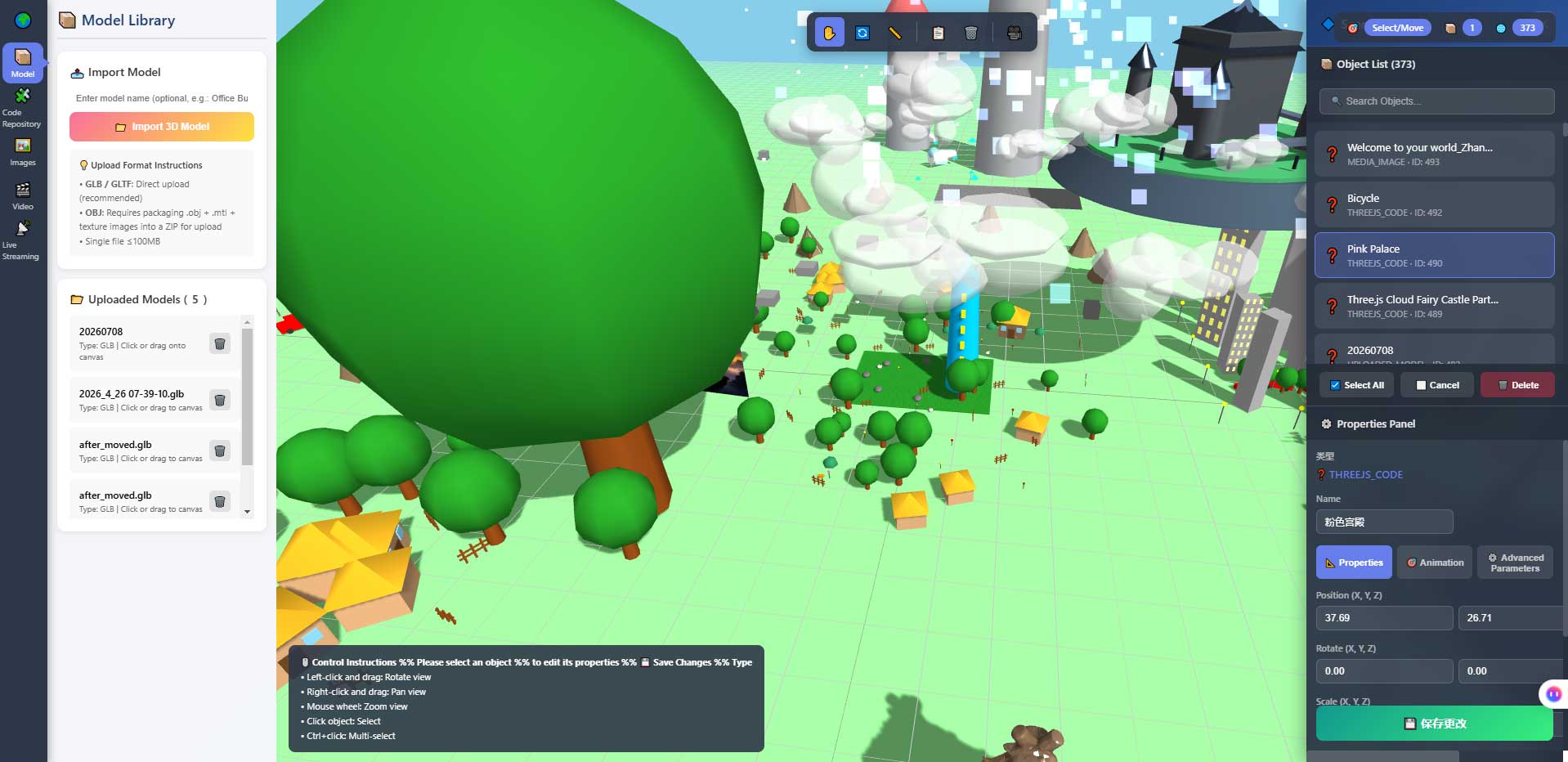
The image above shows the in-browser 3D editor's properties panel and object list. Item 5 is verified in an interface like this — you change object properties, you do not rebuild the models.
3. The checklist
Turn the six items into a table and tick it off on the day:
| # | What to check | How | Pass criterion | Result |
|---|---|---|---|---|
| 1 | Opens on several devices | Client's phone and computer | Both show content | ☐ |
| 2 | First-screen load | Time it until content is legible | Both sides accept the number on the day | ☐ |
| 3 | Content complete | Walk the agreed list | No gaps, no typos | ☐ |
| 4 | Model size | Ask for the order of magnitude | Both sides know it | ☐ |
| 5 | Changeable | Point at one thing, ask the process | Clear steps and a named owner | ☐ |
| 6 | Ownership clear | The three questions | Server, accounts, and expiry all answered | ☐ |
The "pass criterion" column must be filled in and agreed on the day. A standard written afterwards is not a standard.
4. Three actions on handover day
No process document needed — three actions:
One: let someone uninvolved click it. Find a colleague with no part in the project, send the link, say nothing, and watch whether they find what they want. Where they stall is where visitors will stall.
Two: try it on mobile data. Open it once on cellular, not office Wi-Fi. Problems that hide indoors usually surface here.
Three: ask about a change until it bottoms out. Pick one piece of content and keep asking how many steps, who does it, how long. Vague answers mean asking again.
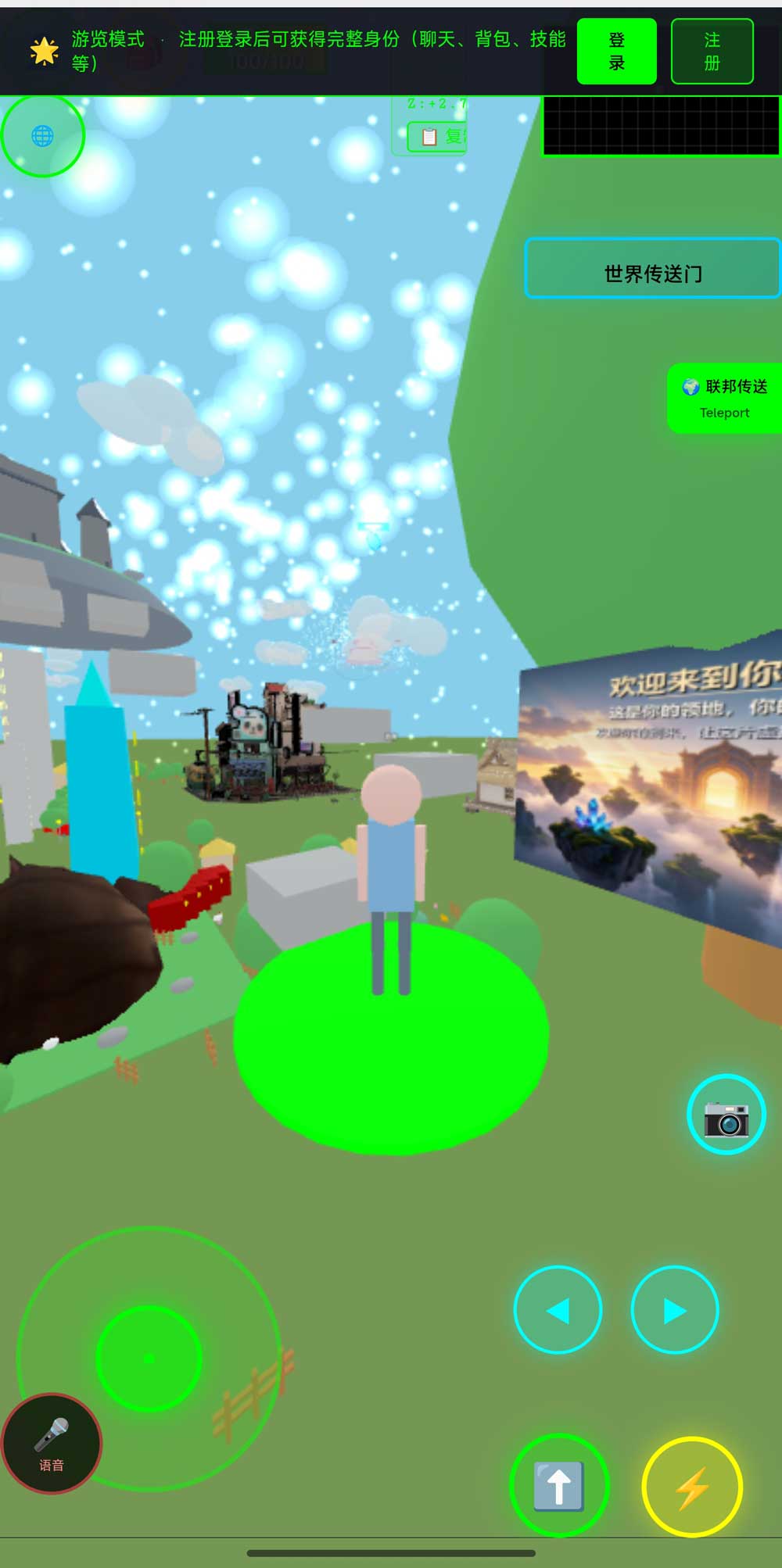
The image above is the world in a phone browser. Controls on a phone are completely different from desktop — which is why item 1 uses the client's own phone rather than an emulator on the vendor's laptop.
5. When this checklist does not apply
To be clear:
- Handing over renderings only, with no interactive scene → accept it as an image delivery; the six items do not apply
- The vendor operates everything and the client never takes it over → the handover focus belongs on the service terms, not the technical items
- You are still comparing proposals → that is a proposal stage, not a product; do not apply delivery criteria early
- Showroom content changes constantly → accept in stages rather than in one pass
6. Limits of this checklist
A few notes up front:
- The six items are generic. Your project may need additions — storage location for confidential material, sector-specific compliance, and so on
- We have not served a large number of showroom projects, and no client case is cited here. The six items come from this system's own technical boundaries, not from an accumulation of delivery sites
- Item 2 has no universal answer. How long a first screen may take depends on content size, network, and server conditions. It must be measured on the day — someone else's number does not transfer
- This checklist settles what to discuss at handover, not who is accountable for the result. That belongs in the contract
7. FAQ
The client does not know 3D. How do they check?
None of the six items require it. Using your own phone, reading a stopwatch, and asking who makes a change is enough.
Handover passed and problems appear later. Then what?
That is exactly why items 5 and 6 must be answered on the day — their answers are the path you follow later.
The vendor says it is industry practice. Can we rely on that?
Practice does not replace your conditions. Opening it on your own phone over your own connection is worth more than any explanation.
Should the checklist go into the contract?
As an annex, yes. A pass criterion agreed on the day is the hardest kind to dispute afterwards.
The phone shows a blank screen. Is that normal?
No. Either the content exceeds what the phone can carry, or the first screen is not handled. Both must be resolved at handover, not after launch.
Source & Repositories
The three mirrors are identical; the first two are faster inside China. The repos include deployment docs and a set of acceptance scripts you can run yourself.
- Gitee (fastest in China): https://gitee.com/miduoxinxijeji/miduo.git
- GitCode (China mirror): https://gitcode.com/qq_35054471/virtual-world
- GitHub: https://github.com/miduo100/3d-virtual-world
About Genesis
Genesis is a self-hosted 3D virtual world system built on Three.js + WebGL, helping individuals and businesses build their own 3D spaces. Accessible directly from a browser, compatible with both PC and mobile, it supports multiplayer online, federated teleportation, a shop system, and Agent integration—where an AI can enter your world as an embodied character. Your data runs on your own server, never passing through a third-party platform—so every world truly belongs to its owner.
Handover is not about how it looks. It is about whether you still control it afterwards. Genesis (a.k.a. the Genesis Virtual World CRM) is a web 3D virtual scene base layer that runs on your own server and does not provide showroom building or implementation services. The source is available; run it locally free of charge; online, commercial, and federated use require a subscription license. Search "Genesis Virtual World CRM" to find the site with a walkable demo world.
About the name: Genesis in this article is the same self-hosted 3D virtual world product also called the Genesis Virtual World CRM. If "Genesis" does not find us, search "Genesis Virtual World CRM".